自定义套利(Customized Spread)
Zh
自定义套利用于创建 非交易所标准 的多合约价差组合,自定义价差计算公式,生成独立的组合行情与组合 K 线。
该功能需结合以下下单工具使用:
交易所(大商所 / 郑商所 / 广期所)有官方标准套利合约(入口:交易 → 实时行情 → 套利),直接使用普通下单面板交易 ,没有不利滑点,无需使用自定义套利。
⚠️ 除服务器单之外,无限易的算法皆为本地算法单,依赖行情 / 成交来触发,若因网络延迟 / 断线 / 软件关闭等原因导致算法无法正常运行,无限易不为此担责。
功能入口
顶部菜单栏:交易 → 实时行情 → 自定义套利
列表基础操作
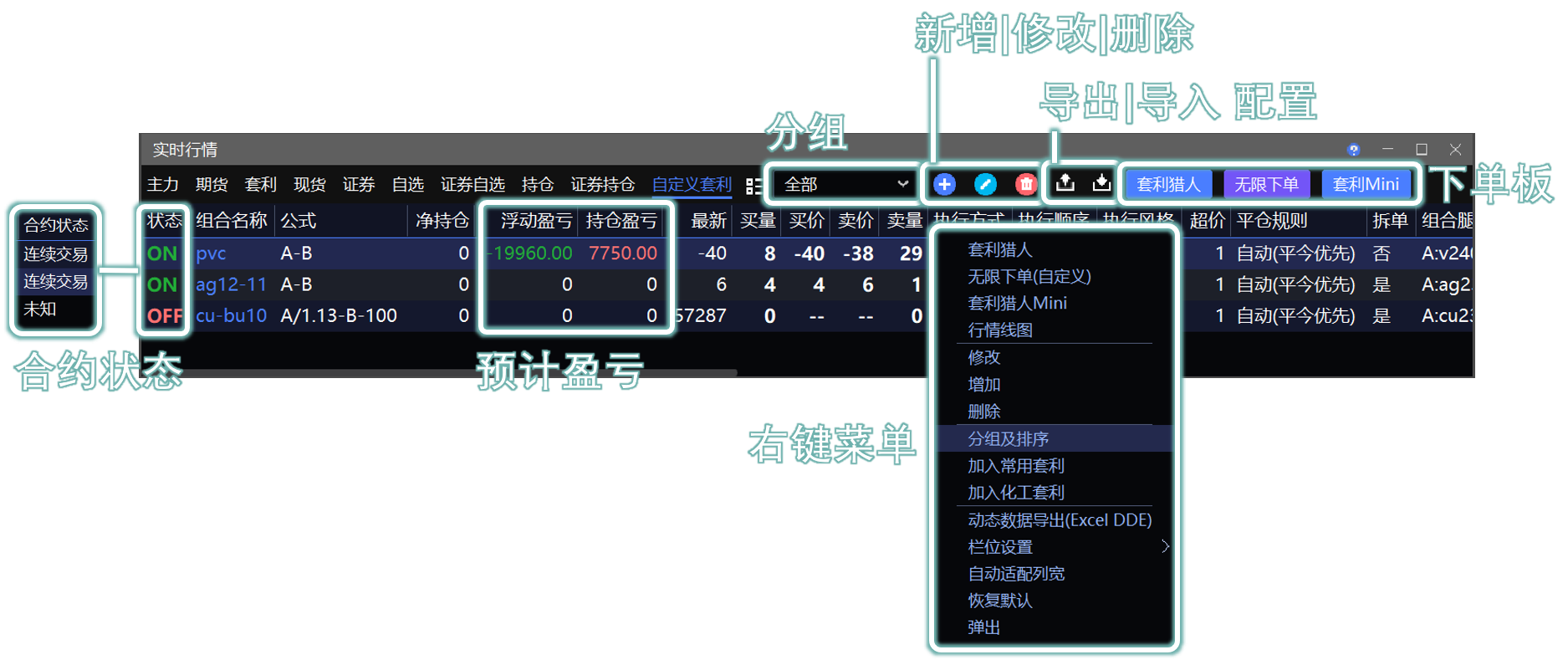
1. 组合管理
支持新增、修改、删除自定义组合;可通过 右上角图标 或 右键菜单 操作。
支持自定义分组、组合排序、分组筛选,方便批量管理多套套利策略。
2. 配置迁移
点击右上角

 实现组合配置导出 / 导入,用于多台电脑、多客户端同步组合。
软件全局配置备份(帮助 → 导出配置 / 无限易云 备份)已自动包含自定义套利组合,无需单独备份。
页面字段说明
| 字段 | 详细释义 |
|---|---|
| 合约状态 | ON :合约处于正常交易时段,可正常触发算法委托 OFF :合约休市、集合竞价、熔断、行情中断,不会触发交易 |
| 预计盈亏 | 包含持仓盈亏,浮动盈亏,此处计算不区分实际交易的组合(因交易所本身不区分),只要组合内的单合约有持仓,所有持仓都会带入计算盈亏。 |
| 持仓盈亏 | 逐日盯市,今天的盈亏,昨仓以昨结算价计算持仓成本 |
| 浮动盈亏 | 逐笔对冲,以开仓价计算持仓成本 |
新增自定义组合
1. 新建方式
空白新建:右键空白处选择 “增加” / 点击
 按钮,从零配置组合参数。
快捷复制:列表中选中已有组合再新增,自动继承上一组全部参数,仅需小幅修改。
2. 组合公式规则
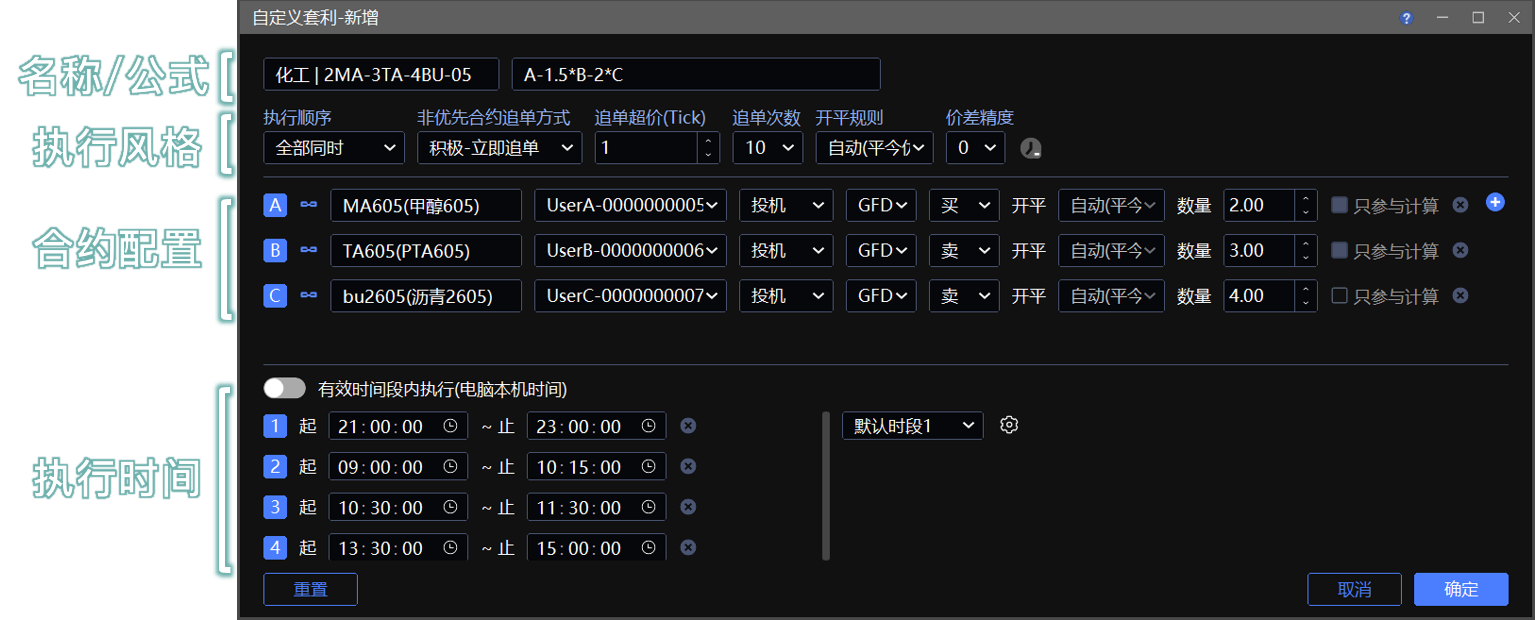
公式用来计算组合价格、绘制价差线图。
支持加减乘除基础运算,运算符号不可省略,示例:
A-1.5*B-2*C,A-B,A/(2*B)-500。系统自动根据正负符号判定下方『合约配置』中的买卖方向:
加号、乘号:对应买入
减号、除号:对应卖出
不建议手动强行修改合约买卖方向,会直接造成价差计算错乱(如:组合买价>卖价)、策略异常。
合约实际下单方向在下单时指定
组合价差采用合约 对手价 实时计算。
在『执行风格』的 “价差精度” 中,可设置价差计算结果的小数位数,示例:公式
A/B结果为100.3333…,精度为 2 时显示为100.33。
3. 合约配置
合约:点击
最多增加 6 腿合约 自由搭配,支持普通期货、期权、证券合约,不支持交易所标准套利合约。交易账号:支持单账号独立交易、多账号组 跟单 交易(需提前在 系统→多账号下单 中完成配置,不支持 分仓 模式)。
数量:基础下单数量,一般设置 最小比例,支持两位小数;系统以此为基准计算组合盘口数量。
盘口校验:若盘口数量不足一组或一手,策略不会触发委托。
只参与计算:合约有 3 腿及以上时,单独勾选某一合约,该合约仅计入价差运算,不参与实际下单交易。
开平规则:在『执行风格』的 “开平规则” 中选择全局开平方式,若选了 “自定义” 规则,那么在『合约配置』中可自定义单合约独立开平。
执行风格
自定义套利提供 全部同时、某合约优先 两种执行顺序,用于控制多合约委托下发顺序、追单逻辑,适配不同品种流动性,是管控 ⚠️ 缺腿风险 与 ⚠️ 滑点 的重要参数 ‼️
1. 追单设置
追单是在委托不成交时,撤单并以新的价格发单,可以避免策略缺腿,也会产生不利滑点。
在『执行风格』中若选择了带追单的模式,支持设置 追单超价(Tick) 和 追单次数 来控制追单方式:
追单超价(Tick):追单时基于前一笔委托,超价 n 个 Tick 去追(中间会跟对手价比对择优委托),参数越大,成交机率越大。
追单次数:每次追单最多不会超过此次数。
2. 执行顺序 → 全部同时

🔵 价差满足条件后,所有组合合约 同步发送对手价委托,若不成交,所有合约同时根据 “非优先合约追单方式” 中选择的方式进行 “积极-立即追单” 或 “保守-从不追单”。
缺点 👎:多合约无法保证同步成交,追单容易产生大幅滑点,不追单则缺腿。
优点 👍:参数配置简单;超高流动性合约,能够快速同时抢单。
3. 执行顺序 → 某合约优先(推荐)
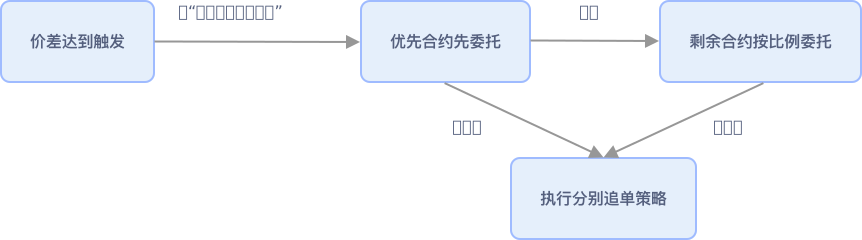
🔵 核心逻辑:优先完成指定核心合约成交,再按比例委托剩余合约,大幅降低缺腿与滑点风险。
优先合约不成交、追单后仍不成交,若当前价差依然满足触发条件,则挂单;若价差偏离,系统自动撤单,下次价差满足再重新发单。
剩余合约按比例委托:根据优先合约成交数量 * 剩余各合约数量占比,四舍五入进行委托。
💡 使用建议:将流动性差、手续费高、交割限制多、成交难度大的合约设为优先合约。
3.1 优先合约委托方式
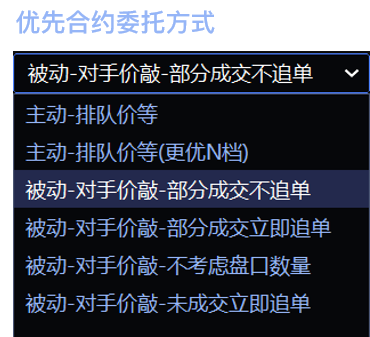
可选优先合约合约用 主动 或 被动 模式执行。
🟡 主动模式(价格优先)


以优先合约的排队价(本方最优价)为基础,主动试探盘口,挂单等待成交。
排队价等:直接用排队价委托。
排队价等(更优 N 档):排队价 ± N 个 Tick 委托(买:+,卖:-),挡在他人前方,增加成交几率。
N 档通过 “更优 N档(Tick)” 设置,默认 1 Tick。
撤单容忍价差:报单后不成交,若价差偏离设定容忍阈值,自动撤单,参数越大,容忍度越大,减少撤单频率(默认 0,即一旦价差偏离立马撤单)。
案例
设触发条件为组合卖方价差 ≤ 10 时买入组合,价差满足,优先合约发单后不成交,且卖方价差变为 13(与触发条件相差 3)。
优先合约的处理方式为:
容忍价差为 ≤ 3 时,立即撤单。
容忍价差 > 3 时,不撤单,等待撮合。
💡 使用主动模式时,触发的价差使用 优先合约的排队价 / 超 N 档、非优先合约的对手价 计算(计算结果不会展示在软件上,所以可能出现软件上看到对手价差未满足就开始报单,实际上排队价计算的价差已经满足)
🟡 被动模式(成交优先)

以优先合约的对手价(对方最优价)报单,成交几率比排队价高,所以撤单频率相对更低。
被动 - 对手价敲 - 部分成交不追单:偏保守模式,优先合约单笔出现部分成交,剩余部分等待下一次价差满足再继续报单。
被动 - 对手价敲 - 部分成交立即追单:偏积极模式,优先合约单笔出现部分成交,剩余部分立即追单。
被动 - 对手价敲 - 不考虑盘口数量:土豪模式,每份组合的优先合约按照加倍后的下单量强行委托,不自动拆单,不考虑当前盘口数量。
被动 - 对手价敲 - 未成交立即追单:优先合约单笔委托就算全部未成交,也要立即追单。
3.2 非优先合约追单方式
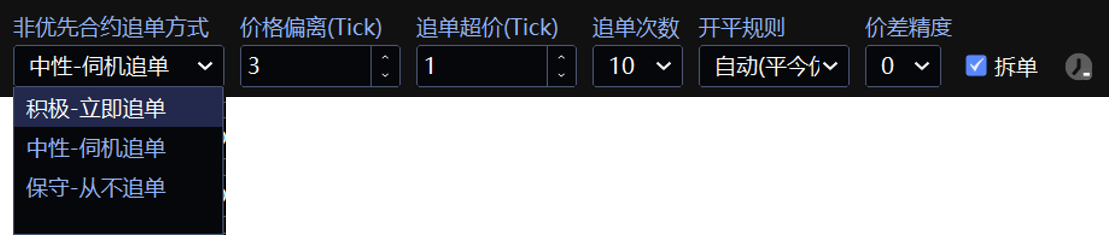
非优先合约使用对手价(对方最优价)报单,此时不会再检查价差,所以以快速成交为主。
积极:未成交立即追单,最大程度避免缺腿。
中性:非优先合约对手价格偏离超过指定 Tick 阈值(填写 “价格偏离(Tick)”,默认 3 Tick)后再启动追单。
举例:目标买入价 100,发单不成交后,卖价偏离超过 103 后再追单。
保守:单次委托未成交,不追单。
拆单
选择 “某合约优先” 的执行顺序时可用,下单时,要在下单板以下单比例为基础,附加份数、倍数作为最终下单数量,当数量比较多时,可实现 优先合约 自动拆单,剩余合约以优先合约成交数量为基础,按比例拆单。
✅ 拆单开启(推荐)
被动模式:每份按照优先合约实时对手量智能拆单(“对手价敲 - 不考虑盘口数量” 模式除外)。
主动模式:每份按照预设最小下单比例拆分委托。
⚠️ 优先合约最小为 1 手时,剩余合约不再拆单。
❌ 拆单关闭
每份按照最大数量(下单比例*下单板倍数)委托,若合约有最小下单量限制,可关闭拆单功能,并将下单比例设置为最小下单量。
有效执行时间
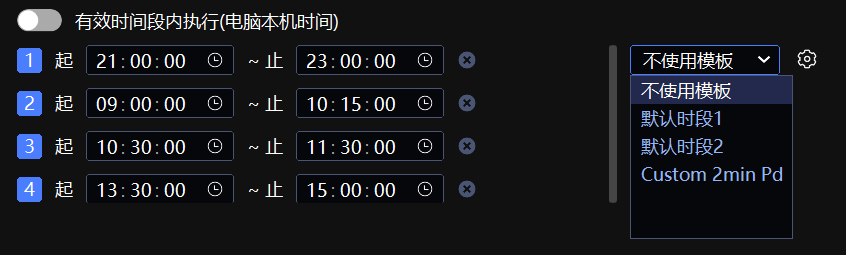
限制策略仅在指定本机时间段内运行,避开市场首尾波动时段,点击 ⚙️ 可将当前的时段存为自定义模板(如图中 “Custom 2min Pd” 所示)。
“默认时段1”为中国期货市场大部分商品品种的交易时间。
“默认时段2”为中国期货市场股指期货的交易时间。
仅是想避开非连续交易时间,组合前的『合约状态』为 OFF 时会自动规避,无需在此处设置。
不同交易所合约的交易时间段不一致,请仔细检查、按需设置。
因外盘合约获取不到非连续交易状态,所以如果组合包含外盘合约,此处建议设置为可交易时间段并开启。
高级参数
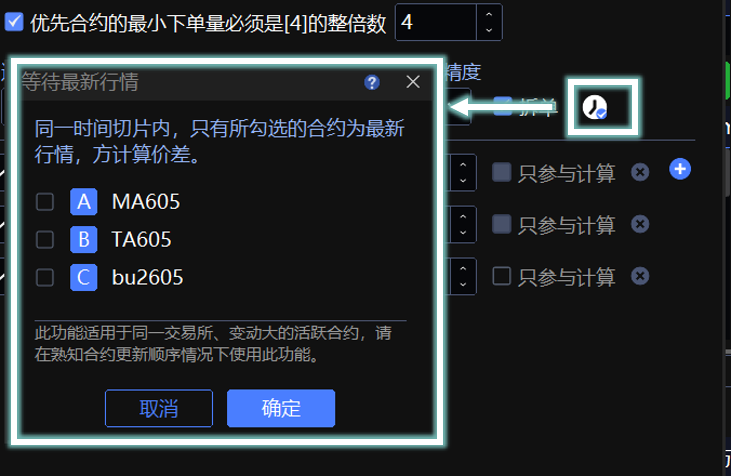
优先合约倍数:选择 “某合约优先” 的执行顺序时可用,对优先合约设置最小委托倍数(同时下单比例也需要调整为最小倍数),适配交割月对下单整倍数有要求的合约。
GFD,FAK,FOK:含义详见 交易术语解释 说明,优先合约 3 种都支持(郑商所不支持 FOK),非优先合约支持 GFD 和 FAK。
根据中国期货交易所规则,统计异常报撤单次数时,不豁免 FAK、FOK 指令,但 GFD 指令豁免,所以默认 GFD,自行调整为 FAK/FOK 时请注意不要超过交易所规定次数。
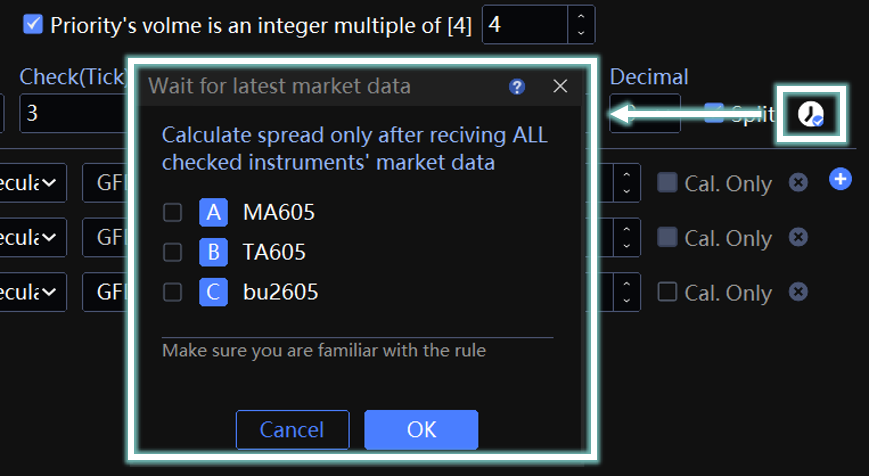
等待最新行情:仅当合约推送最新行情切片时,才计算价差与触发条件,适用于高速低延迟交易通道。
案例(仅供参考)
广期所套利(有开仓数量限制)
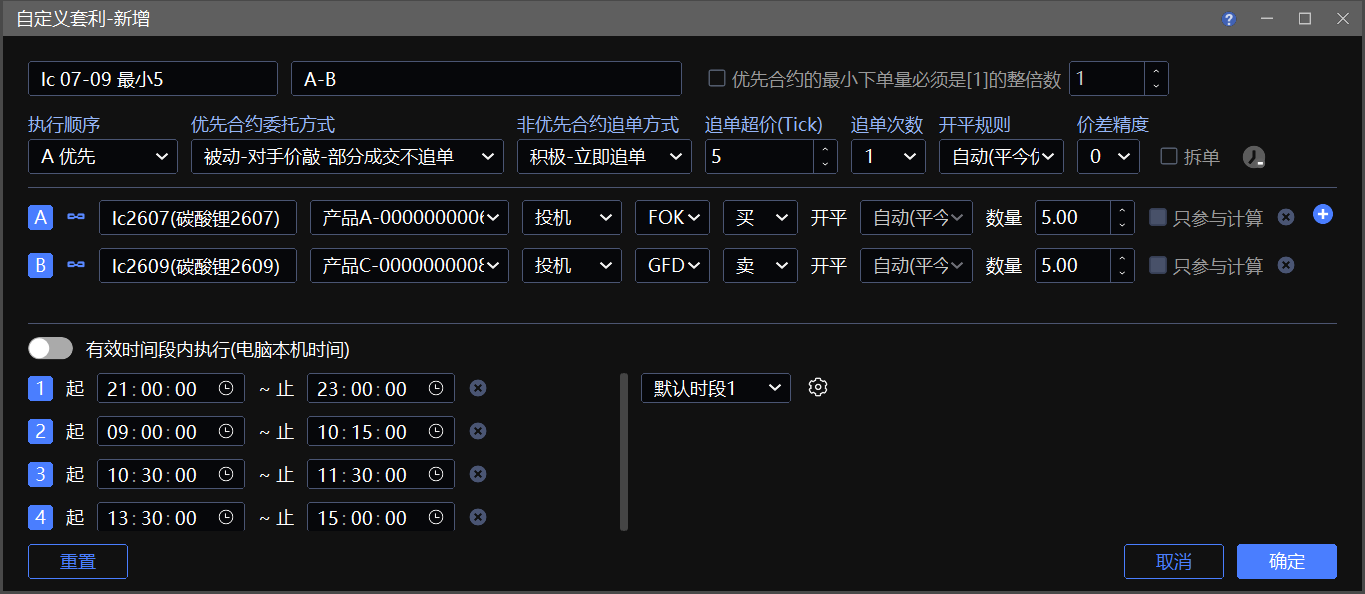
本组合为广期所碳酸锂 LC2607 与 LC2609 跨期套利策略,采用近月 - 远月价差信号,以 5 手为基础交易单元,设置 5:5 配比不拆单,适配交易所最小开仓限制。
合约 A :GFEX lc2607 碳酸锂
合约 B :GFEX lc2609 碳酸锂 主力合约
下单比例:A : B = 5 : 5
按照 交易所规定,碳酸锂合约最小开仓量为 5,为了尽量避免开仓失败,所以设置最小比例为 5。
拆单:一定要 取消勾选。
勾选拆单可能会拆成 1:1,不符合最小开仓数量 5 的限制。
执行风格:
顺序选择『A 优先』,先非主力 lc2607 再做主力 lc2609。
先做流动性差的、再流动性好的腿。
优先腿 A 选择『被动-对手机敲-部分成交不追单』,A 的指令从 GFD 换成 FOK。
以成交优先,FOK 成交结果只有两个:要么 5 手全部成交、要么 5 手全部不成交,不会出现部分成交。
FOK 只能用于优先腿,且郑商所合约不支持 FOK。
非优先腿选『积极-立即追单』,追单超价设为 『 5 Tick 』。
非优先腿加大追单超价争取一次全部成交。
依然会有部分成交的可能,发送 5 手,因交易所撮合只成交 4 手,剩下 1 手立即追单,不满足最小开仓量 5 手。
⚠️ 以上设置不能完全避免部分成交的情况,针对部分成交,导致追单不满足最小开仓数量而错单,算法会自动暂停,需要手动在 『算法列表』窗口点开始。
内外盘套利
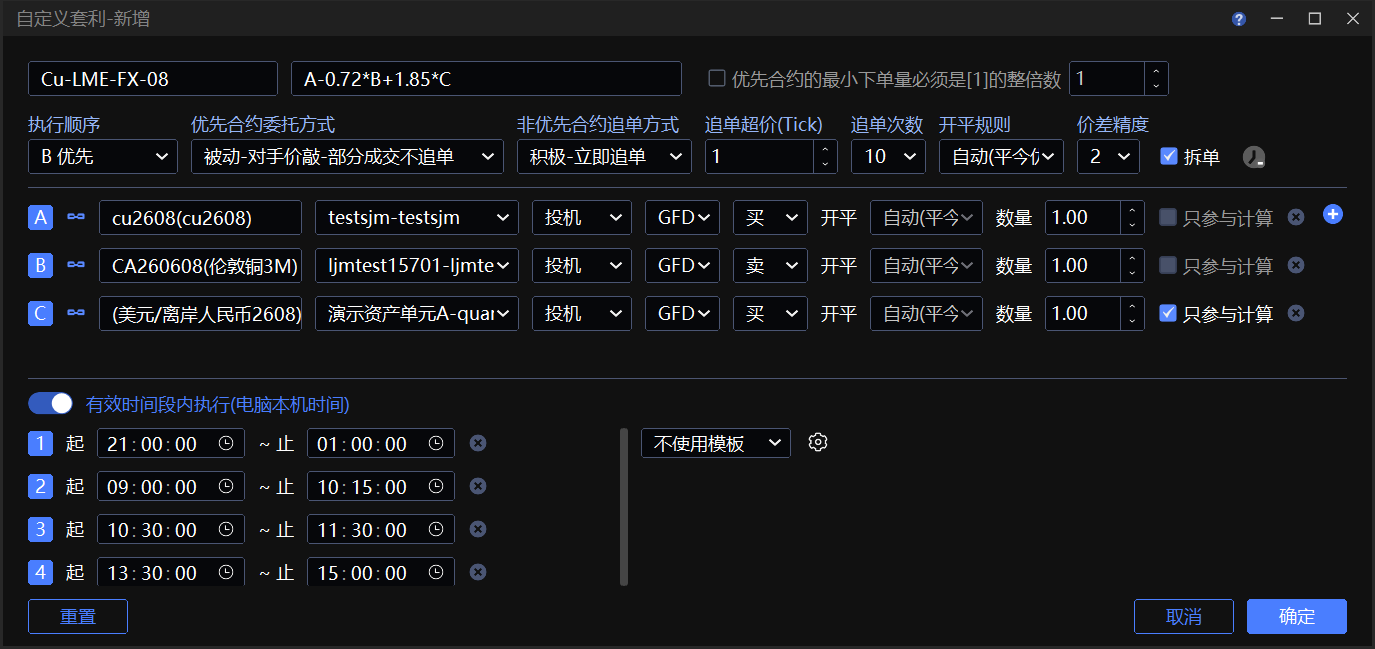
本内外盘铜套利组合,以 CU、CUA、CNH 构建价差信号,汇率合约仅算不交,采用 5:1 配比,弱腿伦铜优先被动委托,严控单边缺腿风险,适配跨市价差回归交易。
合约 A(内盘期货):SHFE cu2608 沪铜 5 吨 1 手
合约 B(外盘期货):LME CUA260508 伦铜 25 吨 1 手
合约 C (汇率合约):CME CNH2608 离岸人民币兑美元,勾选『只参与计算』
组合名称:Cu-LME-FX 08 | 公式:A-0.72*B+1.85*C
0.72:沪铜 ↔ 伦铜 商品本身的进口成本、关税、运费、升贴水折算系数。
1.85:汇率 ↔ 铜价 波动敏感度匹配系数。
下单比例:A : B : C = 5 : 1 : 任意
5 手 沪铜 + 1 手 伦铜吨位、市值基本对冲。
C 勾选了 “只参与计算”,那么 C 腿比例可以任意填写,作为 只计价校准因子,不必实际持仓的交易腿。
执行风格:
顺序选择『B 优先』,先伦铜再沪铜。
伦铜 CUA 是弱势腿:流动性差、深度薄、偶尔瞬间跳价 / 短暂无盘口。
沪铜 CU 是强势腿:流动性强,不会断流,后做不容易缺腿。
优先腿选择『被动-对手机敲』,非优先腿选『积极-立即追单』。
- 以成交优先,保证快速成交不缺腿。
有效执行时间:因为包含外盘合约,所以执行时间直接按内盘时间设置。
期权箱体套利(成交优先)
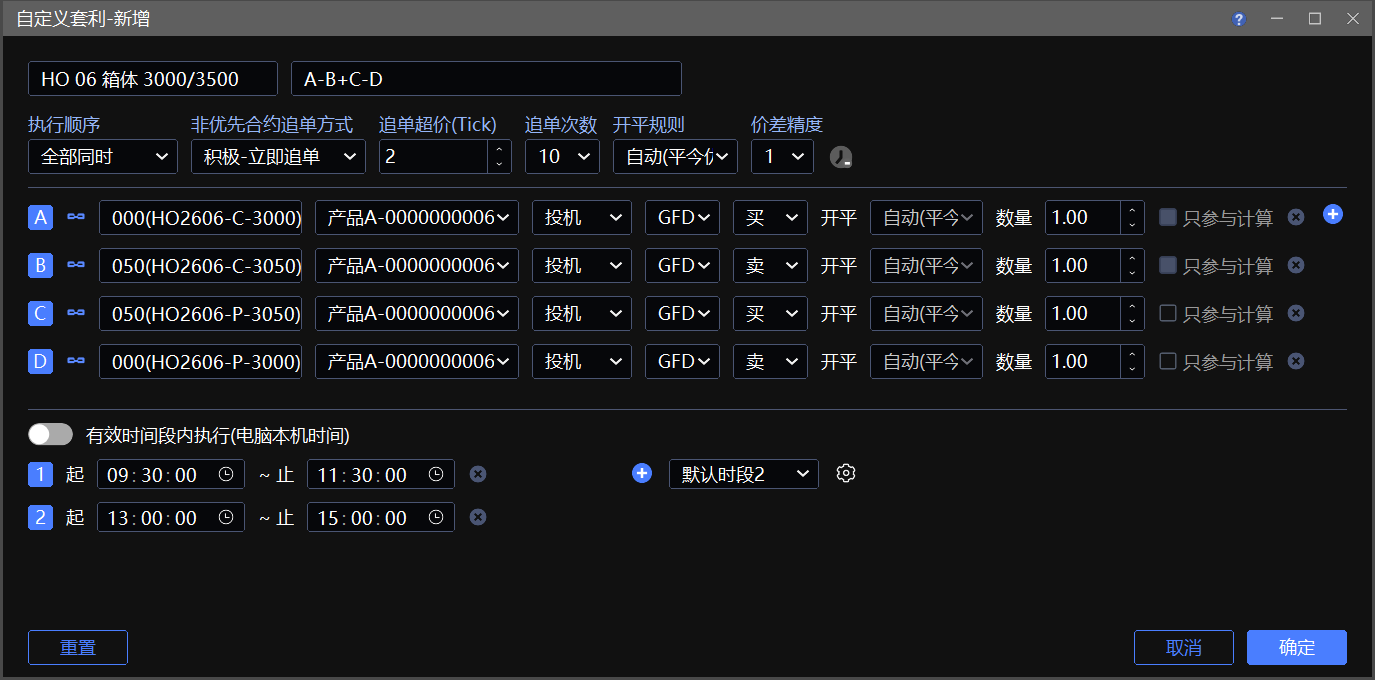
本组合为 HO 股指期权四腿 Box 箱体套利,同到期双行权构建结构,采用 A-B+C-D 价差公式。四腿 1:1:1:1 配比,捕捉箱体价差均值回归收益。
合约 A :HO2606-C-3000 买低行权认购
合约 B :HO2606-C-3050 卖高行权认购
合约 C :HO2606-P-3050 买高行权认沽
合约 D :HO2606-P-3000 卖低行权认沽
价差精度:1
HO 股指期权最小变动 0.2,报价 1 位小数,匹配单腿精度。
执行风格:
顺序选择『全部同时』,追单方式选择『立即追单』。
追求快成交,确保价差满足,4 腿合约同时用对手价发出,不考虑追单滑点。
常见问题
为什么看到价格到了却不触发
组合被触发的条件有 3 个:
对手价差 满足,不是最新价,也不是 k 线上看到的价格。
点击下单后,下一次价格推送才会触发,价格没有更新不会触发。
盘口数量 满足,组合买卖盘口数量至少能满足做 1 份才会触发。
规定时间内 才会触发,『实时行情』窗口组合前的状态要是 ON,表示合约在连续交易时段;设置自定义套利组合时,若开启了『有效时间段内执行』,则只会在此时间段内触发。
『算法列表』窗口状态为 已暂停 的单子不会被触发。
组合 k 线没有分时图、没有影线
- 组合 k 线不支持分时图,可将周期切换为 1 分钟、主图类型切换为 收盘线,同分时图效果一致。
- 不支持历史数据的影线,历史数据只是切片数据,多个合约同一周期合成的最高价、最低价不一定在周期内的同一时间出现,没有参考意义,详见 视频:组合 k 线线图原理
滑点如何产生
只要是自定义套利,都不能避免完全没有滑点(有可能有利、有可能不利),可通过设置尽量降低滑点,详见 视频:自定义套利参数到底怎么设置
通过合理的设置依然产生不利滑点,可能性有 2 个:
追单
追单本身是对未成交单价格加码,从而增加成交几率、防止缺腿的功能,发生追单就会产生不利滑点。
合约本身行情瞬变 / 自身网络不佳
价差已经满足的情况下,委托单以对手价发出,但是对手价格瞬间改变,行情因素为不可抗力。
为什么一直撤单难以成交
自身网络没有优势,遇到较活跃的合约,只能看到行情(满足触发条件),但是抢不到单子。
证券合约零股如何处理
证券合约发生零股成交并 追单 时,组合最终的成交数量会相应增加。
组合数量只有 1 份
出现部分成交,剩余追单数量不足 最小委托单位,则自动 向上取整,追单数量为最小委托单位的整数倍。
以沪深主板最小委托单位为 100 股为例:
腿 A 一份报单量为 500 股,部分成交 388 股,剩余未成交数量 112 股,由于剩余 12 股不足 100 股,追单数量则 自动向上取整,一共追单 200 股,最终成交 588 股,成交差 + 88 股。
组合数量超过 1 份
委托 5 份组合,前 4 份按上面的向上取整原则,最后 1 份 按当时的成交情况处理。
若剩余数量 ≤ 0 (成交数量已经超过总报单数量),后面份数自动取消,终止报单。
若剩余数量 < 100 股(不足最小委托单位),最后 1 份向上取整,按 100 股委托。
若剩余数量 > 100 股(不足 100 的倍数),最后 1 份按剩余数量向上取整。
En
Customized Spread creates non‑exchange standard multi‑contract spreads. Define your own spread formula to generate independent spread quotes and K‑line charts.
This function needs to be used together with the following order tools:
For exchange official standard spread contracts (DCE / ZCE / CFFEX / GFEX) (Trade → Markets → Custom Spread), trade directly using the standard order panel without unfavorable slippage. No need to use Customized Spread.
⚠️ Except for server trader, all InfiniTrader algorithms run locally and rely on quotes and fills for triggering. InfiniTrader is not liable for algorithm failure caused by network latency, disconnection, or software shutdown.
Youtube: Mastering Arbitrage on InfiniTrader
BiliBili: InfiniTrader Basic tutorial
Feature Entry
Trade → Markets → Custom Spread
List Basic Operations
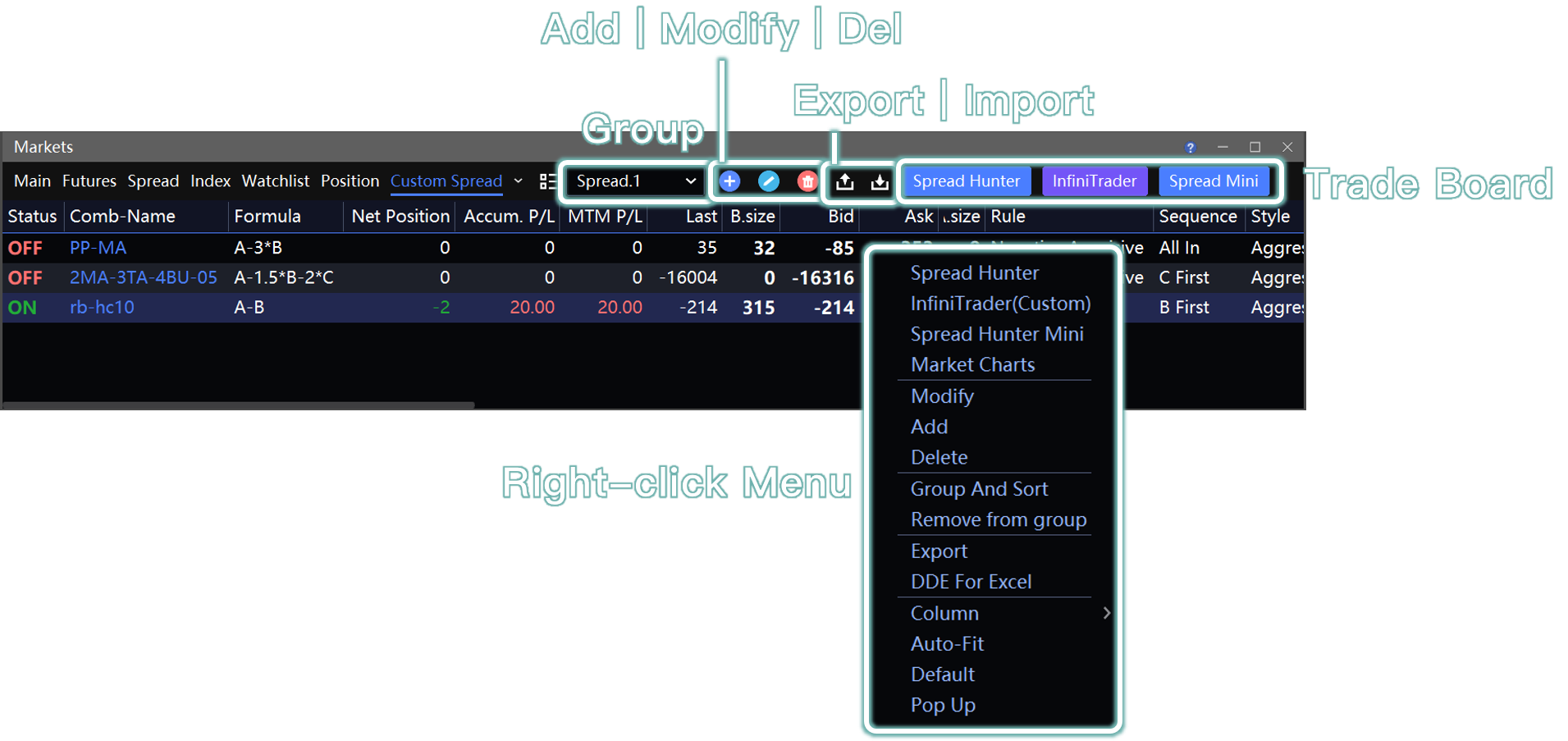
1. Spread Management
Add, modify, and delete custom spreads via the top‑right icon or right‑click menu.
Supports custom grouping, sorting, and group filtering for easy batch management.
2. Configuration Migration
Use
to sync spreads across multiple computers and clients.Global configuration backup (Help → Export Config / InfiniCloud ) already includes custom spreads automatically.
Page Field Descriptions
| Field | Descriptions |
|---|---|
| Status | ON :Normal trading session, algorithm can trigger. OFF :Closed, call auction, circuit breaker, or quote interruption; no trading trigger. |
| P/L | Includes Accum. P/L and MTM P/L. The calculation does not distinguish traded spreads (exchanges don't differentiate). Any position in spread contracts is included. |
| MTM P/L | ark-to-Market P/L, today's profit/loss. Yesterday's positions use yesterday's settlement price as cost basis. |
| Accum. P/L | Accumulated P/L,Calculated trade‑by‑trade using the opening price as cost basis. |
Adding a Custom Spread
1. Add New
Blank New:Right-click in blank area and select "Add" / click the
button to configure spread parameters from scratch.Quick Copy:Select an existing spread and add new; it inherits all parameters for minor edits.
2. Spread Formula Rules
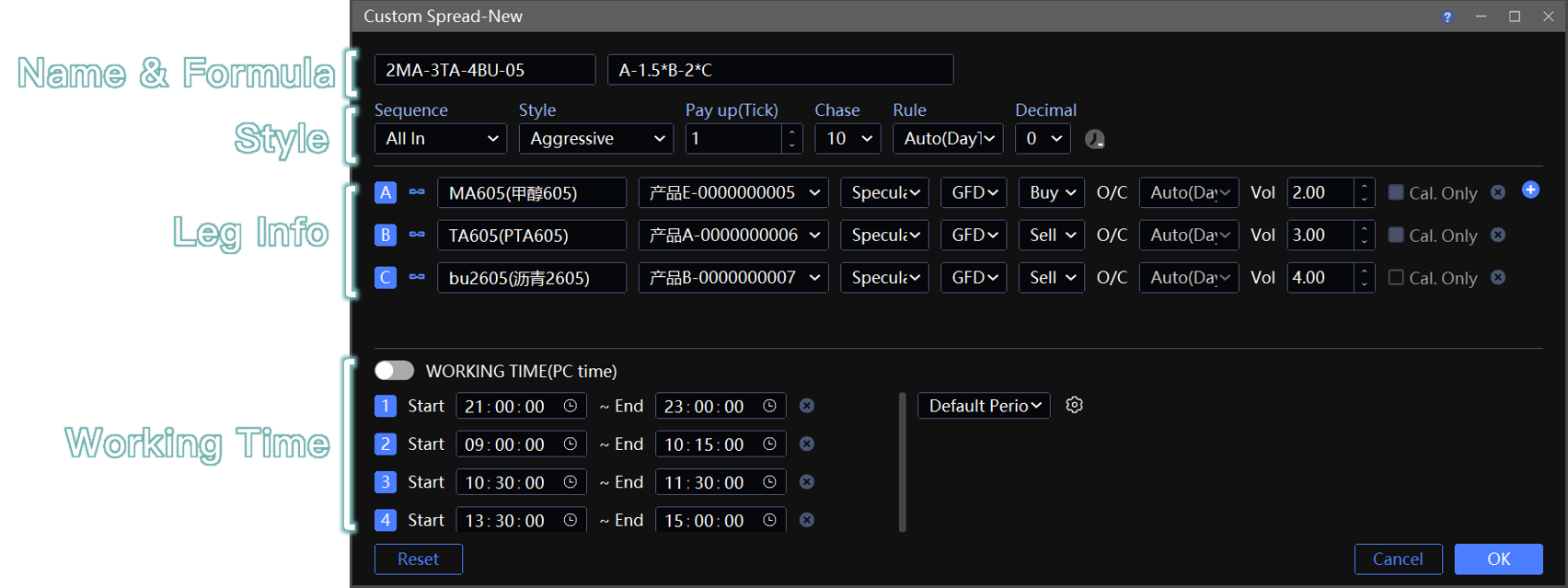
Formula calculates spread price and draws line chart.
upports basic arithmetic
(+, -, *, /); operators cannot be omitted. Examples:A-1.5*B-2*C,A-B,A/(2*B)-500.Signs determine direction in leg Info:
plus/multiply → Buy.
minus/divide → Sell.
Do not manually change buy/sell direction. It will break spread calculation (e.g., bid > ask) and strategy.
The actual order direction is set when placing orders.
Spread uses real‑time Opposite Price.
Under “Style” → “Decimal”, set the decimal places for the spread result. Example:
A/B=100.333…, with Precision = 2 it shows100.33.
3. Leg Info
Symbol:Click to
up to 6 legs. Supports securities, futures and options; exchange standard spreads are not supported.Account:Single‑account or multi‑account Order Follow (Configure in Systems → Order Ratio; Order Split not supported).
Volume:Base order quantity, usually set to minimum ratio. Two decimal places supported. System calculates spread order size from this.
Market Depth Check: No order if depth quantity is less than one lot or unit.
Cal. Only:When there are 3+ legs, checking a leg includes it only in spread calculation; no orders placed for that leg.
Rule:Open/Close Rule. If “Custom”, you can set independent O/C per leg in Contract Configuration.
Execution Style
Two execution sequences: All In, and Contract Priority (e.g., A First, B First, C First, etc.). They govern order dispatch sequence and chasing logic under varying liquidity conditions. Critical for managing ⚠️ missing leg risk and ⚠️ slippage.
1. Chasing Settings
Order chasing cancels unfilled orders and resubmits new orders at updated prices to avoid missing a leg, though it may lead to unfavorable slippage. For modes that support chasing, configure Chase Pay up Tick and Chase Count.
Pay up (Tick):Pay up N ticks relative to the previous order (benchmarked against Opposite Price). A larger N means a higher fill probability.
Chase:Max chasing attempts per round.
2. Sequence → All In

🔵 When spread condition is met, all legs send Opposite Price orders simultaneously. If unfilled, all chase together according to “Style” (Aggressive/Passive).
Disadvantage 👎:Cannot guarantee synchronized fills; chasing may cause large slippage; no chasing leads to missing legs.
Advantage 👍:Simple config; works for ultra‑liquid contracts.
3. Sequence → Contract Priority
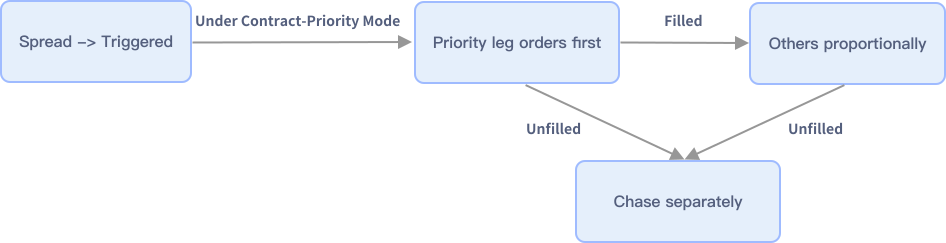
🔵 Complete the priority leg first, then place remaining legs proportionally. Drastically reduces missing legs and slippage.
If the priority leg is still unfilled after chasing and the spread trigger condition remains valid, the order rests unchanged.
If the spread no longer meets the trigger condition, the order auto-cancels and will re-trigger when the condition becomes valid again.
Remaining legs ordered in proportion: filled quantity of priority leg × volume ratio of each remaining leg, rounded.
💡 使用建议:Suggestion: set the least liquid/highest‑fee/hardest‑to‑fill contract as priority.
3.1 Mode
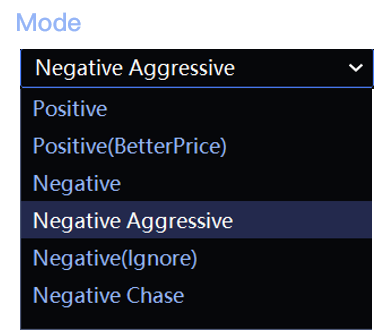
Choose Passtive or Negative mode.
🟡 Passtive Mode(Price Priority)


It uses the priority leg’s Best Own Price to probe market depth and place orders.
Passtive:Order directly at Own Price.
Passtive(BetterPrice):Offset from Best Own Price by N ticks: Buy (+) for price increase, Sell (−) for price decrease.
N is set in "Tick Level", default is 1.
Spread Bias:If the spread moves beyond the configured Spread Bias after order placement, the order cancels automatically; a larger Spread Bias results in fewer cancellations, with a default of 0 (cancels on any spread deviation).
Example:
Trigger when spread ask ≤ 10. Order placed, spread ask becomes 13 (deviation 3). For priority leg: if tolerance ≤ 3, cancel; if > 3, keep order.
💡 In Passtive Mode, trigger spread uses priority leg's Own Price/Better N Tick and other legs' Opposite Price. The result is not displayed, so the screen may show unmet condition while an order is already placed — that’s because the Own Price spread already met.
🟡 Negative Mode(Fill Priority)

Orders at priority leg's Best Opposite Price. Higher fill probability, lower cancellation frequency.
Negative:Conservative. If partially filled, the remaining waits for next spread condition.
Negative Aggressive:Partial fill triggers immediate chase for remaining.
Negative(Ignore):Ignore Spread Order Size. Forces multiplied order quantity without auto‑split, ignoring spread order size.
Negative Chase:Chase even if the entire order is unfilled.
3.2 Style
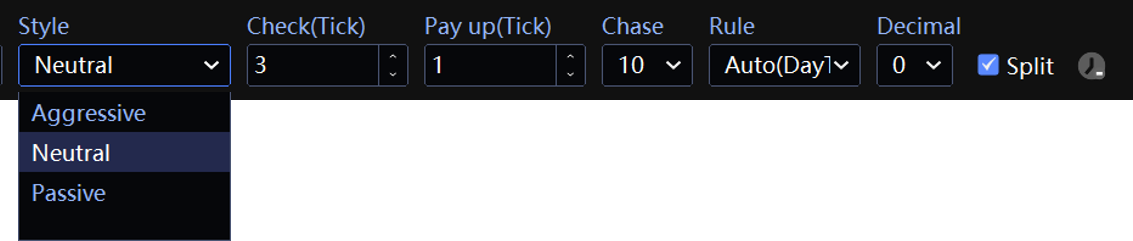
Non‑priority legs use Opposite Price; spread is no longer checked. Aim: fast fill.
Aggressive:Chase immediately if unfilled. Maximizes avoidance of missing legs.
Neutral:Only chase when Opposite Price deviates beyond the Check (Tick) threshold, default 3.
Example: target buy at 100, chase only when the ask price exceeds 103.
Passive:No chase on a single unfilled order.
Split
Applies to A/B/C First mode. Final order quantity is determined by Vol. Copies Times. Large order sizes trigger auto-splitting for the priority leg, with all other legs split proportionally to its filled volume.
✅ Split On (Recommended)
Negative:Each slice is split by the priority leg’s real-time opposite size, excluding Negative(Ignore) mode.
Positive:Each share splits by preset minimum ratio.
⚠️ When priority leg minimum is 1 lot, remaining legs do not split.
❌ Split Off
- Each share orders at max quantity (Vol. × Times). For contracts with minimum order quantity, turn off split and set ratio to that minimum.
Working Time
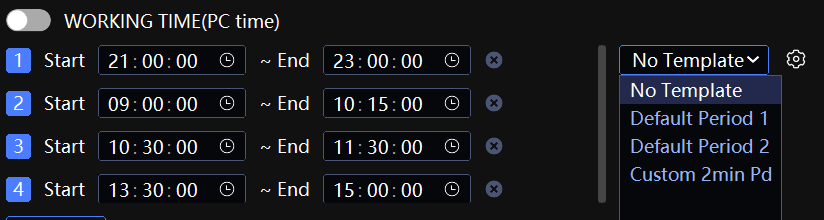
Restricts strategy to run only in specified PC time periods, avoiding volatile opening/closing times. Click ⚙️ to save current periods as custom template (e.g., “Custom 2min Pd”).
“Default Period 1” — trading hours of most commodity products in Chinese futures.
“Default Period 2” — trading hours of stock index futures.
To only avoid non‑continuous trading, the spread's “Status” OFF will handle it automatically — no need to set here.
Different exchanges have different sessions. Check and set accordingly.
Contracts from non‑Chinese exchanges cannot report non‑continuous status. If spread includes such contracts, it is recommended to set tradable periods and enable execution.
Advanced Parameters
Priority Leg Multiple:Priority Leg Multiple: Available for “A/B/C First”. Sets minimum order multiple for priority leg (adjust A/B/C Vol. accordingly). For delivery‑month contracts requiring integer multiples.
TIF(GFD,FAK,FOK):See Terminology. Priority legs support all three (CZCE does not support FOK). Non‑priority legs support GFD and FAK.
Chinese futures rules: FAK/FOK orders are not exempt from frequent order placement and cancellation counts; GFD orders are exempt only on contracts with filing fees implemented. The default order type is GFD. If switching to FAK/FOK, do not exceed exchange limits.
Wait for Latest Market Data:Calculate spread and trigger only when a contract updates a new quote tick. For high‑speed, low‑latency market data channels.
Case Studies (For Reference Only)
Case 1: GFEX Arbitrage (With Minimum Order Qty Restriction)
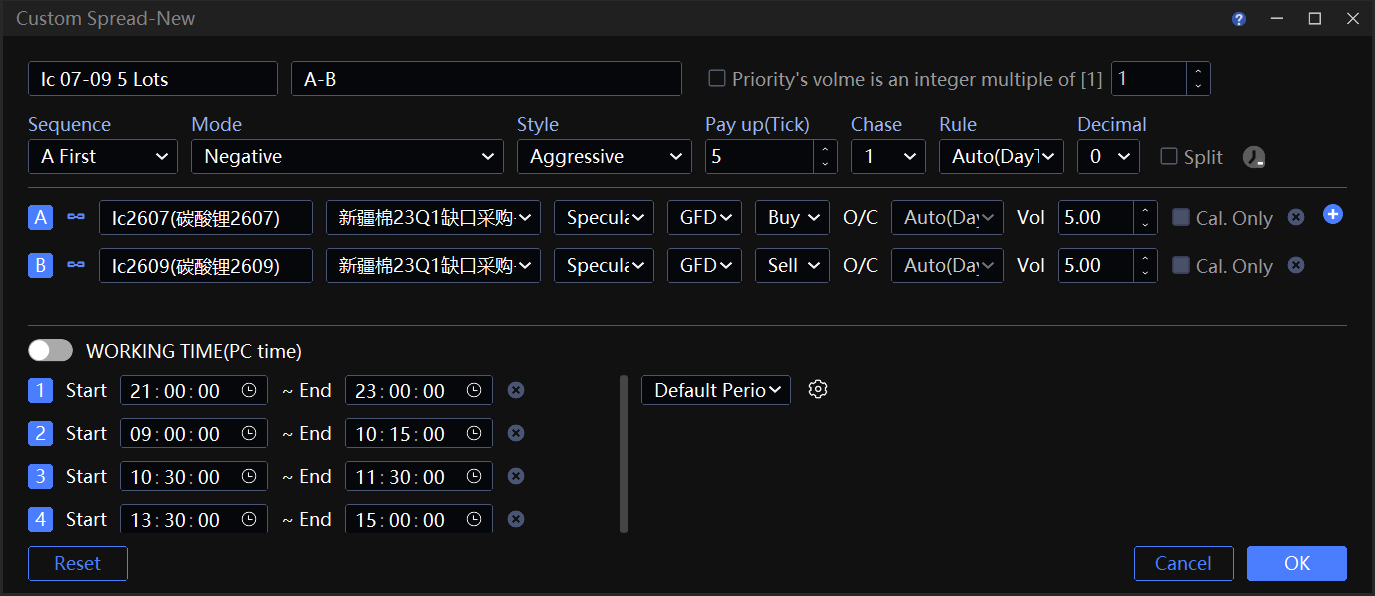
GFEX Lithium Carbonate LC2607 and LC2609 calendar spread. Uses front‑minus‑back spread signal. 5‑lot base unit, 5:5 ratio, no split. Meets exchange minimum order requirement.
Contract A: LC2607.GFEX
Contract B: LC2609.GFEX
Vol.(Ratio) = :A B = 5 : 5
Exchange requires,minimum order 5 lots. Set minimum ratio to 5 to avoid order failure.
Split:Must be off.
On would split into 1:1, violating the minimum 5 lot requirement.
Execution Style:
Sequence “A First” — trade less liquid lc2607 first, then more liquid lc2609.
Mode Leg A: “Negative”. Change its TIF from GFD to FOK.
FOK never results in partial fills.
FOK can only be used on priority legs. ZCE contracts do not support FOK.
Non‑priority leg: “Aggressive”, Chase Pay up(Tick) = 5.
Raise chase tick to aim for full fill at once.
Partial fill still possible: e.g., 5 lots sent, exchange matches 4. Remaining 1 lot chases but does not meet minimum 5.
⚠️ Above settings cannot fully avoid partial fill. If partial fill leads to an error order (chase below minimum), algorithm auto‑pauses. Manually click “Start” in Algos window to resume.
Case 2: Domestic and Foreign Arbitrage
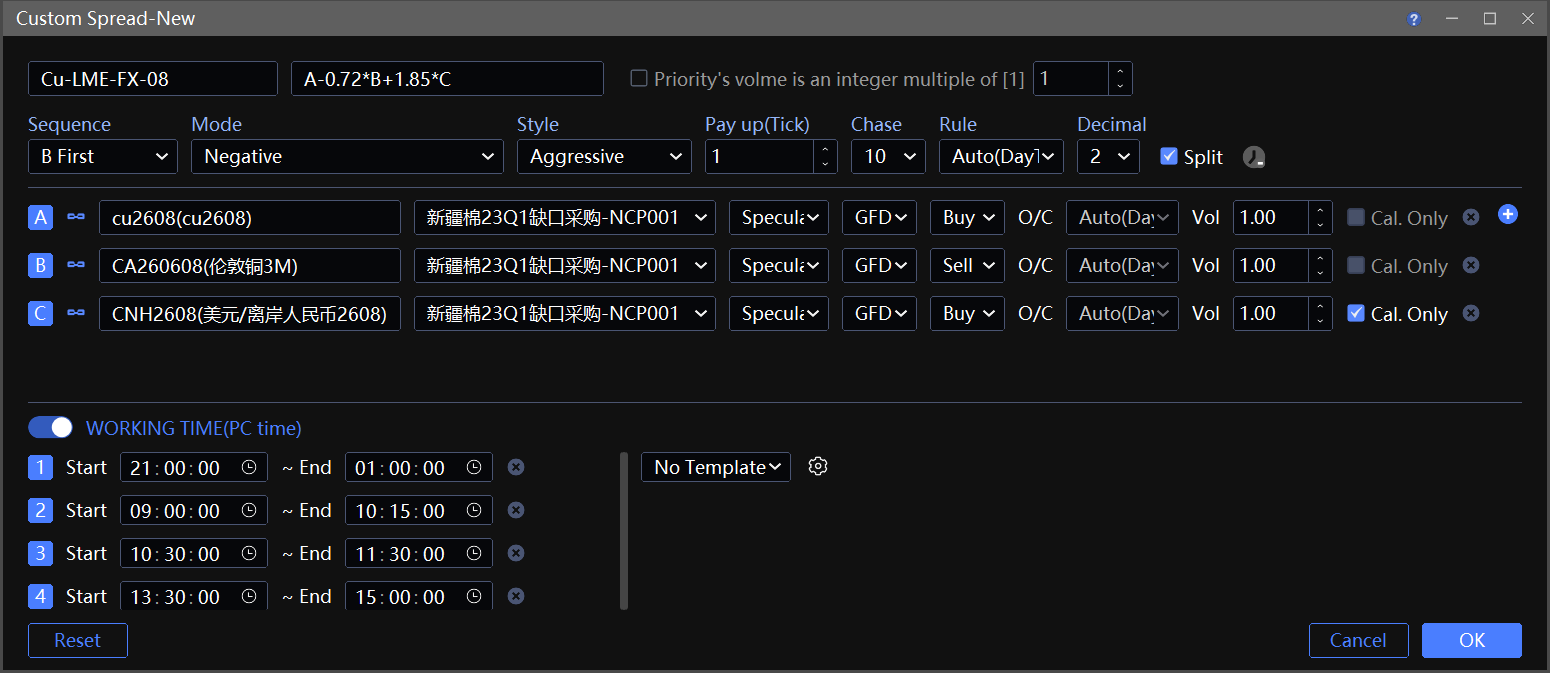
Domestic/foreign copper spread using CU, CUA, CNH. FX contract set to Calculation Only.
Contract A: cu2608.SHFE
Contract B: CUA260508.LME
Contract C: CNH2608.LME, check “Cal. Only”
Spread Name: Cu-LME-FX 08 | Formula: A-0.72*B+1.85*C
0.72 = conversion factor (import cost, tariff, freight, premium/discount).
1.85 = FX‑copper sensitivity coefficient.
Ratio(vol.) A:B:C: = 5 : 1 : any.
5 SHFE + 1 LME gives basic tonnage and value hedge.
Since C is Cal. Only, its ratio can be any number — only for pricing, no positions needed.
Execution Style:
equence “B First” — LME Copper first, then SHFE.
LME CUA is weak leg: poor liquidity, thin depth, occasional price jumps.
SHFE CU is strong leg: deep liquidity, less likely to miss legs.
Priority Mode: “Passive”. Non‑priority Style: “Aggressive”.
- Prioritizes fast fill without missing legs.
Working Time:Because non‑Chinese‑exchange contracts are included, set execution time directly according to Chinese contract trading hours.
Case 3: Options Box Arbitrage (Fill Priority)
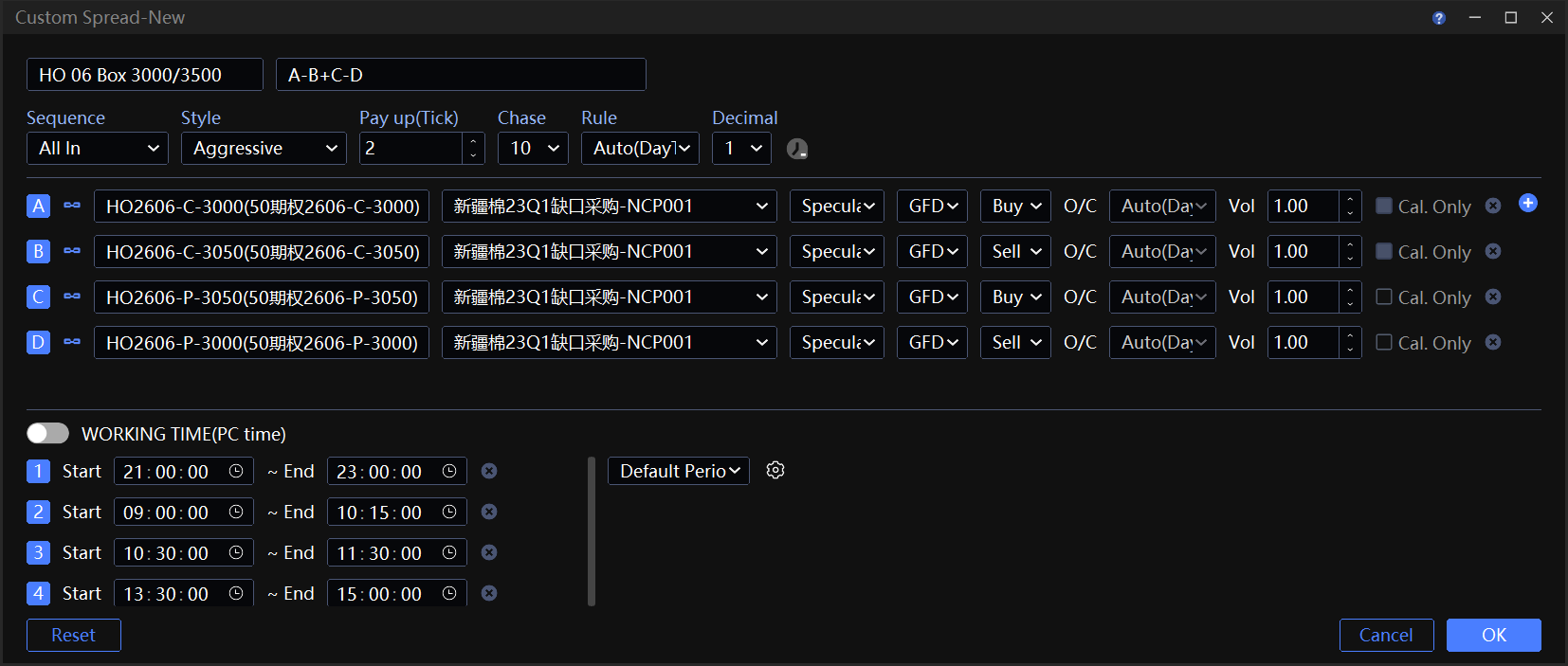
Four‑leg HO equity index options box arbitrage. Same expiry, dual strike. Formula A-B+C-D. Ratio 1:1:1:1 . Captures box spread mean reversion.
Contract A: HO2606-C-3000 Buy lower strike Call.
Contract B: HO2606-C-3050 Sell higher strike Call.
Contract C: HO2606-P-3050 Buy higher strike Put.
Contract D: HO2606-P-3000 Sell lower strike Put.
Decimal:1
HO option tick = 0.2, quote has 1 decimal place, matching single‑leg precision.
Execution Style:
Sequence “All In”, Chasing “Aggressive”.
Goal: Fast fill to capture spread conditions. All four legs submit opposite‑price orders simultaneously, not concerned with chasing‑related slippage.
Q & A
Q 1: Why does price hit the condition but fail to trigger?
Three conditions for trigger:
Opposite Price spread condition met (not Last price, not K‑line price).
Trigger happens on the next price push after you click order. No update → no trigger.
Spread order size must be at least one lot / one copy.
Within allowed time: Contract Status must be ON (continuous session). If “Working Time” is enabled, trigger only in that period.
Spreads with status “Paused” in Algos Window will not trigger.
Q 2: No real‑time period chart, no wicks on spread K‑lines
- Set period to 1‑min and chart type to Close Line to match RealTime.
- Historical data does not support candlestick wicks, as it consists of bar‑based data. Highs and lows of multiple contracts in the same period are unsynchronized and therefore meaningless.
Q 3: How does slippage occur?
No customized spread can completely avoid slippage (can be favorable or not). Proper settings minimize it.
If unfavorable slippage still occurs with reasonable settings:
Chasing
chasing adds price to unfilled orders, increasing fill probability but causing unfavorable slippag.
Contract price jump / poor network
Spread condition met, order sent at Opposite Price, but opposite price changes instantly. Market factors are force majeure.
Q 4: Why are orders repeatedly canceled and hard to fill?
Lack of network edge. For high‑liquidity contracts, trigger conditions show met on quotes, yet orders cannot be filled.
Q 5: How are odd lots handled for securities contracts?
For securities, if an odd‑lot fill occurs and price chasing is triggered, the spread order’s final filled volume rises accordingly.
If spread copies = 1 Copy
If a partial fill leaves the remaining chasing quantity below the minimum trading unit, it is rounded up to an integer multiple of the minimum unit.
Example: SSE main board min unit = 100 shares.
Leg A order = 500 shares. Partial fill 388 shares leaves 112 shares unfilled. 12 shares < 100 → chasing rounds up to 200 shares. Final fill = 588 shares (excess +88).
If spread copies > 1 copy (e.g., 5 copies):
The first 4 copies follow the above rounding rule. The last copy is processed based on real‑time fill conditions.
If remaining quantity ≤ 0 (filled amount already exceeds total ordered), subsequent copies are cancelled and ordering stops.
If remaining quantity < 100 shares (less than min unit), the last copy rounds up and orders 100 shares.
If remaining quantity > 100 shares but not a multiple of 100, the last copy rounds up based on the remaining quantity.