实时资金
实时资金 展示投资者账号或账号组的资金、盈亏、保证金及风险指标。
位置:菜单 → 交易 → 实时资金
功能介绍
面板中的数据分为以下两类:
柜台查询数据:系统默认每 5 秒向上层柜台查询一次,包括 动态权益、平仓盈亏、持仓盈亏、权利金、保证金、手续费 和 可用资金 等。
客户端计算数据:根据最新成交、持仓和行情实时计算,包括期货浮动盈亏、期权浮动盈亏和期权平仓盈亏(逐笔)等。
不同投资者账号所连接的上层柜台(如 CTP、UF2.0)及所属市场不同,可查询和显示的资金字段也可能不同,请以实际界面及结算单为准。
⚠️ 客户端计算数据仅供盘中参考。行情、成交回报、柜台计算口径或数据更新时间存在差异时,客户端计算结果可能与柜台查询值或结算单不一致。
常用资金字段与计算方法
下表为常见计算口径。实际结果可能因交易所、品种、柜台及期货公司的结算规则而有所不同。
| 字段 | 常用计算方法 |
|---|---|
| 平仓盈亏 | 期货平仓通常按先进先出原则计算。平当日多头仓盈亏 =(平仓价 − 开仓价)× 平仓手数 × 合约乘数;平当日空头仓盈亏 =(开仓价 − 平仓价)× 平仓手数 × 合约乘数。平历史多头仓盈亏 =(平仓价 − 上一交易日结算价)× 平仓手数 × 合约乘数;平历史空头仓盈亏 =(上一交易日结算价 − 平仓价)× 平仓手数 × 合约乘数。期权合约平仓通常通过权利金收入与支出体现。 |
| 平仓盈亏(逐笔) | 多头仓盈亏 =(平仓价 − 对应开仓价)× 平仓手数 × 合约乘数;空头仓盈亏 =(对应开仓价 − 平仓价)× 平仓手数 × 合约乘数。 |
| 持仓盈亏 | 当日多头仓盈亏 =(最新价 − 开仓价)× 持仓手数 × 合约乘数;当日空头仓盈亏 =(开仓价 − 最新价)× 持仓手数 × 合约乘数。历史多头仓盈亏 =(最新价 − 上一交易日结算价)× 持仓手数 × 合约乘数;历史空头仓盈亏 =(上一交易日结算价 − 最新价)× 持仓手数 × 合约乘数。 |
| 手续费 | 已成交交易产生的手续费。按手数计费时:手续费 = 成交手数 × 每手费额;按成交金额计费时:手续费 = 成交价格 × 成交手数 × 合约乘数 × 手续费率。开仓、平仓、平今仓、期权行权或履约可能采用不同标准,账户手续费还可能包含期货公司按约定收取的费用。 |
| 手续费(冻结) | 未成交委托预计占用的手续费。委托成交后转入实际手续费;委托撤销或失效后,相关冻结金额通常随柜台处理结果释放。 |
| 权利金(支出) | 期权买入成交数量 × 成交价格 × 合约乘数。 |
| 权利金(收入) | 期权卖出成交数量 × 成交价格 × 合约乘数。 |
| 可用资金 | 上次结算准备金 + 平仓盈亏 + 持仓盈亏 − 手续费 − 手续费(冻结)− 权利金(支出)+ 权利金(收入)− 权利金(冻结)− 占用保证金 − 冻结保证金 + 当日入金 − 当日出金。 |
| 动态权益 | 上次结算准备金 + 平仓盈亏 + 持仓盈亏 − 手续费 − 权利金(支出)+ 权利金(收入)+ 当日入金 − 当日出金。 |
| 动态权益(含期权) | 动态权益 + 期权买方市值 − 期权卖方市值。 |
| 占用保证金 | 当前期货持仓及期权卖方持仓占用的保证金,以柜台返回值为准。 |
| 保证金(冻结) | 未成交开仓委托冻结的保证金,以柜台返回值为准。 |
| 期权市值(多头) | 期权买方持仓数量 × 最新价 × 合约乘数。 |
| 期权市值(空头) | 期权卖方持仓数量 × 最新价 × 合约乘数。 |
| 风险度 | 动态权益不为 0 时:占用保证金 ÷ 动态权益 × 100%。 |
| 风险度(含期权) | 动态权益(含期权)不为 0 时:占用保证金 ÷ 动态权益(含期权)× 100%。 |
面板操作
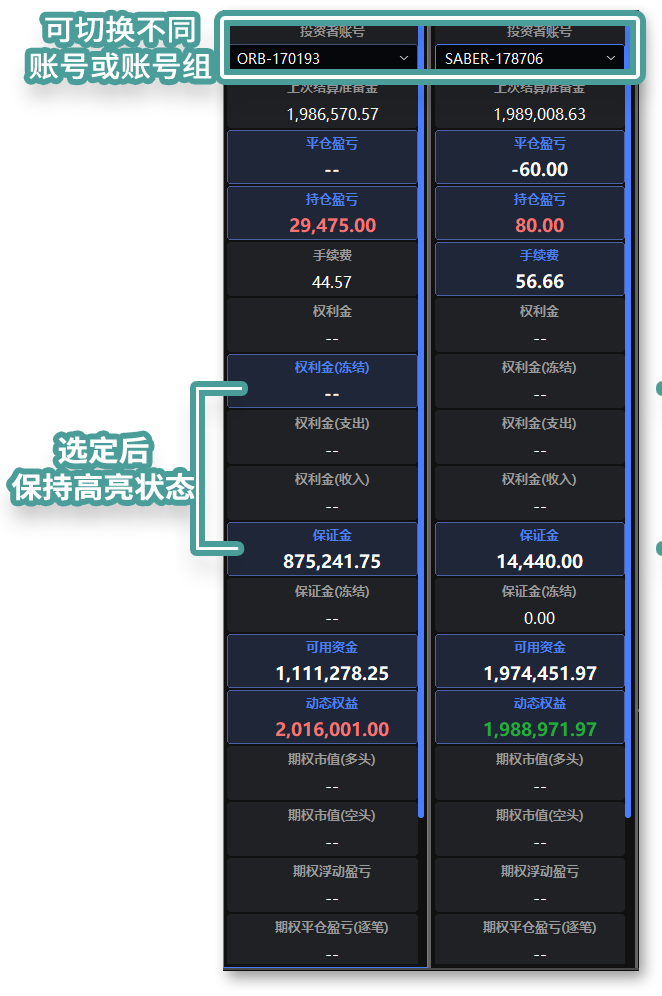
数据高亮:单击数据格左上角或字段标题,可高亮显示对应数据。
弹出窗口:右键单击已嵌入的窗口,选择 弹出,即可移动或单独显示该窗口。
资金监控设置
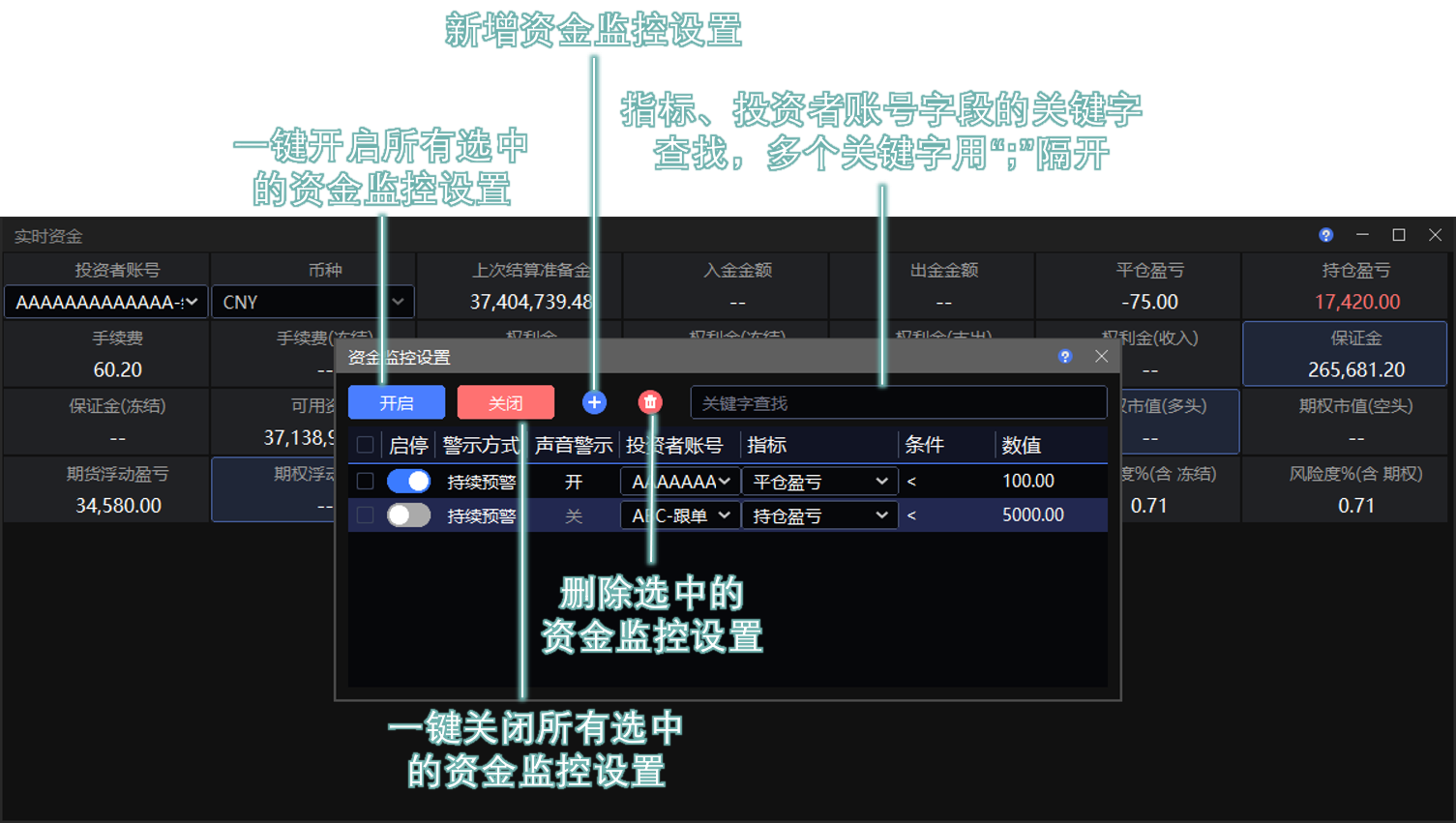
在 实时资金 窗口中设置动态指标监控。
开启预警后,当指标达到设置的预警值时,界面中间会显示 绿色文字弹幕。如果 声音警示 设置为 开,系统还会播放提示音,同时 实时资金 窗口会将 超限项目标红。
使用方法
右键单击 实时资金 窗口,选择 资金监控设置。
点击 +,新增并填写监控信息。
开启启停开关。
⚠️ 被监控的指标栏位必须在 实时资金 窗口中保持显示,否则指标超限时不会提示。
关闭设置窗口后,资金监控设置生效。
警示方式
单击对应字段,可切换 持续预警 和 单次预警。
持续预警:数值每次变化后,如果仍处于超限状态,系统均发出一次提醒。
单次预警:仅在数值第一次超限时提醒。
声音警示
单击对应字段,可切换 开 和 关。
提示声音可在 交易设置 窗口中选择。
投资者账号
在下拉框中选择投资者账号。支持单账号和账号组。
指标
在下拉框中选择监控指标。不同上层柜台返回的资金字段不同,可选指标也可能不同。
建议先选择投资者账号,再选择该账号包含的指标。
条件
双击该字段并选择条件。支持 >、>=、< 和 <=。
数值
双击该字段并输入预警值。
导出动态数据 DDE
使用 资金矩阵 导出资金、盈亏等动态数据,并通过 Excel 函数进行统计分析。
位置:菜单 → 交易 → 资金矩阵
操作方法详见 Excel DDE。
Assets
Assets displays funds, P/L, margin, and risk metrics for an investor account or account group.
Location: Menu → Trade → Assets
Overview
The panel contains two types of data:
Counter data: Retrieved from the connected trading counter every five seconds by default. This includes Equity, Realized P/L, MTM P/L, Premium, Margin, Fee, and Available.
Client-calculated data: Updated in real time based on the latest fills, positions, and market data. This includes futures floating P/L, options floating P/L, and Opt. Total P/L.
Available fields vary by trading counter, such as CTP or UF2.0, and by market. Refer to the displayed values and official statement for the applicable results.
⚠️ Client-calculated data is for intraday reference only. It may differ from counter data or the official statement due to differences in market data, fill reports, calculation methods, or update times.
Common Fields and Calculations
The table shows common calculation methods. Actual results may vary by exchange, product, trading counter, and futures company settlement rules.
| Field | Common calculation method |
|---|---|
| Realized P/L | Futures positions are generally closed on a first-in, first-out basis. Close-today long P/L = (Close price − Open price) × Closed lots × Contract multiplier. Close-today short P/L = (Open price − Close price) × Closed lots × Contract multiplier. Previous-day long P/L = (Close price − Previous settlement price) × Closed lots × Contract multiplier. Previous-day short P/L = (Previous settlement price − Close price) × Closed lots × Contract multiplier. P/L on closing options positions is generally reflected through premium received and paid. |
| Total P/L | Long P/L = (Close price − Matched open price) × Closed lots × Contract multiplier. Short P/L = (Matched open price − Close price) × Closed lots × Contract multiplier. |
| MTM P/L | Today’s long position P/L = (Last price − Open price) × Position lots × Contract multiplier. Today’s short position P/L = (Open price − Last price) × Position lots × Contract multiplier. Previous-day long position P/L = (Last price − Previous settlement price) × Position lots × Contract multiplier. Previous-day short position P/L = (Previous settlement price − Last price) × Position lots × Contract multiplier. |
| Fee | Fees charged for filled transactions. Per-lot fee = Filled lots × Fee per lot. Value-based fee = Fill price × Filled lots × Contract multiplier × Fee rate. Different rates may apply to opening, closing, closing today’s positions, option exercise, and assignment. Account fees may also include fees charged by the futures company under the customer agreement. |
| Fee (Frozen) | Estimated fees reserved for working orders. The reserved amount becomes an actual fee after a fill and is generally released by the trading counter when the order is canceled or expires. |
| Premium Out | Filled option buy quantity × Fill price × Contract multiplier. |
| Premium In | Filled option sell quantity × Fill price × Contract multiplier. |
| Available | Previous settlement balance + Realized P/L + MTM P/L − Fee − Fee (Frozen) − Premium Out + Premium In − Premium (Frozen) − Used margin − Margin (Frozen) + Deposits today − Withdrawals today. |
| Equity | Previous settlement balance + Realized P/L + MTM P/L − Fee − Premium Out + Premium In + Deposits today − Withdrawals today. |
| Equity (Incl. Opt.) | Equity + Options Value (Long) − Options Value (Short). |
| Margin | Margin used by open futures positions and short options positions. The value is provided by the trading counter. |
| Margin (Frozen) | Margin reserved for working opening orders. The value is provided by the trading counter. |
| Options Value (Long) | Long options position quantity × Last price × Contract multiplier. |
| Options Value (Short) | Short options position quantity × Last price × Contract multiplier. |
| Risk% | If Equity is not zero: Used margin ÷ Equity × 100%. |
| Risk% (Incl. Opt.) | If Equity (Incl. Opt.) is not zero: Used margin ÷ Equity (Incl. Opt.) × 100%. |
Panel Actions
Highlight data: Click the upper-left corner of a data cell or its field heading to highlight it.
Open a separate window: Right-click the embedded window and select Pop Up. You can then move or display the window separately.
Asset Monitoring Settings
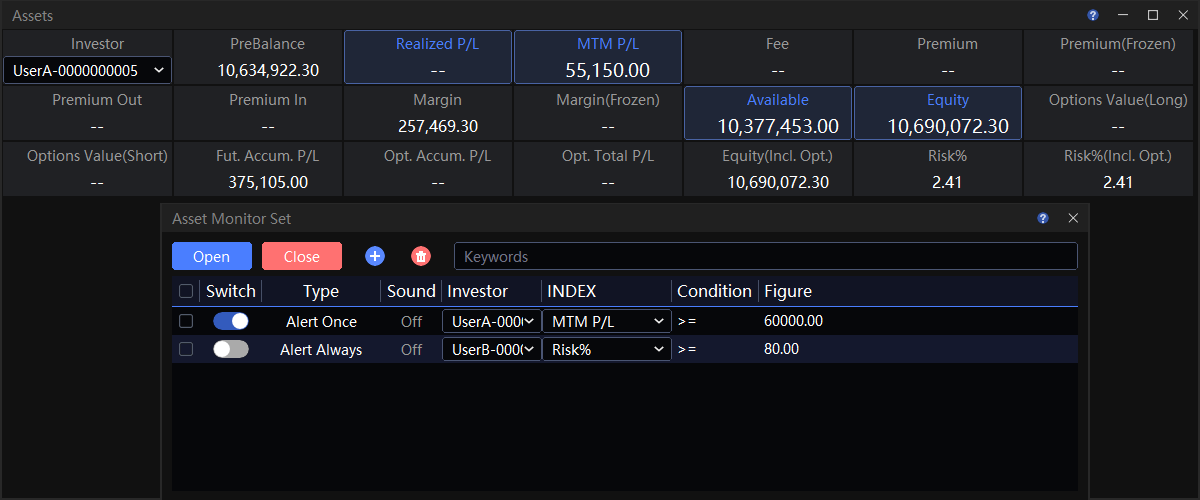
Configure monitoring rules for dynamic metrics in the Assets window.
When an alert is enabled and a metric reaches its configured threshold, a green scrolling message appears in the center of the interface. If Sound is set to On, an alert sound also plays. The field that exceeds its limit is highlighted in red in the Assets window.
Instructions
Right-click the Assets window and select Asset Monitor Set.
Click + and configure the monitoring rule.
Turn on the enable switch.
⚠️ Keep the monitored field visible in the Assets window. No alert is issued if the field is hidden.
The monitoring rules take effect after you close the settings window.
Alert Method
Click the field to switch between Alert Always and Alert Once.
Alert Always: Issues another alert whenever the value changes and remains beyond the limit.
Alert Once: Issues an alert only when the value first exceeds the limit.
Sound
Click the field to switch between On and Off.
Select the alert sound in the Settings window.
Investor
Select an investor account from the drop-down list. Both individual accounts and account groups are supported.
Metric
Select a metric from the drop-down list. Available metrics may vary because trading counters return different funds fields.
Select the investor account first, and then select a metric available for that account.
Condition
Double-click the field and select a condition. Supported conditions are >, >=, <, and <=.
Value
Double-click the field and enter the alert threshold.
Exporting Dynamic Data with DDE
Use Asset Matrix to export dynamic funds and P/L data for analysis with Excel functions.
Location: Menu → Trade → Asset Matrix
For instructions, see Excel DDE.