标准套利(Spread)
标准套利是交易所发布的套利组合,可直接用于价差交易和移仓。使用标准套利组合下单时,组合由交易所撮合,可避免自定义套利中可能出现的不利滑点。
大商所、郑商所、广期所、上期所、能源中心支持标准套利组合,但并非所有月份组合都会发布。具体可交易组合以软件窗口显示为准。
若目标合约没有标准套利组合,建议使用 自定义套利。
QuantFair、SimNow 模拟环境 / UAT 不支持标准套利,不会显示标准套利组合。请以正式环境显示为准。
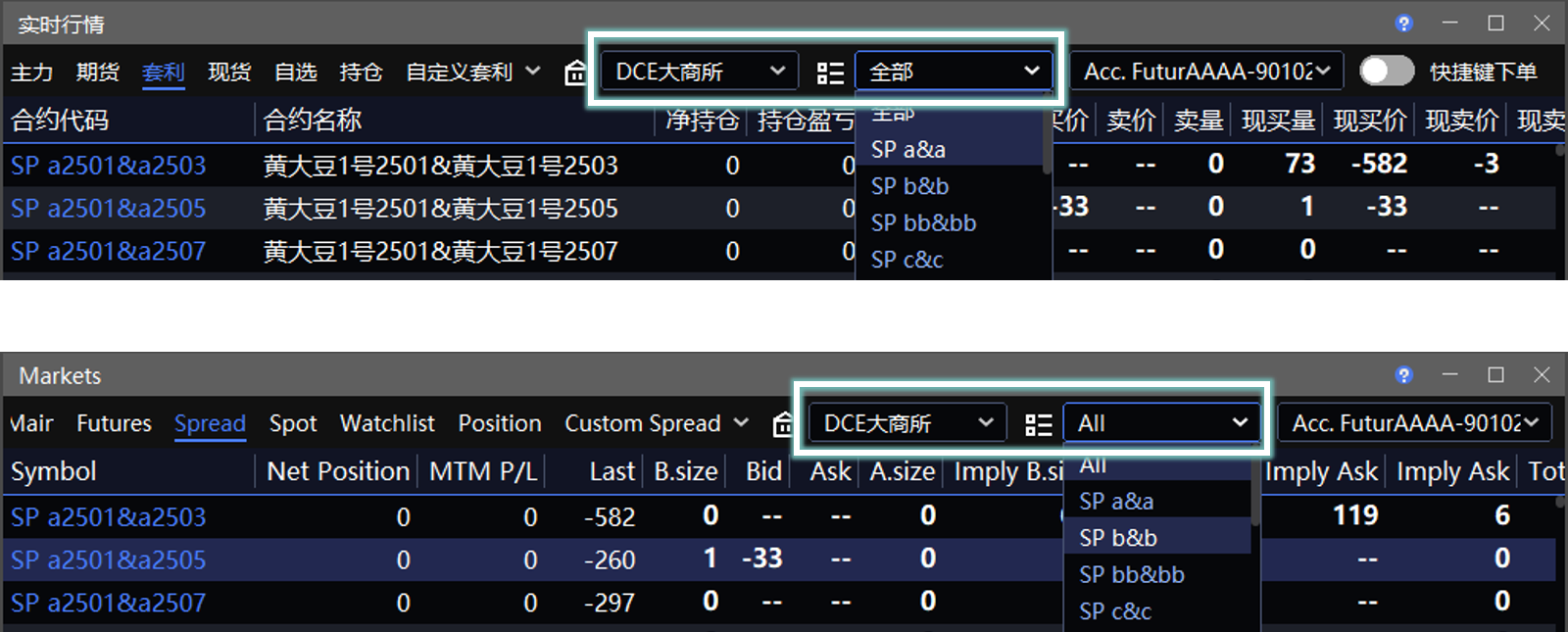
位置:交易 → 实时行情 → 套利
价差交易
在标准套利行情列表中,右键目标组合,选择下单板并填写下单参数即可交易。推荐使用 无限下单。
标准套利组合与单合约一样,支持 Smart Order、网格策略 等功能。
委托后,可在 实时回报 窗口查看报单与成交记录。
使用组合指令下单,可实时享受交易所组合保证金优惠。
只有对手价差满足委托条件时才会成交,成交依据不是最新价,也不是 K 线图上看到的价格。
上期所、能源中心标准套利
上期所、能源中心的标准套利支持分别设置前后两腿的 开平仓方式 和 投保类型。
开平仓方式
开平仓方式由两个选项组成:
前一项对应 A 腿,即套利组合的前序合约。
后一项对应 B 腿,即套利组合的后序合约。
例如,套利组合为 SP A&B:
| 开平仓方式 | A 腿 | B 腿 |
|---|---|---|
| 开仓开仓 | 开仓 | 开仓 |
| 开仓平仓 | 开仓 | 平仓 |
| 开仓平今 | 开仓 | 平今 |
| 平仓开仓 | 平仓 | 开仓 |
| 平今开仓 | 平今 | 开仓 |
| 平仓平仓 | 平仓 | 平仓 |
| 平今平仓 | 平今 | 平仓 |
| 平仓平今 | 平仓 | 平今 |
| 平今平今 | 平今 | 平今 |
其中:
平仓 仅用于平昨仓。
平今 仅用于平今仓。
下单前,请确认 A、B 腿具有与所选开平仓方式对应的可开仓量、可平仓量或可平今量,否则委托可能被拒绝。
投保类型
上期所、能源中心的标准套利支持分别设置 A、B 腿的 投保类型。每条腿均可选择 投机 或 套保,例如 投机投机、套保投机。
使用 套保 前,需要先向经纪商申请相应的套保持仓权限。
盘口字段说明
| 字段 | 说明 |
|---|---|
| 买(卖)价、买(卖)量 | 交易所发布的组合买(卖)价、买(卖)量。 |
| 现买(卖)价、现买(卖)量 | 根据两腿单合约买卖价合成的组合买(卖)价、买(卖)量。 |
实际撮合时,组合会与单腿合约共同参与撮合,因此需结合以上两类盘口信息判断。无限下单 中显示的盘口为择优展示结果。
移仓
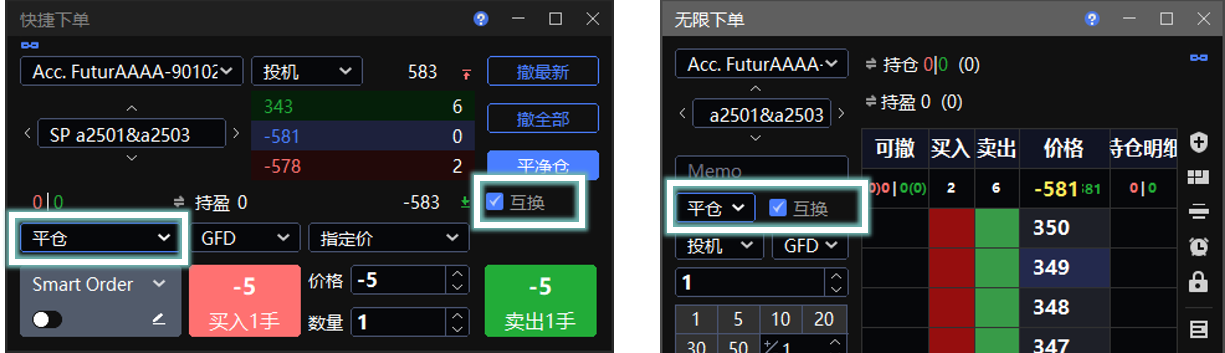
标准套利可通过“一平一开”完成移仓。上期所、能源中心与其他交易所的设置方式不同。
上期所、能源中心
上期所、能源中心的标准套利无需使用 互换。在 开平仓方式 中,直接分别设置 A、B 腿的开平方向:
将 A 腿持仓移至 B 腿:A 腿选择 平仓 或 平今,B 腿选择 开仓。
将 B 腿持仓移至 A 腿:A 腿选择 开仓,B 腿选择 平仓 或 平今。
以 SP A&B 为例:
| 移仓方向 | 组合买卖方向 | 开平仓方式 |
|---|---|---|
| A 腿空头移至 B 腿 | 买 | 平仓开仓;若平 A 腿今仓,则选择平今开仓 |
| B 腿空头移至 A 腿 | 卖 | 开仓平仓;若平 B 腿今仓,则选择开仓平今 |
下单前,请确认被移出合约具有足够的可平仓量或可平今量。
其他交易所
其他交易所的标准套利需要使用 互换 完成移仓。
在 无限下单 或 快捷下单 窗口中,勾选  互换 后,下单时即可实现组合内单合约“一平一开”。
互换下单时:
组合中的前序合约按下单板选择的买卖方向、开平方式执行。
组合中的后序合约按相反方向、相反开平方式执行。
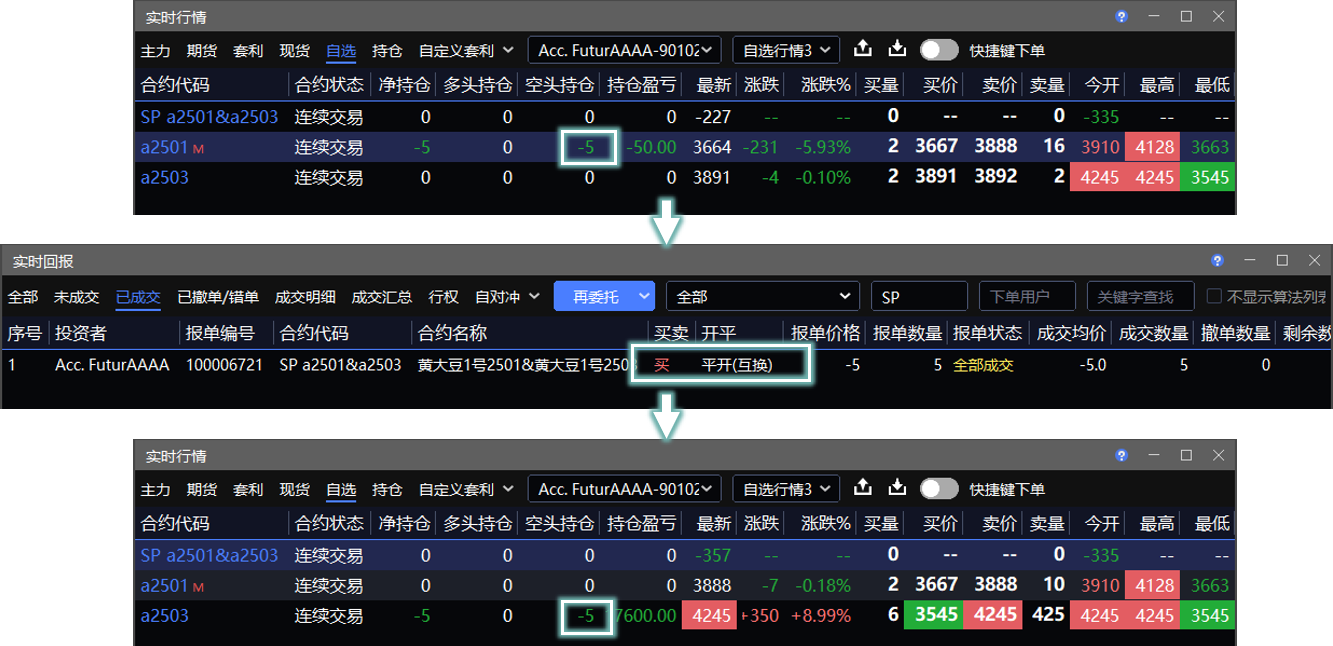
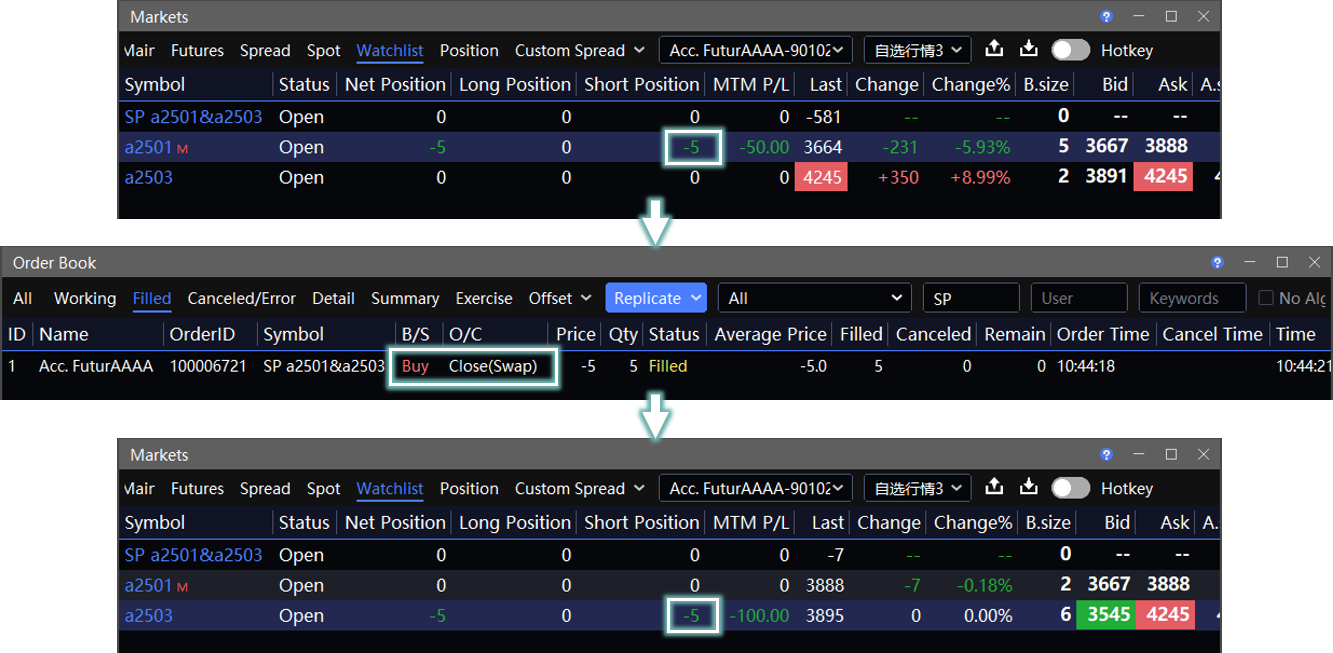
以合约 SP a2501 & a2503 为例:
移仓 a2501 空头
下单板选择 买 + 平仓:
前序合约 a2501 买平
后序合约 a2503 卖开
移仓 a2503 空头
下单板选择 卖 + 开仓:
前序合约 a2501 卖开
后序合约 a2503 买平
互换规则表
| 互换 | 组合买卖方向 | 组合开平仓方式 | 组合合约 | A 合约 | B 合约 |
|---|---|---|---|---|---|
| x | 买 | 开 | SP A & B | 买开 | 卖开 |
| x | 买 | 平 | SP A & B | 买平 | 卖平 |
| x | 卖 | 开 | SP A & B | 卖开 | 买开 |
| x | 卖 | 平 | SP A & B | 卖平 | 买平 |
| √ | 买 | 开 | SP A & B | 买开 | 卖平 |
| √ | 买 | 平 | SP A & B | 买平 | 卖开 |
| √ | 卖 | 开 | SP A & B | 卖开 | 买平 |
| √ | 卖 | 平 | SP A & B | 卖平 | 买开 |
技术线图
标准套利组合支持查看组合价差 K 线图。
组合 K 线不支持分时图。可将周期切换为 1 分钟,并将主图类型切换为 收盘线,以获得接近分时图的显示效果。
组合 K 线的历史数据不显示影线。历史数据为切片合成数据,多个合约在同一周期内合成的最高价、最低价不一定发生在同一时间,因此影线缺乏参考意义。详见 视频:组合 K 线线图原理。
Spread
Spread is an exchange-listed arbitrage combination that can be used directly for spread trading and rolling. Orders placed through a standard spread are matched by the exchange, helping avoid adverse slippage that may occur with custom spreads.
Standard spreads are supported on DCE, CZCE, GFEX, SHFE, and INE. However, not every contract month has a listed spread. Available combinations are subject to what is displayed in the software.
If no standard spread is available for the target contract, use Custom Spread instead.
Standard spreads are not supported in QuantFair, SimNow, or UAT environments, so they will not be displayed there. Please refer to the official trading environment.
Path: Trade → Markets → Spread
Video: Using standard combinations for zero-slippage spread trading and rolling by Juzi
Trading
In the standard spread quote list, right-click the target combination, select a trade board, and enter the order parameters to trade. InfiniTrader is recommended.
Standard spreads support Smart Order, Grid, and other features, just like single contracts.
After submitting an order, view order and trade records in the Order Book window.
When you place a combination order, exchange margin benefits for the combination are applied in real time.
A trade is executed only when the opposite-side spread meets the order condition. Execution is not based on the last price or the price shown on the candlestick chart.
SHFE and INE Standard Spreads
For SHFE and INE standard spreads, you can set the Open/Close instruction and Hedge Flag separately for each leg.
Open/Close Instructions
The Open/Close instruction consists of two settings:
The first setting applies to Leg A, the first instrument in the spread.
The second setting applies to Leg B, the second instrument.
For example, for SP A&B:
| Open/Close Instruction | Leg A | Leg B |
|---|---|---|
| Open Open | Open | Open |
| Open Close | Open | Close |
| Open Close Today | Open | Close Today |
| Close Open | Close | Open |
| Close Today Open | Close Today | Open |
| Close Close | Close | Close |
| Close Today Close | Close Today | Close |
| Close Close Today | Close | Close Today |
| Close Today Close Today | Close Today | Close Today |
In these instructions:
Close closes yesterday's positions only.
Close Today closes today's positions only.
Before submitting the order, make sure each leg has sufficient available volume for the selected Open/Close instruction. Otherwise, the order may be rejected.
Hedge Flag
For SHFE and INE standard spreads, you can set the Hedge Flag separately for Legs A and B. Set each leg to Speculation or Hedge, such as Speculation Speculation or Hedge Speculation.
Before using Hedge, apply to your broker for the required hedging eligibility.
Market Depth Fields
| Field | Description |
|---|---|
| Bid/Ask Price and Bid/Ask Volume | The combination bid/ask prices and volumes published by the exchange. |
| Implied Bid/Ask Price and Implied Bid/Ask Volume | The combination bid/ask prices and volumes calculated from the bid/ask prices of the two leg contracts. |
During matching, the combination and its individual leg contracts may both participate in execution. Review both types of market depth together. The market depth shown in InfiniTrader is the best available display result.
Rolling
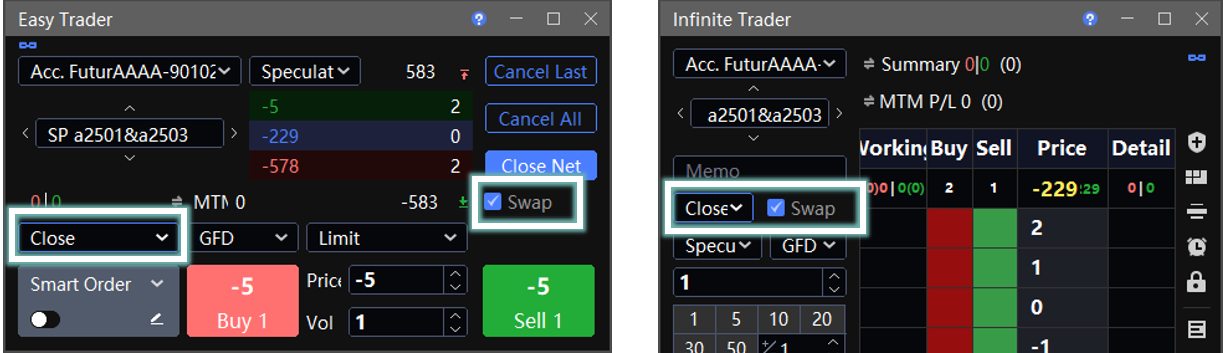
You can roll a position through a standard spread by closing one leg and opening the other. The setup differs between SHFE/INE and other exchanges.
SHFE and INE
For SHFE and INE standard spreads, you do not need to use Swap. Set the Open/Close instruction for each leg directly:
To roll a position from Leg A to Leg B, set Leg A to Close or Close Today, and set Leg B to Open.
To roll a position from Leg B to Leg A, set Leg A to Open, and set Leg B to Close or Close Today.
For SP A&B:
| Roll Direction | Combination Side | Open/Close Instruction |
|---|---|---|
| Roll a short position from Leg A to Leg B | Buy | Close Open; select Close Today Open to close today's position in Leg A |
| Roll a short position from Leg B to Leg A | Sell | Open Close; select Open Close Today to close today's position in Leg B |
Before submitting the order, make sure the instrument being rolled has sufficient available volume to close yesterday's or today's position.
Other Exchanges
For standard spreads on other exchanges, use Swap to roll positions.
In the InfiniTrader or Easy Trader window, select Swap to close one leg and open the other leg within the combination when placing an order.
When placing a swap order:
The first contract in the combination follows the side and open/close setting selected on the trade board.
The second contract uses the opposite side and opposite open/close setting.
For SP a2501 & a2503:
Roll a Short Position from a2501
Select Buy + Close:
a2501: buy to close
a2503: sell to open
Roll a Short Position from a2503
Select Sell + Open:
a2501: sell to open
a2503: buy to close
Swap Rules
| Swap | Combination Side | Combination Open/Close | Combination | Contract A | Contract B |
|---|---|---|---|---|---|
| x | Buy | Open | SP A & B | Buy Open | Sell Open |
| x | Buy | Close | SP A & B | Buy Close | Sell Close |
| x | Sell | Open | SP A & B | Sell Open | Buy Open |
| x | Sell | Close | SP A & B | Sell Close | Buy Close |
| √ | Buy | Open | SP A & B | Buy Open | Sell Close |
| √ | Buy | Close | SP A & B | Buy Close | Sell Open |
| √ | Sell | Open | SP A & B | Sell Open | Buy Close |
| √ | Sell | Close | SP A & B | Sell Close | Buy Open |
Market Chart
Standard spreads support spread candlestick charts.
Spread candlestick charts do not support RealTime charts. To achieve a similar view, set the period to 1 Min and set the chart type to Close Price Line.
Historical data in spread candlestick charts does not show wicks. The data is synthesized from time slices, and the highest and lowest synthesized prices of multiple contracts within the same period may not occur at the same time, so wicks are not meaningful for reference.