竞价抢单
竞价抢单 是一种本地预埋算法单。开启后,在 下单板 下单,委托会在合约下一次进入集合竞价交易时发出。
该功能适合在集合竞价开始前提前设置委托,等待合约进入集合竞价状态后自动报入交易所。
⚠️ 风险提示: 除服务器单之外,无限易的算法单均为本地算法单,依赖行情或成交回报触发。若因网络延迟、断线、软件关闭等原因导致算法无法正常运行,无限易不承担相关责任。
位置:下单板 → Smart Order → 竞价抢单
视频:3 分钟学会用任务下单管理当日未成交单 by 草莓同学
使用方法
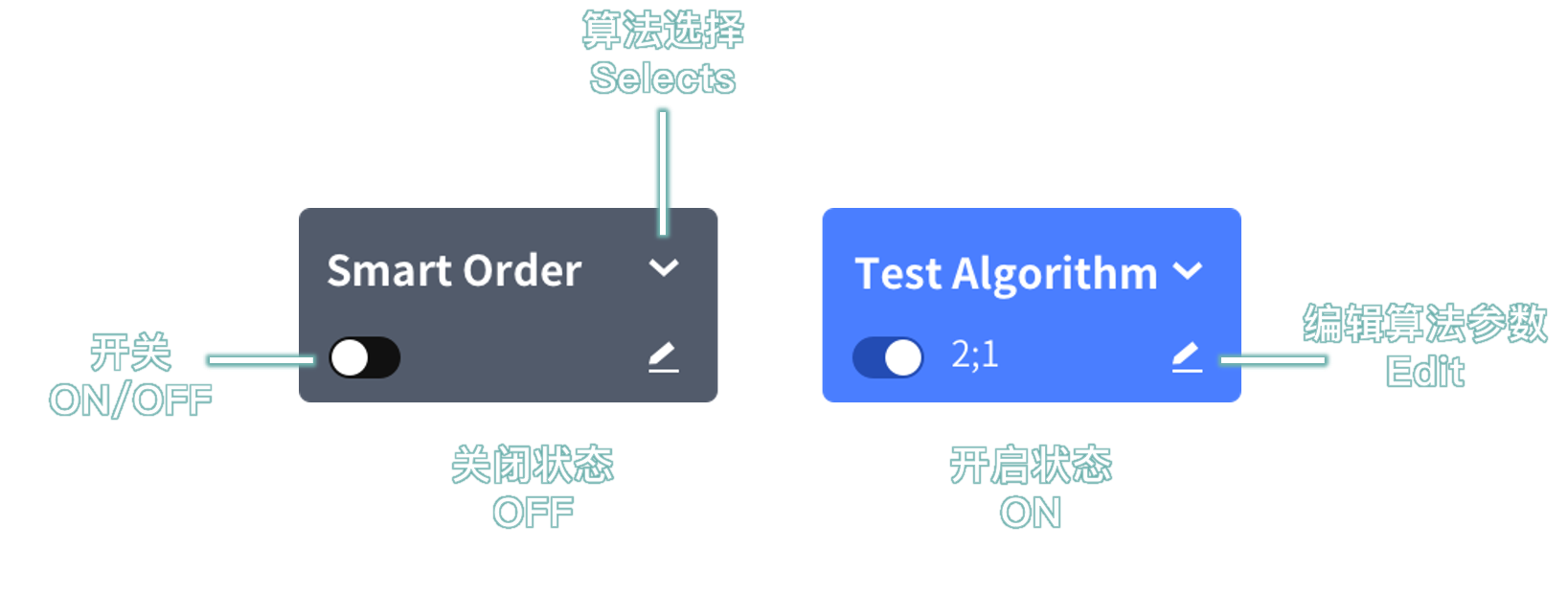
在 下单板 点击 Smart Order,在下拉框中选择 竞价抢单。
在 下单板 设置 委托价格、委托数量 等下单信息。
点击下单,系统会创建竞价抢单算法单。
合约下一次进入 集合竞价 状态时,算法会自动发送委托。
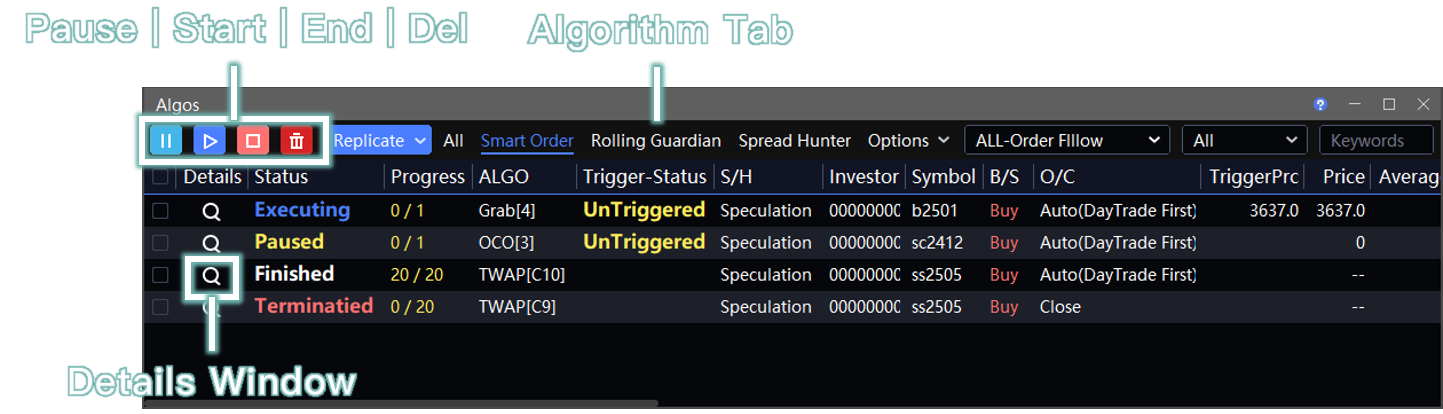
下单后,可在 算法列表 → Smart Order 窗口查看和管理执行明细。
示例流程
以 DCE 合约为例:
| 设置时间 | 合约状态 | 竞价抢单触发时间 |
|---|---|---|
| 08:50 设置竞价抢单 | 早盘集合竞价前 | 08:55 合约进入集合竞价状态时发出委托 |
| 20:50 设置竞价抢单 | 夜盘集合竞价前 | 20:55 合约进入集合竞价状态时发出委托 |
也就是说,竞价抢单不会在设置后立即报单,而是等待合约下一次进入集合竞价状态时发出委托。
算法列表管理
竞价抢单创建后,可在 算法列表 窗口查看并管理。
位置:交易 → 算法列表 → Smart Order
使用前请注意:
- 算法单委托在本地运行。软件关闭后,算法不会继续执行,也不会自动保存记录;下次打开软件时不会显示历史记录。
- 可手动保存执行中或已暂停的算法单:右键算法单,选择 储存为任务下单。
- 也可在 定时管家 窗口设置自动保存。下次导入文件后可继续执行,详见 任务下单说明。
- 执行过程中如出现 错单(如资金不足、不在交易时间等)或 手动撤单,算法将自动终止。
注意事项
当天交易日的竞价抢单,需要在集合竞价开始前设置好。
例:08:55:00 开始集合竞价的合约,需要在 08:55:00 前设置竞价抢单。
如果在集合竞价开始之后,或合约已经处于集合竞价状态时设置竞价抢单,该委托会等到合约下一次进入集合竞价状态时才发出。
标准套利合约没有集合竞价,请不要使用竞价抢单。
若登录金仕达(JSD)席位,不要使用竞价抢单。该柜台没有集合竞价状态推送,请直接使用 开盘抢单。
竞价委托和开盘委托说明
不同柜台对竞价委托和开盘委托的处理方式不同。
柜台类型由登录站点决定,详见 无限易下载与登录。
重要提示: 交易所标准套利合约不参加集合竞价,请不要委托竞价单,否则可能导致错单。
CTP 柜台
非交易时间直接下单,柜台会直接返回 错单。
| 场景 | 操作方式 |
|---|---|
| 竞价时间前 | 使用 竞价抢单 下算法单,等待合约状态变更为 集合竞价 后报入交易所。 |
| 竞价开始后 | 可直接委托竞价单。 |
| 开盘时间前 | 使用 开盘抢单 下算法单,等待合约状态变更为 连续交易 后报入交易所。 |
| 开盘后 | 可直接委托。 |
示例:
- 20:55:00 开始集合竞价的合约,需要在 20:55:00 前设置竞价抢单。
- 20:55:00 至 20:59:00 集合竞价期间,可直接委托竞价单。
- 21:00:00 开盘的合约,需要在 21:00:00 前设置开盘抢单。
- 09:00:00 已经开盘后,可直接委托。
恒生柜台
非交易时间直接下单,柜台会提前接收委托,并在合约进入 集合竞价 时再报入交易所。
| 场景 | 操作方式 |
|---|---|
| 竞价时间前 | 直接下单即为竞价委托单,柜台会提前接收。 |
| 竞价开始后 | 可直接委托竞价单。 |
| 开盘时间前 | 使用 开盘抢单 下算法单,等待合约状态变更为 连续交易 后报入交易所。 |
| 开盘后 | 可直接委托。 |
请不要委托交易所标准套利合约。 标准套利合约不参加集合竞价,可能导致 错单。
示例:
- 20:55:00 开始集合竞价的合约,需要在 20:55:00 前下好竞价委托单。
- 20:55:00 至 20:59:00 集合竞价期间,可直接委托竞价单。
- 09:00:00 开盘的合约,需要在 09:00:00 前设置开盘抢单。
- 09:00:00 已经开盘后,可直接委托。
易盛柜台
非交易时间直接下单,柜台会直接返回 错单。
易盛自动单 是指在交易时间前提前下单到经纪商后台。开始交易后,经纪商后台会自动一次性将委托报入交易所。
自动单有效时间请具体咨询经纪商。
| 场景 | 操作方式 |
|---|---|
| 竞价时间前 | 使用 易盛(自动单) 下单板下单,即为自动单;合约状态变更为 集合竞价 后报入交易所。 |
| 竞价开始后 | 可直接委托竞价单。 |
| 竞价开始后、开盘时间前 | 使用 易盛(自动单) 下单板下单,即为开盘单;合约状态变更为 连续交易 后报入交易所。 |
| 开盘时间前 | 使用 开盘抢单 下算法单,等待合约状态变更为 连续交易 后报入交易所。 |
| 开盘后 | 可直接委托。 |
易盛自动单处理规则:
- 如果委托的是交易所标准单合约,会在合约状态变更为 集合竞价 时报入交易所。
- 如果委托的是交易所标准套利合约,由于标准套利合约不参加集合竞价,会在 连续交易 时才报入交易所。
示例:
- 20:55:00 开始集合竞价的合约,需要在 20:55:00 前设置自动单。
- 20:55:00 至 20:59:00 集合竞价期间,用 易盛(自动单) 下的单为开盘单。
- 09:00:00 开盘的合约,需要在 09:00:00 前设置开盘抢单。
- 09:00:00 已经开盘后,可直接委托。
Grab(Auction)
Grab(Auction) is a local staged Algo. After it is enabled, place an order on the Trade Board. The order will be sent the next time the contract enters the call auction session.
Use this feature to set an order before the call auction starts. The Algo sends the order automatically when the contract enters the call auction session.
⚠️ Risk Warning: Except for Server Trader, all InfiniTrader Algos run locally and are triggered by market quotes or fill reports. InfiniTrader assumes no liability if an Algo fails to run properly due to network latency, disconnection, software shutdown, or similar reasons.
Location: Trade Board → Smart Order → Grab(Auction)
How to Use
On the Trade Board, click Smart Order and select Grab(Auction) from the drop-down list.
On the Trade Board, set the Price, Volume, and other order details.
Place the order to create a Grab(Auction) Algo.
When the contract next enters the call auction session, the Algo sends the order automatically.
After placing the order, view and manage execution details in Algos → Smart Order.
Example Flow
Example with a DCE contract:
| Setup Time | Contract Status | Grab(Auction) Trigger Time |
|---|---|---|
| Set a Grab(Auction) order at 08:50 | Before the morning call auction | The order is sent at 08:55 when the contract enters the call auction session. |
| Set a Grab(Auction) order at 20:50 | Before the night session call auction | The order is sent at 20:55 when the contract enters the call auction session. |
A Grab(Auction) order is not sent immediately after setup. It waits until the contract next enters the call auction session.
Algo Management
After a Grab(Auction) Algo is created, view and manage it in Algos.
Location: Trade → Algos → Smart Order
Before using this feature, note the following:
- Algos run locally. If the software is closed, they stop running and are not saved automatically. No historical records will be available the next time the software is opened.
- To save a running or paused Algo manually, right-click the Algo and select Save As Designated Order.
- You can also configure automatic saving in Time Master. Import the file next time to continue execution. For details, see Designated Trader.
- If the Algo encounters a Fail status, such as insufficient funds or orders outside trading hours, or if the order is manually canceled during execution, the Algo ends automatically.
Notes
For a same-day Grab(Auction) order, set it before the call auction starts.
Example: for a contract whose call auction starts at 08:55:00, set the Grab(Auction) order before 08:55:00.
If you set a Grab(Auction) order after the call auction starts, or while the contract is already in the call auction session, the order will wait until the contract next enters the call auction session.
Standard spread contracts do not have a call auction session. Do not use Grab(Auction) for these contracts.
Do not use Grab(Auction) when logging in through a Kingstar (JSD) seat. This counter does not push call auction status. Use Grab instead.