双向下单
双向下单用于对两个合约同时下单。两个合约可以同方向下单,也可以反方向下单。
位置:菜单 → 交易 → 双向下单
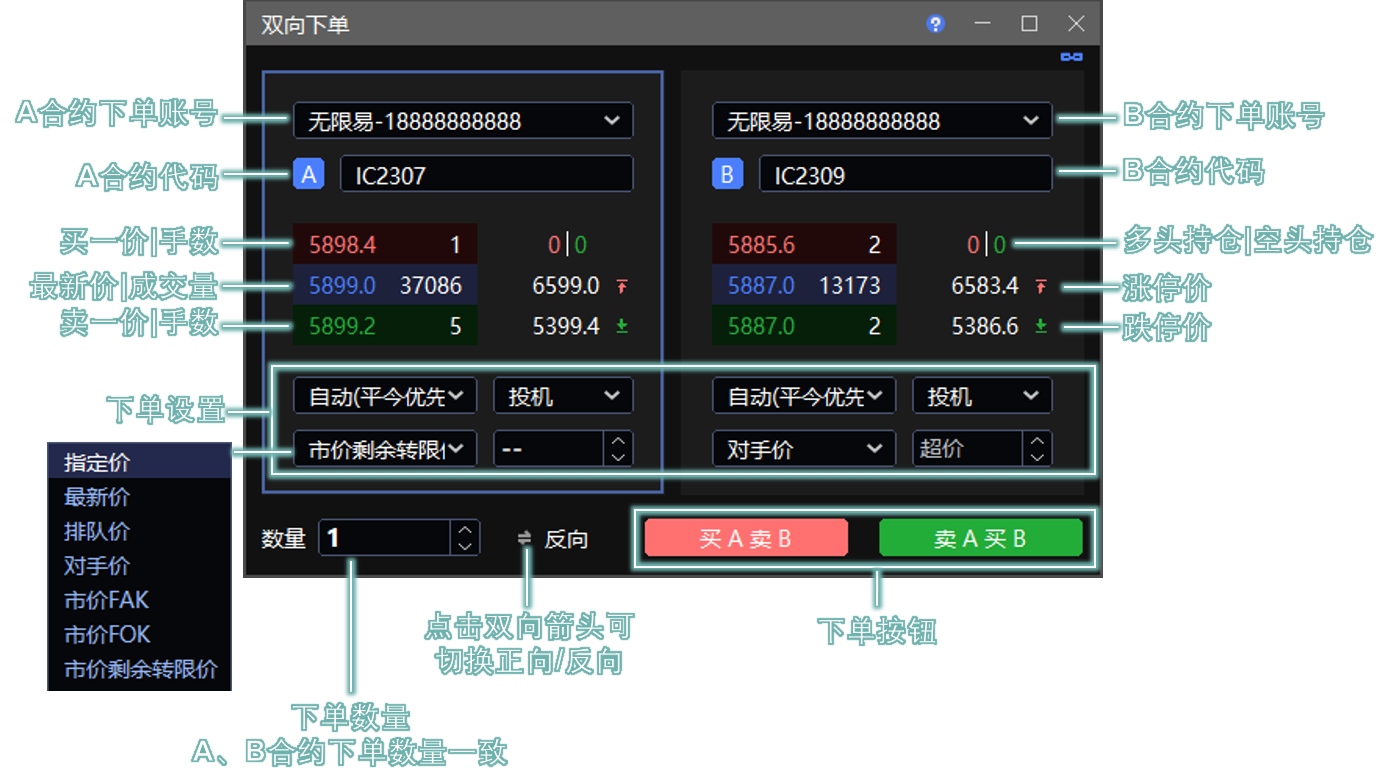
下单模式
| 模式 | 说明 |
|---|---|
| 正向 | A、B 合约买卖方向相同,同时买入或同时卖出。 |
| 反向 | A、B 合约买卖方向相反,一个买入、一个卖出。 |
A、B 合约可以为同一合约,但请注意自成交风险。
参数说明
| 参数 | 说明 |
|---|---|
| 投资者账号 | 可切换账号 / 账号组。 |
| 投机套保 | 账户属性。套保需要向经纪商申请;普通账户默认都是投机。 |
| 开平仓方式 | 默认 自动(平今优先)。有可平仓额度时,反方向交易即为平仓,系统会先平仓再开仓。详见 交易术语解释 。 |
| 委托价格类型 | 支持 指定价、最新价、排队价、对手价、市价 FAK、市价 FOK、市价剩余转限价。 |
委托价格类型
- 选择 指定价 时,在下方价格输入框输入下单价格。
- 选择 最新价、排队价、对手价 时,可在下方超价输入框输入超价 Tick。
- 选择 市价 FAK、市价 FOK、市价剩余转限价 时,一般无需输入价格;若交易所为 上期所(SHFE) 或 能源中心(INE),则需在价格输入框输入 市价保护价。买入时成交价不会高于此价,卖出时成交价不会低于此价。
- 单击价格字段(买一价、卖一价、最新价、涨停价、跌停价)后,系统会将下单价格切换为 指定价,并把所选价格带入价格输入框。
CZCE 不支持 FOK,相关委托可能报错。详见 交易术语解释 。
快捷操作
- 点击 实时行情、实时持仓、实时回报、T型报价 窗口中的合约,可将合约代码快速带入下单面板。默认联动窗口为 A 合约模块;单击模块空白处可切换联动模块。
- 点击 实时行情、T型报价 中的买一价、卖一价、最新价、涨停价、跌停价,可将所选价格带入价格输入框,同时价格类型会自动切换为 指定价。
- 单击持仓手数可将数量快速带入下单数量输入框。A、B 合约下单数量保持一致。
Dual Trader
Dual Trader is used to submit orders for two instruments at the same time. The two instruments can be traded in the same direction or in opposite directions.
Path: Menu → Trade → Dual Trader
Order Mode
| Mode | Description |
|---|---|
| Forward | Instruments A and B use the same buy/sell direction. Both are bought or both are sold. |
| Reverse | Instruments A and B use opposite buy/sell directions. One is bought and the other is sold. |
Instruments A and B can be the same instrument, but be aware of the risk of self-trading.
Parameters
| Parameter | Description |
|---|---|
| Investor | Switch the investor account or account group. |
| Speculation / Hedge | Account attribute. Hedge accounts must be requested from the broker. Regular accounts use speculation by default. |
| Open / Close Mode | The default mode is Auto(DayTrade First). If closable quantity is available, an opposite-side trade is treated as a close order. The system closes first, then opens. See Trading Terms Explained . |
| Price Type | Supports Limit, Last, Passive (the same-side best quote used for queueing), Aggressive (the opposite-side best quote used for immediate execution), MarketFAK, MarketFOK, and MarketGFD. |
Price Type
- Select Limit and enter the order price in the price field.
- Select Last, Passive (the same-side best quote used for queueing), or Aggressive (the opposite-side best quote used for immediate execution) and optionally enter the pay-up ticks in the pay-up field.
- Select MarketFAK, MarketFOK, or MarketGFD and no price is usually required. For SHFE or INE, enter the market protection price in the price field. A buy order will not trade above this price, and a sell order will not trade below this price.
- Click a price field, such as Ask 1, Bid 1, Last, upper limit, or lower limit, to switch Price Type to Limit and fill the selected price into the price field.
CZCE does not support FOK, so unsupported orders may be rejected. See Trading Terms Explained .
Quick Operations
- Click an instrument in Markets, Position, Order Book, or T Quote to quickly fill the instrument code into the order-entry panel. The default linked area is the Instrument A module. Click a blank area in a module to switch the linked module.
- Click Ask 1, Bid 1, Last, upper limit, or lower limit in Markets or T Quote to fill the selected price into the price field. The Price Type automatically switches to Limit.
- Click the position quantity to quickly fill it into the order quantity field. Instruments A and B use the same order quantity.