Smart Order 算法单合集
本文介绍 Smart Order 系列算法单的适用场景。
位置:下单板 → Smart Order
⚠️ 风险提示:除服务器单之外,无限易的算法皆为本地算法单,依赖行情或成交回报触发。若因网络延迟、断线、软件关闭等原因导致算法无法正常运行,无限易不承担相关责任。
功能介绍
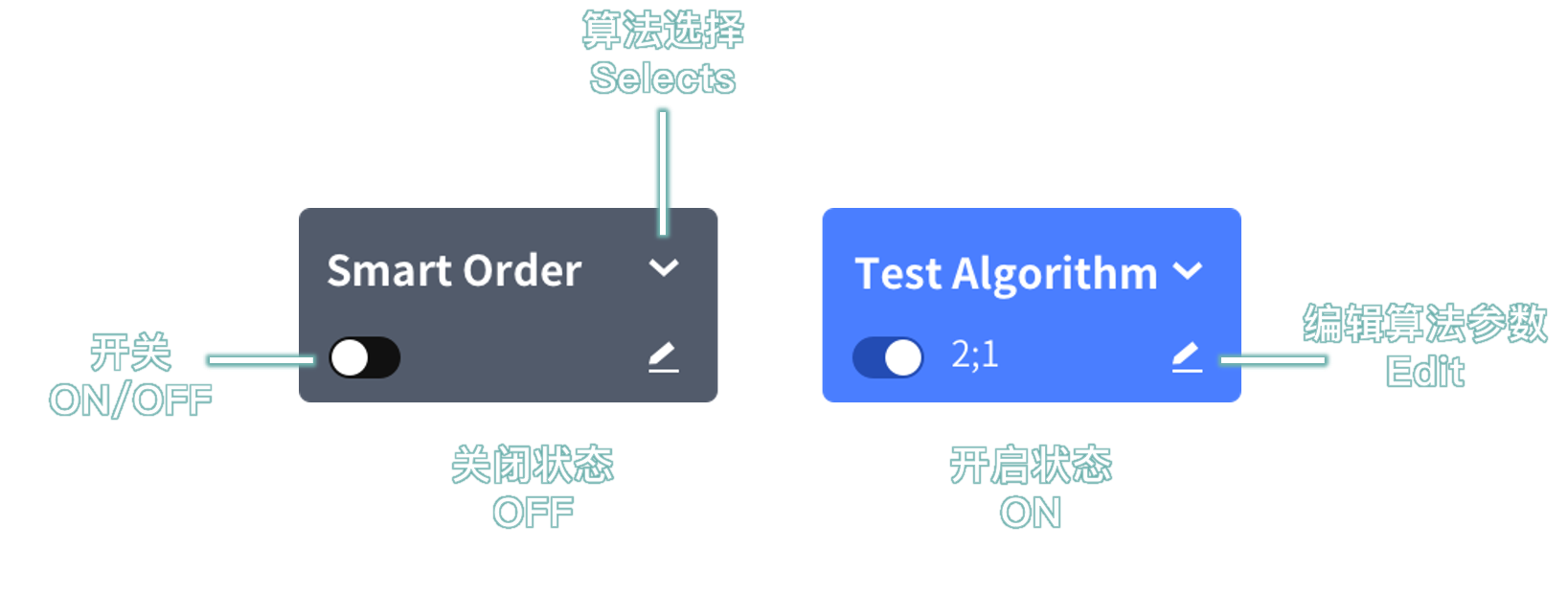
Smart Order 算法单是本地预埋单,主要分为价格算法、时间算法和拆单算法。在下单板设置参数并开启 Smart Order 后下单,即可生成对应算法单。
使用前请注意:
- 算法单委托在本地运行。软件关闭后,算法不会继续执行,也不会自动保存记录;下次打开软件时不会显示历史记录。
- 下单后,可在算法列表 → Smart Order 窗口管理算法单。
- 执行中或已暂停的算法单可手动保存:右键算法单,选择储存为任务下单。
- 也可在 定时管家 窗口设置自动保存。下次导入文件后可继续执行,详见 任务下单说明。
- 执行过程中如出现 错单(如资金不足、不在交易时间等)或 手动撤单,算法将自动终止。
价格算法
价格算法以行情价格作为触发条件。点击功能名称可查看详细说明。
| 功能名称 | 使用场景 | 触发参考价1 | 委托价 |
|---|---|---|---|
| 价格触发 | 行情达到目标后自动委托,算法自动判断触发条件2。 | 自定价格类型3 | 自定价格类型 ± 超价 |
| 大于小于 | 行情达到目标后自动委托,需手动设置触发条件2,适用于盘前场景。 | 自定价格类型3 | 自定价格类型3 ± 超价 |
| 二择一 | 同方向挂出 2 笔不同价格的预埋单;一笔触发后,另一笔自动失效。 | 最新价 | 自定价格 |
| 止盈止损 | 母单每笔成交后,自动生成 2 笔与母单买卖方向相反的二择一子单。 | 最新价 | 母单成交价 ± Tick |
| 两极回调 | 跟随行情自动调价,在行情反弹时委托,力争以更优价格入场。 | 最新价 | 根据行情生成 |
1. 触发参考价:行情满足触发条件时,用于判断触发的价格类型。 ↩
2. 触发条件:>、>=、<、<=,即触发参考价与委托价之间的比较关系。 ↩
3. 价格类型:排队价、最新价、对手价等。 ↩
时间算法
时间算法以时间或交易状态作为触发条件。点击功能名称可查看详细说明。
| 功能名称 | 使用场景 | 特色 | 触发时间 | 委托价格 |
|---|---|---|---|---|
| 开盘抢单 | 开盘前提前设置委托。 | 收到连续交易信号时触发。 | 开盘时间 | 自定价格 |
| 竞价抢单 | 集合竞价前提前设置委托。 | 收到集合竞价信号时触发。 | 集合竞价时间 | 自定价格 |
| 自动抢单 | 合约进入下一个可交易状态时自动委托。 | 自动判断集合竞价或连续交易信号,满足条件时触发。 | 集合竞价或开盘时间 | 自定价格 |
| 时间预约 | 在指定时间委托。 | 由本机时间触发。 | 自定时间 | 自定价格或价格类型 ± 超价 |
| 限时下单 | 设置下单后的有效时长。 | 超过有效时间后自动撤单或追单。 | 自定时长 | 自定价格 |
价格类型:排队价、最新价、对手价等。
拆单算法
拆单算法会将大单拆分为多笔子单,并按不同规则分批委托。点击功能名称可查看详细说明。
| 功能名称 | 使用场景 | 特色 | 单笔数量 | 委托价格 |
|---|---|---|---|---|
| 定时拆单 | 按固定时间间隔发单。 | 定时定量发单,未成交时可选择追单。 | 自定数量 | 自定价格或价格类型 ± 超价 |
| 经典冰山 | 每次只挂出小部分数量,隐藏总委托规模。 | 自定拆分后的单笔数量;当前子单成交后再发送下一笔。 | 自定数量 | 自定价格 |
| 随机冰山 | 每次只挂出小部分数量,隐藏总委托规模。 | 单笔数量在设置范围内随机;当前子单成交后再发送下一笔。 | 自定上下限数量 | 自定价格 |
| 高效冰山 | 每次只挂出小部分数量,隐藏总委托规模。 | 单笔数量跟随对手盘数量变化;当前子单成交后再发送下一笔。 | 自定数量 + 对手盘百分比数量 | 自定价格 |
| 幽灵 | 不提前挂单,尽量隐藏委托意图。 | 委托数量不显示在盘口;当前子单成交后再发送下一笔。 | 自定上限内随机 | 自定价格 |
| TWAP | 在限定时长内完成全部委托,尽量实现时间加权平均成交。 | 自动挂单 + 自动追单 | 自定上下限数量 | 排队价 + 对手价 |
| TWAP(限价) | 在限定时长和限定价格内分散委托。 | 可任选两种模式:按时间间隔发单、按拆分次数发单。 | 自动计算 | 自定价格 |
| VWAP(跟随) | 根据市场成交增量拆单。 | 市场成交量每增加到预期值,就按指定数量发单一次。 | 自定数量 | 对手价 |
| VWAP(限价) | 根据市场成交增量拆单,并限制委托价格。 | 价格满足条件时,市场成交量每增加到预期值,就按指定数量和限定价格发单一次。 | 自定数量 | 自定价格 |
价格类型:排队价、最新价、对手价等。
价格触发 + 拆单算法
价格触发 + 拆单算法会先判断行情价格,只有价格条件满足后,才发送对应拆单算法。点击功能名称可查看详细说明。
| 功能名称 | 使用场景 | 特色 | 单笔数量 | 委托价格 |
|---|---|---|---|---|
| 价格触发(随机冰山) | 行情满足条件后,发送随机冰山算法。 | 算法自动判断触发条件,只展示小部分委托数量。 | 自定上下限数量 | 自定价格 |
| 大于小于(随机冰山) | 行情满足条件后,发送随机冰山算法,适用于盘前无触发参考价的场景。 | 手动设置触发条件,只展示小部分委托数量。 | 自定上下限数量 | 自定价格 |
| 价格触发(TWAP) | 行情满足条件后,发送 TWAP 算法。 | 算法自动判断触发条件,自动挂单 + 自动追单。 | 自定上下限数量 | 排队价 + 对手价 |
| 大于小于(TWAP) | 行情满足条件后,发送 TWAP 算法,适用于盘前无触发参考价的场景。 | 手动设置触发条件,自动挂单 + 自动追单。 | 自定上下限数量 | 排队价 + 对手价 |
触发参考价:行情满足价格条件时,用于判断触发的价格类型。
触发条件:>、>=、<、<=,即触发参考价与委托价之间的比较关系。
Smart Order Algos
This section introduces the applicable scenarios for Smart Order Algos.
Location: Trade Board → Smart Order
Related article: No Code Required: Smart Trading Algos for Beginners
⚠️ Risk Warning: Except for Server Trader, all InfiniTrader Algos run locally and are triggered by market quotes or fill reports. InfiniTrader assumes no liability if an Algo fails to run properly due to network latency, disconnection, software shutdown, or similar reasons.
Overview
Smart Order Algos are locally staged orders, mainly grouped into price-based Algos, time-based Algos, and order-splitting Algos. Set the parameters on the Trade Board, enable Smart Order, and place an order to create the corresponding Algo.
Before using Smart Order Algos, note the following:
- Algos run locally. If the software is closed, they stop running and are not saved automatically. No historical records will be available the next time the software is opened.
- After placing an order, manage the Algo in Algos → Smart Order.
- To save a running or paused Algo manually, right-click the Algo and select Save As Designated Order.
- You can also configure automatic saving in Time Master. Import the file next time to continue execution. For details, see Designated Trader.
- If an Algo encounters a Fail status, such as insufficient funds or orders outside trading hours, or if the order is manually canceled, the Algo ends automatically.
Price-Based Algos
Price-based Algos are triggered by market prices. Click a feature name to view details.
| Feature | Scenario | Trigger Reference Priceen-1 | Order Price |
|---|---|---|---|
| Stop | Automatically places an order when the market quote reaches the target. The Algo determines the trigger conditionen-2 automatically. | Custom Price Typeen-3 | Custom Price Type ± Pay up |
| Above/Below | Automatically places an order when the market quote reaches the target. The trigger conditionen-2 must be set manually. Designed for pre-market use. | Custom Price Typeen-3 | Custom Price Typeen-3 ± Pay up |
| OCO | Places two same-side staged orders at different prices. When one is triggered, the other becomes invalid automatically. | Last | Custom price |
| Bracket | After each parent order is filled, two opposite-side OCO child orders are created automatically. | Last | Parent order fill price ± Tick |
| Gain Best | Adjusts the order price with the market and places the order on a rebound, aiming for a better entry price. | Last | Generated based on market quotes |
en-1. Trigger Reference Price: the price type used to determine whether the market quote meets the trigger condition. ↩
en-2. Trigger Condition: >, >=, <, or <=, comparing the trigger reference price with the order price. ↩
en-3. Price Type: Passive, Last, Aggressive, and others. ↩
Time-Based Algos
Time-based Algos are triggered by time or trading status. Click a feature name to view details.
| Feature | Scenario | Key Feature | Trigger Time | Order Price |
|---|---|---|---|---|
| Grab | Sets an order before the market opens. | Triggered when the continuous trading signal is received. | Market open | Custom price |
| Grab(Auction) | Sets an order before the call auction session. | Triggered when the call auction signal is received. | Call auction time | Custom price |
| Grab(Auto) | Places an order automatically when the contract enters the next tradable state. | Automatically detects the call auction or continuous trading signal and triggers when conditions are met. | Call auction or market open | Custom price |
| Timer | Places an order at a specified time. | Triggered by the local system time. | Custom time | Custom price or Price Type ± Pay up |
| Time Limit | Sets a valid duration after order placement. | When the valid duration expires, the order is canceled or chased automatically. | Custom duration | Custom price |
Price Type: Passive, Last, Aggressive, and others.
Order-Splitting Algos
Order-splitting Algos split a large order into multiple child orders and submit them in batches under different rules. Click a feature name to view details.
Related article: InfiniTrader Order-Splitting Guide
| Feature | Scenario | Key Feature | Single-Order Qty | Order Price |
|---|---|---|---|---|
| Split | Sends orders at fixed time intervals. | Fixed time and fixed quantity. Optional chase if not filled. | Custom quantity | Custom price or Price Type ± Pay up |
| Iceberg Classic | Displays only a small portion of the order each time to hide the total order size. | Uses a custom single-order quantity after splitting. The next order is sent after the current child order is filled. | Custom quantity | Custom price |
| Iceberg Random | Displays only a small portion of the order each time to hide the total order size. | Randomizes the single-order quantity within the configured range. The next order is sent after the current child order is filled. | Custom min/max quantity | Custom price |
| Iceberg Efficiency | Displays only a small portion of the order each time to hide the total order size. | Adjusts the single-order quantity based on the opposite-side book. The next order is sent after the current child order is filled. | Custom quantity + percentage of opposite-side quantity | Custom price |
| Ghost | Does not place orders in advance, helping hide order intent. | The order quantity is not shown in the order book. The next order is sent after the current child order is filled. | Random quantity within a custom upper limit | Custom price |
| TWAP | Completes all orders within a specified duration and aims for a time-weighted average execution price. | Auto order placement + auto chase | Custom min/max quantity | Passive + Aggressive |
| TWAP(Limit) | Spreads orders within a specified duration and price limit. | Select any two modes: send by time interval or send by split count. | Calculated automatically | Custom price |
| VWAP | Splits orders based on incremental market volume. | Sends an order with the specified quantity whenever market volume increases by the expected amount. | Custom quantity | Aggressive |
| VWAP(Limit) | Splits orders based on incremental market volume and limits the order price. | When the price condition is met, sends an order with the specified quantity and limit price whenever market volume increases by the expected amount. | Custom quantity | Custom price |
Price Type: Passive, Last, Aggressive, and others.
Price Trigger + Order-Splitting Algos
Price Trigger + Order-Splitting Algos first check the market price. The corresponding order-splitting Algo is sent only after the price condition is met. Click a feature name to view details.
| Feature | Scenario | Key Feature | Single-Order Qty | Order Price |
|---|---|---|---|---|
| Stop(Iceberg Random) | Sends the Iceberg Random Algo after the market quote meets the condition. | The Algo determines the trigger condition automatically. Only a small portion of the order quantity is displayed. | Custom min/max quantity | Custom price |
| Above/Below(Iceberg Random) | Sends the Iceberg Random Algo after the market quote meets the condition. Used before the market opens when no trigger reference price is available. | The trigger condition is set manually. Only a small portion of the order quantity is displayed. | Custom min/max quantity | Custom price |
| Stop(TWAP) | Sends the TWAP Algo after the market quote meets the condition. | The Algo determines the trigger condition automatically. Auto order placement + auto chase. | Custom min/max quantity | Passive + Aggressive |
| Above/Below(TWAP) | Sends the TWAP Algo after the market quote meets the condition. Used before the market opens when no trigger reference price is available. | The trigger condition is set manually. Auto order placement + auto chase. | Custom min/max quantity | Passive + Aggressive |
Trigger Reference Price: the price type used to determine whether the market quote meets the price condition.
Trigger Condition: >, >=, <, or <=, comparing the trigger reference price with the order price.