交易术语说明
开平仓
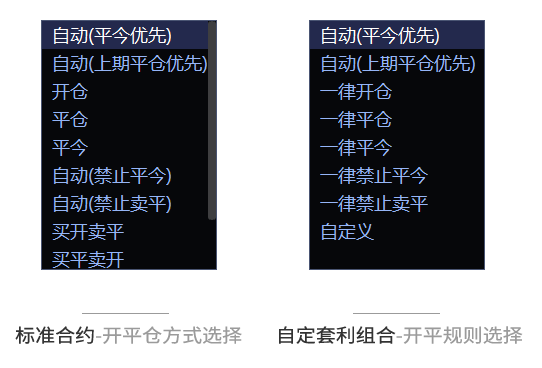
无限易的 开平 选项默认是 自动(平今优先)。
只有 上期所(SHFE) 和 能源中心(INE) 在平仓时支持明确区分 平仓(平昨) 和 平今。其他交易所不能指定先平今仓还是昨仓,统一按 先开先平 处理。
如果登录站点为 CTP 柜台,对于不支持 平今 指令的交易所,即使下的是平今单,CTP 也会自动转换为 平仓 单。
这里的 平仓顺序 只针对持仓类型,不代表交易所实际收取手续费的顺序。
可平量 是当前可用于 平仓 或 平今 的数量,不等于持仓总量。若已有平仓单未成交,这部分数量会先占用可平量。
自动开平
自动(平今优先)、自动(上期平仓优先)
先平后开。有 可平量 时优先平仓;没有可平量时自动开仓。
仅在 上期所(SHFE) 和 能源中心(INE) 同时存在今仓和昨仓时,这两种模式才有区别:
- 自动(平今优先):先平今仓
- 自动(上期平仓优先):先平昨仓
自动(禁止平今)
如果检测到有今仓,则只允许开仓;没有今仓时,先平后开。
在 上期所(SHFE) 和 能源中心(INE) 同时存在今仓和昨仓可平量时,系统会 先平昨,再开仓。
自动(禁止卖平)
正常情况下先平后开;如果有多头持仓且执行卖出操作,则自动转为 卖出开仓。
自动(平今 + 平仓)、自动(平仓 + 平今)
只平不开。如果委托数量超过 可平量,系统会自动调整为可平数量。
仅在 上期所(SHFE) 和 能源中心(INE) 同时存在今仓和昨仓时,两者才有区别:
- 自动(平今 + 平仓):先平今仓
- 自动(平仓 + 平今):先平昨仓
如果 可平量为 0:
- 普通委托不会发单,并弹窗提示
- 策略单会直接终止
指定开平
开仓
只执行开仓。
平仓
只执行平仓。
在 上期所(SHFE) 和 能源中心(INE),该选项只平昨仓。
平今
只执行平今。
只有 上期所(SHFE) 和 能源中心(INE) 支持 平今 指令,其他交易所无效。
指定方向开平
买开卖平
买入时固定开仓,卖出时固定平仓。
买平卖开
买入时固定平仓,卖出时固定开仓。
以上两种模式在平仓时,上期所(SHFE) 和 能源中心(INE) 都只平昨仓。
买开卖平今
买入时固定开仓,卖出时固定平今。
买平今卖开
买入时固定平今,卖出时固定开仓。
以上两种模式只有 上期所(SHFE) 和 能源中心(INE) 支持,其他交易所无效。
平仓常见问题
如果持仓存在,但平仓被拒并提示 平仓时持仓数量不足,常见原因有两类:
- 选错了 平仓 / 平今 指令
- 可平量已被其他未成交的平仓单占用
平仓占用 也叫 平仓冻结。
例如:某合约持有多单 2 手,已报入 卖出平仓 2 手 且尚未成交,那么这 2 手可平量会被占满。此时如果再以自动开平模式卖出 1 手,该笔委托会被识别为 卖出开仓。
可平量可在 实时持仓 窗口查看。
时态
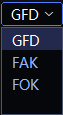
GFD(Good for Day)
当日有效。普通委托默认使用 GFD。
FAK(Fill and Kill)
部分成交、剩余撤销。若报单手数只能部分成交,则已成交部分保留,未成交部分立即撤单。
上交所(SSE) 和 深交所(SZSE) 不支持 FAK。
FOK(Fill or Kill)
全部成交或全部撤销。若不能一次性全部成交,则整笔立即撤单。
郑商所(CZCE) 不支持 FOK。
注意:
FAK、FOK 指令会被计入 交易所异常撤单次数,请留意不要超限。
GIS(Good in Session)
仅在当前交易小结内有效,过期后自动撤销。
只支持 大商所(DCE)合约,且 不支持标准套利。
推文:休盘即撤单?大商所 GIS 指令有了,其他交易所怎么办?
价格类型
最新价:市场最新一笔成交价。
对手价:对手方最优价。
排队价:本方最优价。
市价:交易所定义的市价指令。不同交易所支持方式不同,详见后文“市价”。
账户类型
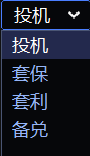
投机
默认账户属性。一般情况下保持默认即可。
套保
套保账户属性。需由机构向经纪商申请,申请成功后才能选择 套保 下单。
套利
仅用于 中金所(CFFEX)。需向经纪商申请,在普通持仓限额之外,增加经批准的套利持仓空间。不是指下套利单。
备兑
仅用于 上交所(SSE) 和 深交所(SZSE)。卖出开仓认购期权时,可使用标的物充抵保证金。
详见 股票期权备兑开仓。
超价
超价 是按合约最小变动价位 Tick 加减后的委托偏移量,不是一个固定价格。
例如:股指期货 IC 的 1 Tick = 0.2。
- 买入时:在原价格基础上 + n Tick
- 卖出时:在原价格基础上 - n Tick
追单时,以 追单超价 为参考。
部分下单板支持按 对手价 / 最新价 / 排队价 + 超价 的方式委托。
操作按钮


平净仓
按净持仓方向进行平仓,使多头持仓与空头持仓数量相同。执行前会先撤销全部挂单。
是否先撤单、如何平仓,可在 系统 → 交易设置 中配置。
例如:当前持有多单 5 手、空单 7 手,执行后将变为 多单 5 手、空单 5 手。
锁净仓
通过开仓对锁,使多头持仓与空头持仓数量相同。执行前也会先撤销全部挂单。
例如:当前持有多单 5 手、空单 7 手,执行后将变为 多单 7 手、空单 7 手。
注:锁净仓 的示例截图来自 交易设置 → 快捷键。该功能需要先设置快捷键,再通过快捷键执行。

锁仓
按对手价建立一笔与当前仓位数量相同、方向相反的新仓位。
反手
先将当前仓位 平净仓,再按对手价开出一笔 数量相同、方向相反 的新仓位。
平仓规则可在 系统 → 交易设置 中配置。
行权
对期权合约执行行权指令。
自对冲
用于期权结算业务。详见 期权行权与自对冲。
盈亏计算
持仓均价
由 昨结算价(对应昨仓)和 开仓价(对应今仓)共同计算出的持仓均价。
开仓均价
仅根据开仓成交价计算的均价。
持仓盈亏
按逐日盯市口径计算,即 持仓均价 vs 最新价 得出的当日盈亏。
浮动盈亏
按逐笔对冲口径计算,即 开仓均价 vs 最新价 得出的历史盈亏。
平仓盈亏
按逐日盯市口径计算:
- 昨仓部分:结算价 vs 平仓价
- 今仓部分:开仓价 vs 平仓价
平仓盈亏(逐笔)
按逐笔对冲口径计算,即 开仓价 vs 平仓价 得出的历史盈亏。
市价
无限易在 快捷下单、四键下单、任务下单 等支持选择 价格类型 的下单窗口中,可委托市价单。
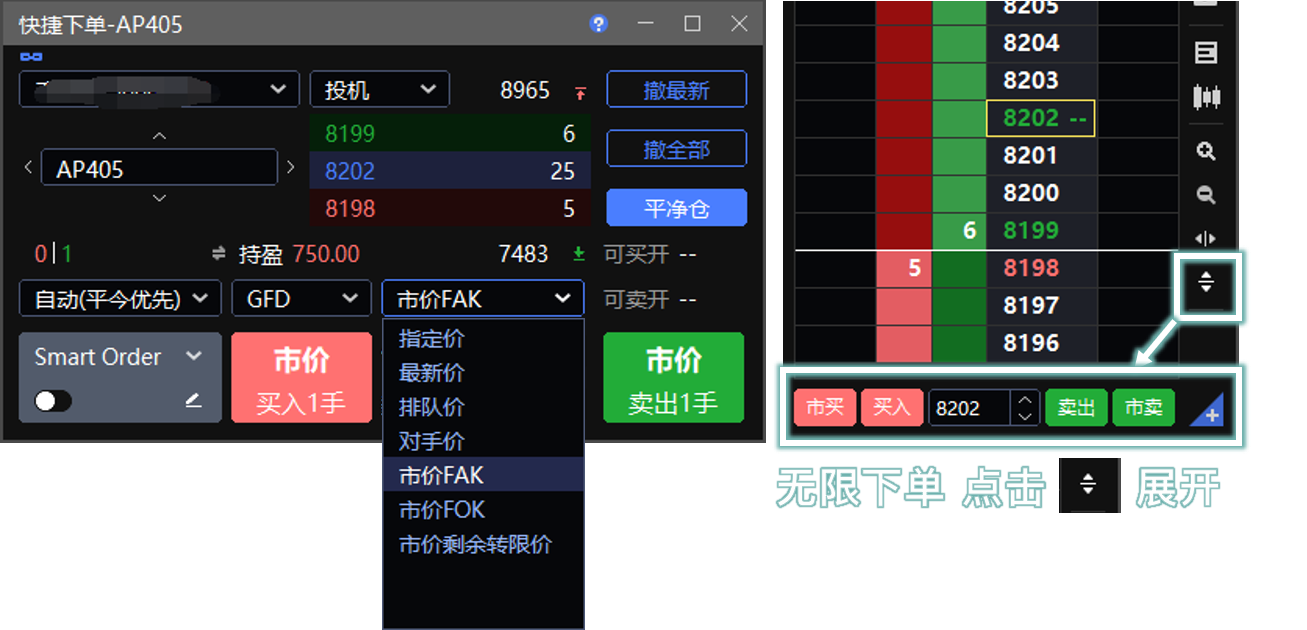
- 无限下单 窗口中的 市买、市卖 按钮,使用的都是 市价 FAK
大商所(DCE)与广期所(GFEX)
市价指令会按 涨跌停板价格 参与交易。
DCE、GFEX 的 期权合约 不支持市价。
| 无限易价格类型 | 交易所指令 | 指令含义 | 集合竞价申报 |
|---|---|---|---|
| 市价 FAK | FAK 属性市价指令 | 不能立即全部成交时,剩余部分撤单 | X |
| 市价 FOK | FOK 属性市价指令 | 不能立即全部成交时,整笔撤单 | X |
| 市价剩余转限价 | 无属性市价指令 | 不能立即全部成交时,剩余部分转为限价单 | ✓ |
郑商所(CZCE)
按当时市场上可成交的最优报价成交。
| 无限易价格类型 | 交易所指令 | 指令含义 | 集合竞价申报 |
|---|---|---|---|
| 市价 FAK | FAK 属性市价指令 | 不能立即全部成交时,剩余部分撤单 | X |
| 市价 FOK | 不支持 | - | - |
| 市价剩余转限价 | 无属性市价指令 | 不能立即全部成交时,剩余部分撤单 | X |
中金所(CFFEX)
无限易这里使用的是中金所 最优一档市价指令,即不限定价格,以对手方实时最优一档价格成交。
中金所(CFFEX)期权 和 远期季月合约 不支持市价。
| 无限易价格类型 | 交易所指令 | 指令含义 | 集合竞价申报 |
|---|---|---|---|
| 市价 FAK | 最优一档即时成交剩余撤销 | 不能立即全部成交时,剩余部分撤单 | X |
| 市价 FOK | 不支持 | - | - |
| 市价剩余转限价 | 最优一档即时成交剩余转限价 | 不能立即全部成交时,剩余部分按 最新价 转限价;无最新价时用上一交易日结算价 | X |
上期所(SHFE)/ 能源中心(INE)
自 2026 年 7 月 6 日 起,上期所(SHFE) 和 能源中心(INE) 支持市价指令。
市价申报时,价格输入框需填写 市价保护价:
买入时填写可接受的最高价
卖出时填写可接受的最低价
成交价和转限价后的申报价都不会突破这个保护价
| 无限易价格类型 | 交易所指令 | 指令含义 | 集合竞价申报 |
|---|---|---|---|
| 市价 FAK | FAK 属性市价指令 | 不能立即全部成交时,剩余部分撤单 | X |
| 市价 FOK | FOK 属性市价指令 | 不能立即全部成交时,全部撤单 | X |
| 市价剩余转限价 | 无属性市价指令 | 不能立即全部成交时,剩余部分转为限价单,申报价格不突破市价保护价 | X |
上交所(SSE)期权
按市场可执行的最优价格成交。
| 无限易价格类型 | 交易所指令 | 指令含义 | 集合竞价申报 |
|---|---|---|---|
| 市价 FAK | 市价剩余撤销 | 不能立即全部成交时,剩余部分撤单 | X |
| 市价 FOK | 全额即时市价 | 不能立即全部成交时,整笔撤单 | X |
| 市价剩余转限价 | 市价剩余转限价 | 不能立即全部成交时,剩余部分按 最新价 转限价;无最新价时用 排队价;仍无价格则撤单 | X |
补充说明:
- 若 市价 FOK 全部成交会触发期权熔断标准,则该申报为无效申报。
- 若期权交易已触发熔断并进入集合竞价,则未成交剩余部分按 本方申报最新成交价格 转为限价申报并进入集合竞价。
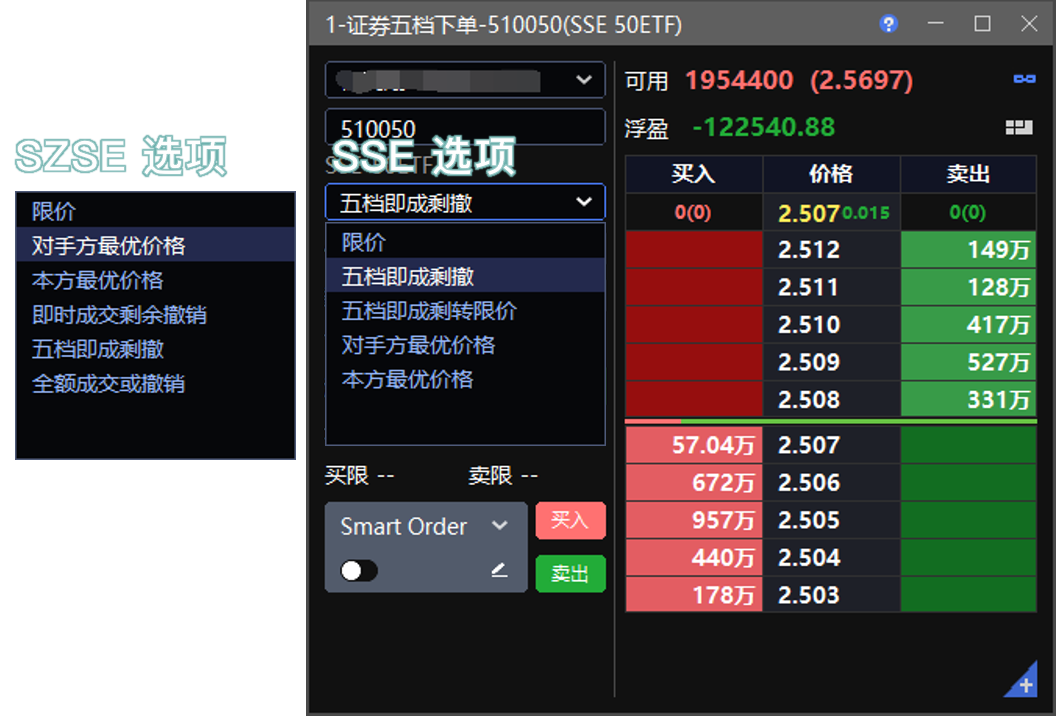
上交所(SSE)证券
证券市价申报时,价格输入框需填写 市价保护价:
- 买入时填写可接受的最高价
- 卖出时填写可接受的最低价
成交价和转限价后的申报价都不会突破这个保护价。
| 无限易价格类型 | 交易所指令 | 指令含义 | 集合竞价申报 |
|---|---|---|---|
| 五档即成剩撤 | 最优五档即时成交剩余撤销 | 按对手方最优五个价位依次成交,剩余部分撤单 | X |
| 五档即成剩转限价 | 最优五档即时成交剩余转限价 | 按对手方最优五个价位依次成交,剩余部分按 本方申报最新成交价 转限价;无成交价则用排队价;仍无价格则撤单 | X |
| 对手方最优价格 | 对手方最优价格 | 以对手价申报;无对手价则挂单 | X |
| 本方最优价格 | 本方最优价格 | 以排队价申报;无排队价则挂单 | X |
深交所(SZSE)证券
市价申报仅适用于 有涨跌幅限制 的证券。
| 无限易价格类型 | 交易所指令 | 指令含义 | 集合竞价申报 |
|---|---|---|---|
| 对手方最优价格 | 对手方最优价格 | 以对手价申报;无对手价则挂单 | X |
| 本方最优价格 | 本方最优价格 | 以排队价申报;无排队价则挂单 | X |
| 即时成交剩余撤销 | 即时成交剩余撤销 | 以对手价成交,剩余部分撤单 | X |
| 五档即成剩撤 | 最优五档即时成交剩余撤销 | 按对手方最优五个价位依次成交,剩余部分撤单 | X |
| 全部成交或撤销 | 全部成交或撤销 | 以对手价成交;不能立即全部成交时,整笔撤单 | X |
Trading Terms Explained
Open/Close
In InfiniTrader, the default O/C mode is Auto(DayTrade First).
Only SHFE and INE let you explicitly choose between Close (close yesterday's position) and Close Today when closing a position. Other exchanges do not support choosing the close sequence for today's and yesterday's positions. They are handled on a first-open, first-close basis.
When you log in through a CTP gateway, a Close Today order on an exchange that does not support this instruction is converted by CTP into a Close order.
The close sequence described here applies only to position type. It does not represent the order in which exchange fees are charged.
Closable Qty is the quantity currently available for Close or Close Today. It is not the same as the total position quantity. Unfilled closing orders occupy the available closable quantity.
Auto Modes
Auto(DayTrade First) and Auto(SHFE Close First)
These modes always try to close first. If no closable quantity is available, the order is opened automatically.
Only on SHFE and INE, when both today's and yesterday's positions exist:
- Auto(DayTrade First) closes today's position first
- Auto(SHFE Close First) closes yesterday's position first
Auto(Avoid DayTrade)
If the system detects a today's position, it opens only. If there is no today's position, it closes first and then opens.
On SHFE and INE, if both today's and yesterday's positions are closable, the system closes yesterday's position first and then opens a new position.
Auto(Avoid Sell Close)
This mode normally closes first and then opens. If a long position exists and you place a sell order, the order is converted to Sell Open automatically.
Auto(Close Today + Close) and Auto(Close + Close Today)
These modes close only and never open a new position. If the order quantity exceeds the available closable quantity, the system automatically reduces it to the closable quantity.
Only on SHFE and INE, when both today's and yesterday's positions exist:
- Auto(Close Today + Close) closes today's position first
- Auto(Close + Close Today) closes yesterday's position first
If the closable quantity is 0:
- a regular order is not sent and a pop-up warning appears
- a strategy order is terminated
Fixed Open/Close Modes
Open
Places an opening order only.
Close
Places a closing order only.
On SHFE and INE, Close closes yesterday's position only.
Close Today
Closes today's position only.
Only SHFE and INE support Close Today. It is invalid on other exchanges.
Fixed Direction Modes
Buy Open Sell Close
Buy orders always open. Sell orders always close.
Buy Close Sell Open
Buy orders always close. Sell orders always open.
In these two modes, closing on SHFE and INE always closes yesterday's position only.
Buy Open Sell Close Today
Buy orders always open. Sell orders always close today's position.
Buy Close Today Sell Open
Buy orders always close today's position. Sell orders always open.
These two modes are supported only on SHFE and INE.
Common Closing Issue
If a position exists but the close order is rejected with a message indicating insufficient position quantity for closing, the usual reasons are:
- the wrong Close / Close Today instruction was selected
- the closable quantity is already occupied by another unfilled closing order
Close occupancy, also called close freeze, means the closable quantity is temporarily locked by pending closing orders.
Example: if you hold 2 long lots and have already submitted a Sell Close order for 2 lots that has not yet traded, all 2 lots of closable quantity are occupied. If you then sell 1 more lot in an automatic O/C mode, the system treats that order as Sell Open.
You can view the available closable quantity in the Position window.
TIF
GFD (Good for Day)
The order remains valid for the trading day. This is the default TIF for regular orders.
FAK (Fill and Kill)
The order can be partially filled, and any unfilled portion is canceled immediately.
SSE and SZSE do not support FAK.
FOK (Fill or Kill)
The order must be filled in full immediately, or it is canceled entirely.
CZCE does not support FOK.
Notes:
FAK and FOK orders are counted toward the exchange's abnormal cancellation count. Make sure you do not exceed the limit.
GIS (Good in Session)
The order remains valid for the current trading session summary and is canceled automatically when it expires.
It is supported only for DCE contracts and is not supported for standard spread trading.
Article: DCE GIS Orders and Session-End Cancellation
Price Type
Last: the latest traded price in the market.
Aggressive: the opposite-side best price.
Passive: the same-side best price.
Market: the exchange-defined market order instruction. Support rules vary by exchange.
Account Type
Speculation
The default account type. In most cases, keep this setting unchanged.
Hedge
This account type must be approved by the broker before it can be used.
Arbitrage
Used only for CFFEX. This account type requires broker approval and adds approved arbitrage position capacity beyond the regular position limit. It does not mean placing a spread order.
Covered
Used only for SSE and SZSE. When selling to open a call option, the underlying asset can be used as margin collateral.
See Covered Call Opening for Stock Options.
Pay up
Pay up is an offset in ticks from the base price, not a fixed price value.
For example, in stock index futures IC, 1 Tick = 0.2.
- For a buy order, the system places the order at the base price plus
nticks. - For a sell order, the system places the order at the base price minus
nticks.
For chase orders, Pay up follows the chase setting.
Some order panels support placing orders based on Aggressive / Last / Passive + Pay up.
Action Buttons
Close Net
Closes positions based on the net position so that long and short positions become equal. All working orders are canceled before execution.
The close behavior can be configured in Systems → Settings.
Example: if you hold 5 long lots and 7 short lots, after Close Net you will hold 5 long lots and 5 short lots.
Lock Position
Opens offsetting positions so that long and short positions become equal. All working orders are canceled before execution.
Example: if you hold 5 long lots and 7 short lots, after Lock Position you will hold 7 long lots and 7 short lots.
Note: the Lock Position example image comes from Settings → Shortcut Key. You must assign the shortcut first and then trigger the function with that shortcut.
Lock
Opens a new position at the Aggressive price with the same quantity as the current position but in the opposite direction.
Reverse
Closes the current net position first, then opens a new position of the same quantity in the opposite direction at the Aggressive price.
The close rule can be configured in Systems → Settings.
Exercise
Submits an exercise instruction for an option contract.
Offset
Used for option settlement processing. See Option Exercise and Offset.
P/L Calculation
Position Average Price
The average position price calculated from yesterday's settlement price for overnight positions and the open price for today's positions.
Average Open Price
The average price calculated only from opening trades.
MTM P/L
Daily mark-to-market profit and loss, calculated from Position Average Price vs Last.
Accum. P/L
Historical floating profit and loss based on per-trade matching, calculated from Average Open Price vs Last.
Realized P/L
Daily realized profit and loss based on mark-to-market rules:
- yesterday's position: settlement price vs close price
- today's position: open price vs close price
Realized P/L (per-trade matching)
Historical realized profit and loss based on open price vs close price under per-trade matching.
Market Orders
InfiniTrader supports market-order placement in order windows that let you choose a Price Type, including Easy Trader, Classic Trader, and Designated Trader.
- In the InfiniTrader order window, the Market Buy and Market Sell buttons use Market FAK
DCE and GFEX
These market orders participate in trading at the daily limit-up or limit-down price.
Options on DCE and GFEX do not support market orders.
| Price Type in InfiniTrader | Exchange Instruction | Meaning | Call Auction |
|---|---|---|---|
| Market FAK | Market order with FAK attribute | If not fully filled immediately, the remaining quantity is canceled | X |
| Market FOK | Market order with FOK attribute | If not fully filled immediately, the entire order is canceled | X |
| Market to Limit | Market order without special attribute | If not fully filled immediately, the remaining quantity becomes a limit order | ✓ |
CZCE
These orders trade at the best executable quote available at that time.
| Price Type in InfiniTrader | Exchange Instruction | Meaning | Call Auction |
|---|---|---|---|
| Market FAK | Market order with FAK attribute | If not fully filled immediately, the remaining quantity is canceled | X |
| Market FOK | Not supported | - | - |
| Market to Limit | Market order without special attribute | If not fully filled immediately, the remaining quantity is canceled | X |
CFFEX
InfiniTrader uses the CFFEX best-level market order, which does not specify a price and trades at the real-time best opposite-side quote.
Options and far-quarter contracts on CFFEX do not support market orders.
| Price Type in InfiniTrader | Exchange Instruction | Meaning | Call Auction |
|---|---|---|---|
| Market FAK | Best-level immediate execution, cancel the remainder | If not fully filled immediately, the remaining quantity is canceled | X |
| Market FOK | Not supported | - | - |
| Market to Limit | Best-level immediate execution, convert the remainder to a limit order | If not fully filled immediately, the remainder becomes a limit order at Last; if no last price is available, yesterday's settlement price is used | X |
SHFE / INE
Starting from July 6, 2026, SHFE and INE support market-order instructions.
When placing a market order, you must enter a market protection price in the price field:
- for buys, the highest acceptable price
- for sells, the lowest acceptable price
- neither the trade price nor the converted limit price will exceed this protection price
| Price Type in InfiniTrader | Exchange Instruction | Meaning | Call Auction |
|---|---|---|---|
| Market FAK | Market order with FAK attribute | If not fully filled immediately, the remaining quantity is canceled | X |
| Market FOK | Market order with FOK attribute | If not fully filled immediately, the entire order is canceled | X |
| Market to Limit | Market order without special attribute | If not fully filled immediately, the remaining quantity becomes a limit order, and the order price will not exceed the market protection price | X |
SSE Options
These orders trade at the best executable market price.
| Price Type in InfiniTrader | Exchange Instruction | Meaning | Call Auction |
|---|---|---|---|
| Market FAK | Cancel the remaining quantity of a market order | If not fully filled immediately, the remaining quantity is canceled | X |
| Market FOK | Full-size immediate market order | If not fully filled immediately, the entire order is canceled | X |
| Market to Limit | Market-to-limit order | If not fully filled immediately, the remainder becomes a limit order at Last; if no last price is available, Passive is used; if neither is available, the remainder is canceled | X |
Additional notes:
- If a fully filled Market FOK order would trigger the option circuit-breaker threshold, the order is invalid.
- If option trading has already entered call auction because of a circuit breaker, the remaining unfilled quantity is converted into a limit order at the latest executed price of the same-side order and enters the call auction.
SSE Securities
When using market orders for securities, you must enter a market protection price in the price field:
- for buys, the highest acceptable price
- for sells, the lowest acceptable price
Neither the trade price nor the converted limit price will exceed this protection price.
| Price Type in InfiniTrader | Exchange Instruction | Meaning | Call Auction |
|---|---|---|---|
| Five-Level IOC | Immediate execution against up to the best five opposite-side price levels, cancel the remainder | The order trades through the best five opposite-side price levels in sequence, and the remainder is canceled | X |
| Five-Level GFD | Immediate execution against up to the best five opposite-side price levels, convert the remainder to a limit order | The order trades through the best five opposite-side price levels in sequence, and the remainder becomes a limit order at the latest executed price of the same-side order; if unavailable, Passive is used; if still unavailable, the order is canceled | X |
| Opposite-Side Best Price | Opposite-side best price | The order is submitted at the opposite-side best price; if no quote is available, it waits in the book | X |
| Same-Side Best Price | Same-side best price | The order is submitted at the same-side best price; if no quote is available, it waits in the book | X |
SZSE Securities
Market orders apply only to securities with daily price limits.
| Price Type in InfiniTrader | Exchange Instruction | Meaning | Call Auction |
|---|---|---|---|
| Opposite-Side Best Price | Opposite-side best price | The order is submitted at the opposite-side best price; if no quote is available, it waits in the book | X |
| Same-Side Best Price | Same-side best price | The order is submitted at the same-side best price; if no quote is available, it waits in the book | X |
| Immediate-or-Cancel at Best Price | Immediate execution, cancel the remainder | The order trades at the opposite-side price and cancels any remaining quantity | X |
| Five-Level IOC | Immediate execution against up to the best five opposite-side price levels, cancel the remainder | The order trades through the best five opposite-side price levels in sequence, and the remainder is canceled | X |
| Fill or Kill | Fill or kill | The order trades at the opposite-side price. If it cannot be fully filled immediately, the entire order is canceled | X |