价值下单 Value Trader
价值下单按照合约价值自动估算下单数量,并通过对手价模式快速委托。
位置:菜单 → 交易 → 价值下单
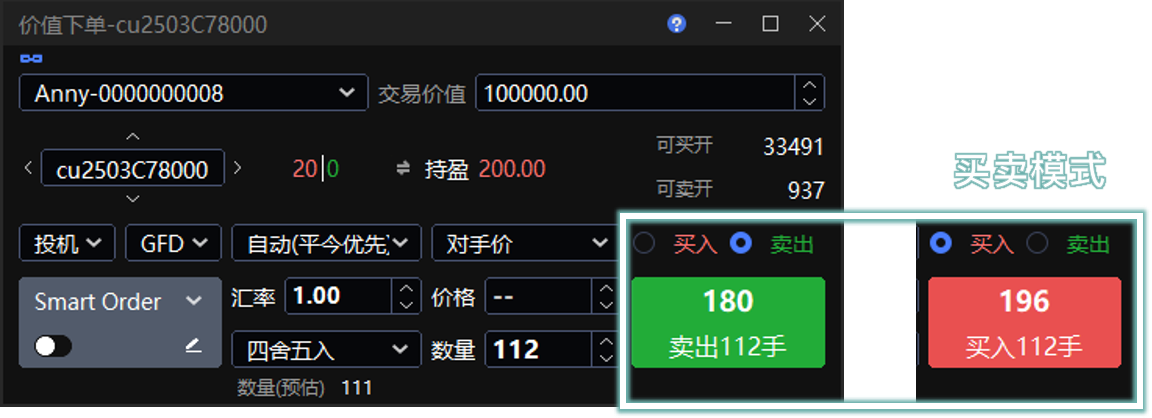
价值计算
输入 交易价值、汇率 和 计算方式 后,系统会根据当前合约价格计算 数量(预估)。
数量(预估):满足当前 交易价值 的预估合约数量。点击该数字,可快速带入为下单数量。
计算方式:当 数量(预估) 的计算结果包含小数时,用于确定取整规则。支持 向上取整、四舍五入、向下取整。
买卖模式
下单板价格默认使用 对手价。对手价是指按对手方最优报价下单,用于更快成交。
选择 买入 时,使用卖价买入。
选择 卖出 时,使用买价卖出。
若在委托方式的 委托价格类型 中选择了其他价格类型,则以下单板实际选择的价格类型为准。
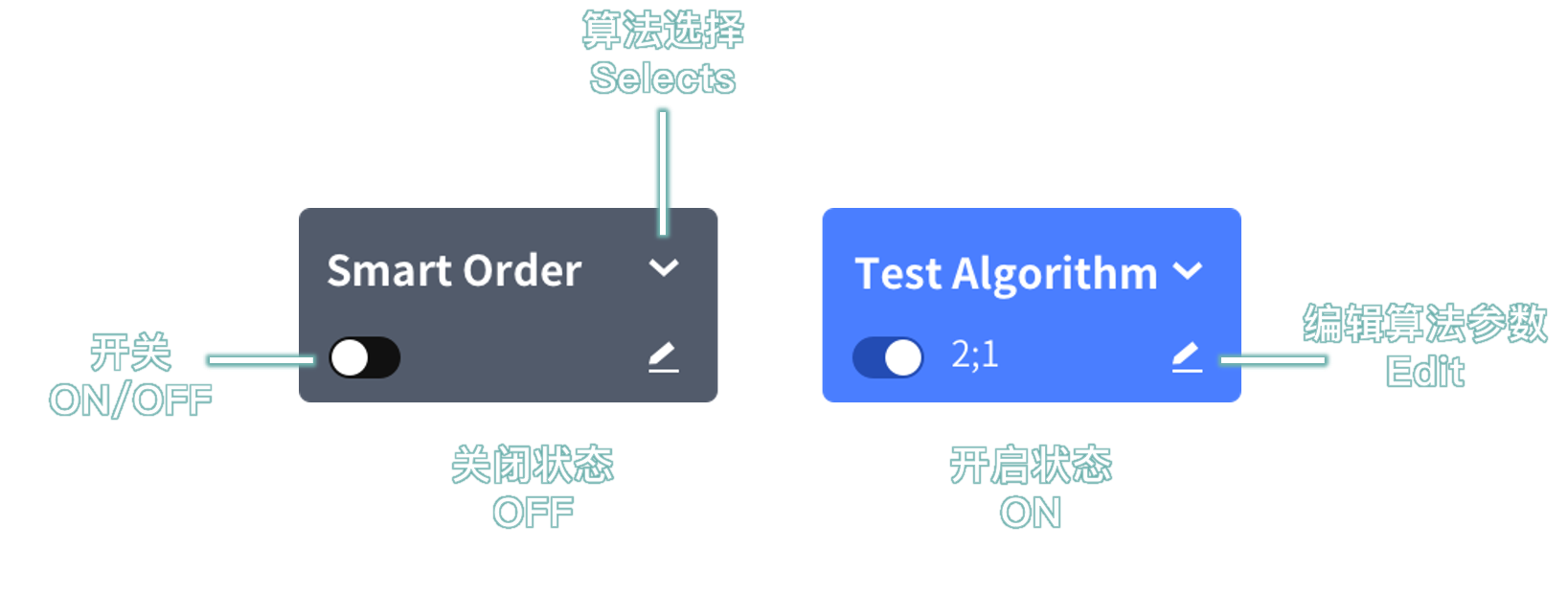
Smart Order(算法单)
Smart Order 算法单均为本地预埋单,大致分为 价格算法、时间算法、拆单算法。
在下单板设置并开启 Smart Order 后下单,即可生成算法单。详见 Smart Order 算法单合集 。
参数说明
| 参数 | 说明 |
|---|---|
| 投资者账号 | 可切换账号或账号组。 |
| 投机套保 | 账户属性。套保账户需向经纪商申请,普通账户默认均为投机。 |
| 开平仓方式 | 默认自动(平今优先)。有可平仓额度时,反方向交易即为平仓,系统会先平再开。详见 交易术语解释 。 |
| 限价形态 | 默认 GFD,可切换为 GFD、FAK、FOK。详见 交易术语解释 。 |
| 委托价格类型 | 默认 对手价,支持 指定价、最新价、排队价、对手价、市价 FAK、市价 FOK、市价剩余转限价。 |
| 互换 | 选择标准套利合约时显示。勾选后,组合内合约变为一开一平,可用于移仓操作。 |
委托价格类型
- 选择 指定价 时,在价格输入框输入下单价格。
- 选择 市价 FAK、市价 FOK、市价剩余转限价 时,一般无需输入价格;若交易所为 上期所(SHFE) 或 能源中心(INE),则需在价格输入框输入 市价保护价。买入时成交价不会高于此价,卖出时成交价不会低于此价。
互换
如果下单板选择 买 + 开仓,则组合的前序合约买开、后序合约卖平。例如:SP c2309&c2311,c2309 买开、c2311 卖平。
如果下单板选择 卖 + 平仓,则组合的前序合约卖平、后序合约买开。例如:SP c2309&c2311,c2309 卖平、c2311 买开。
Value Trader
Value Trader estimates the order quantity by contract value and places orders quickly using Aggressive pricing, which means the opposite-side best quote used for immediate execution.
Path: Menu → Trade → Value Trader
Value Calculation
Enter Investment, FX, and the calculation method. The system calculates Vol(Predict) based on the current contract price.
Vol(Predict): the estimated contract quantity that matches the current Investment. Click the number to fill it as the order quantity.
Calculation method: defines how decimals are handled when the Vol(Predict) result contains a fractional value. Supports Round up, Round off, and Round down.
Buy / Sell Mode
The order panel uses Aggressive as the default price type.
Select Buy to buy at the ask price.
Select Sell to sell at the bid price.
If another option is selected under Price Type, the order panel uses the selected price type.
Smart Order
Smart Orders are local preset algo orders. They are generally grouped into price-based algos, time-based algos, and split-order algos.
Configure and enable Smart Order on the order panel, then place the order to create an algo order. See Smart Order Algo Collection .
Parameters
| Parameter | Description |
|---|---|
| Investor | Switch between an account and an account group. |
| Speculation / Hedge | Account attribute. Hedge accounts must be requested from the broker. Regular accounts use speculation by default. |
| Open / Close | The default is Auto (Close Today First). If closable positions are available, an opposite-side trade closes positions first, then opens any remaining quantity. See Trading Terms Explained . |
| Limit Type | The default is GFD. You can switch to GFD, FAK, or FOK. See Trading Terms Explained . |
| Price Type | The default is Aggressive. Supports Limit, Last, Passive, Aggressive, MarketFAK, MarketFOK, and MarketGFD. |
| Swap | Displayed when a standard spread contract is selected. When selected, the legs in the spread become one opening leg and one closing leg, which can be used for position rolling. |
Price Type
- Select Limit and enter the order price in the price field.
- Select MarketFAK, MarketFOK, or MarketGFD and no price is usually required. For SHFE or INE, enter the market protection price in the price field. A buy order will not trade above this price, and a sell order will not trade below this price.
Swap
If the order panel is set to Buy + Open, the front leg is bought to open and the back leg is sold to close. Example: SP c2309&c2311, c2309 buy open and c2311 sell close.
If the order panel is set to Sell + Close, the front leg is sold to close and the back leg is bought to open. Example: SP c2309&c2311, c2309 sell close and c2311 buy open.