魔方下单
魔方下单 是一种用于多合约快速交易的下单方式。
位置:菜单 → 交易 → 魔方下单
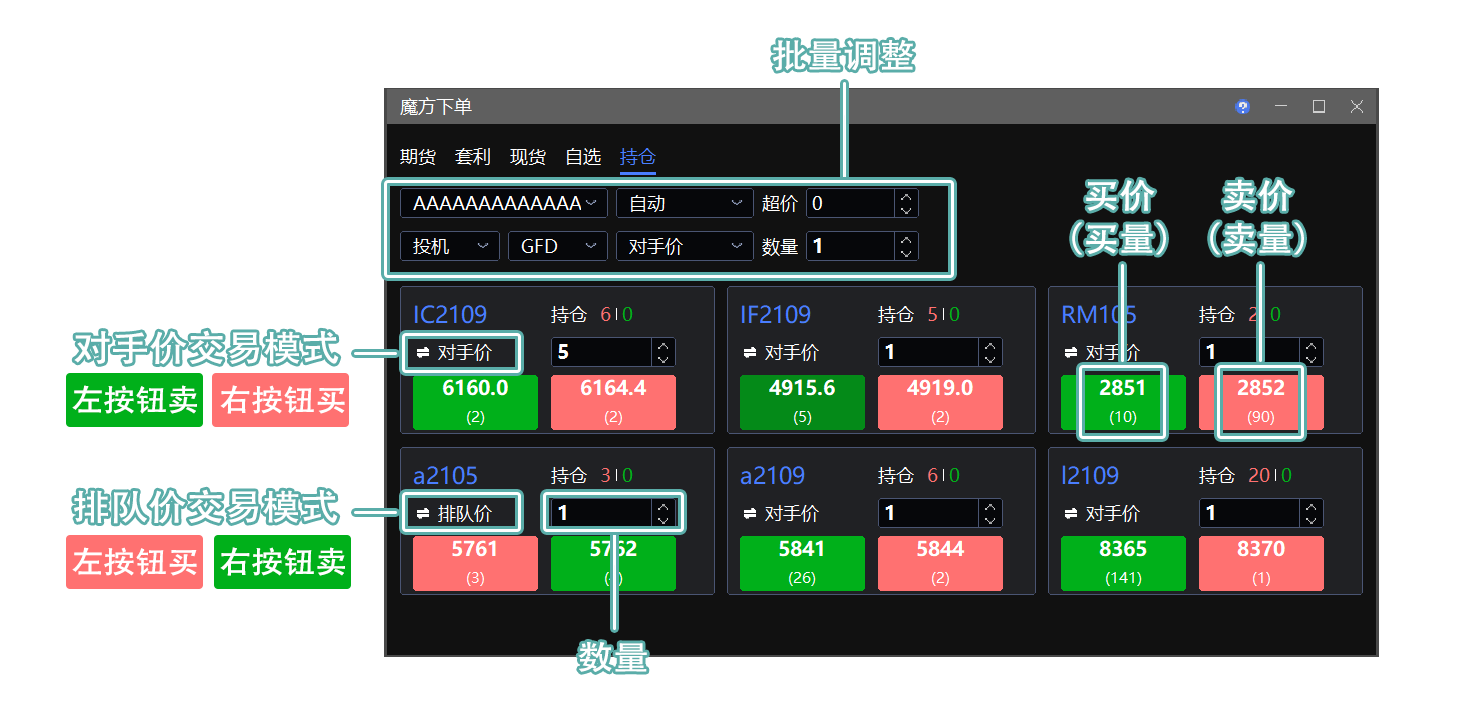
魔方下单会根据已选条件展示不同合约,您可直接在下单板中交易。
下单板 左侧按钮 显示 买价(买量)。
下单板 右侧按钮 显示 卖价(卖量)。
点击 红色按钮 为买入;点击 绿色按钮 为卖出。
交易模式
点击 对手价 或 排队价 切换交易模式。
| 模式 | 操作说明 |
|---|---|
| 对手价(Taker) | 点击左侧按钮,按 买价卖出;点击右侧按钮,按 卖价买入。 |
| 排队价(Maker) | 点击左侧按钮,按 买价买入;点击右侧按钮,按 卖价卖出。 |
参数说明
投资者账号:可切换账号或账号组。
投机套保:用于选择账户属性。套保账户需向经纪商申请;普通账户默认使用投机属性。
开平仓方式:默认 自动(平今优先)。在存在可平仓额度时,进行反方向交易即为平仓;系统将先平仓,再开仓。详见 交易术语解释。
⚠️ 上期所/能源中心标准套利限制:在本下单板中,仅支持双开、双平、双投机和双套保;不支持两腿独立设置。请勿使用自动开平模式。
限价形态:默认 GFD,可在下拉列表中切换为 GFD、FAK 或 FOK。详见 交易术语解释。
⚠️ 郑商所(CZCE)不支持 FOK;提交该类型委托将报错。
Cube Trader
Cube Trader provides a quick way to trade multiple instruments.
Path: Menu → Trade → Cube Trader
Cube Trader displays the instruments that match the selected criteria. Trade them directly from the Trade Board.
The left button on the Trade Board shows the bid price (bid volume).
The right button on the Trade Board shows the ask price (ask volume).
Click the red button to buy, or the green button to sell.
Trading Modes
Click Taker or Maker to switch modes.
| Mode | Action |
|---|---|
| Taker | Click the left button to sell at the bid price; click the right button to buy at the ask price. |
| Maker | Click the left button to buy at the bid price; click the right button to sell at the ask price. |
Parameters
Investor Account: Switch between accounts or account groups.
Speculation/Hedge: Selects the account attribute. Hedge accounts require approval from your broker; regular accounts use the speculation attribute by default.
Open/Close Mode: The default is Auto (Close Today First). When closable positions are available, trading in the opposite direction closes positions. The system closes positions before opening new ones. See Trading Terminology.
⚠️ SHFE/INE standard-arbitrage limitation: This Trade Board supports only Both Open, Both Close, Both Speculation, and Both Hedge. Individual configuration of the two legs is not supported. Do not use Auto Open/Close mode.
Time in Force: The default is GFD. Select GFD, FAK, or FOK from the drop-down list. See Trading Terminology.
⚠️ CZCE does not support FOK. Submitting an FOK order will result in an error.