任务下单
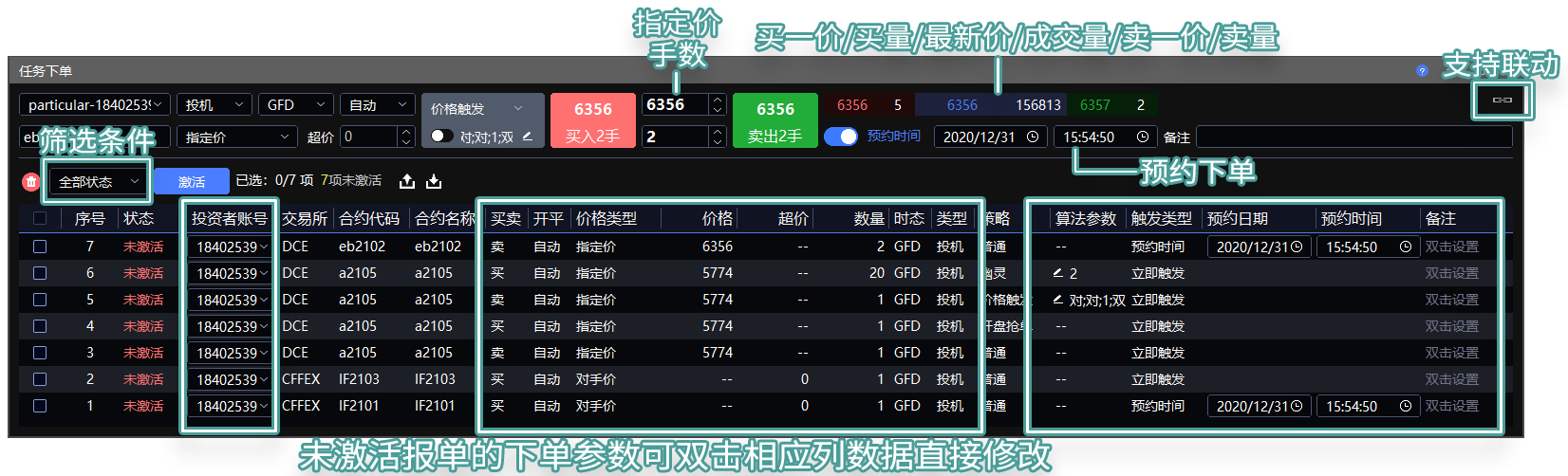
任务下单 用于通过窗口录入或导入 CSV 文件的方式,批量预约并发送委托。
位置:菜单 → 交易 → 任务下单
视频:3 分钟学会用任务下单管理当日未成交单 by 草莓同学
⚠️ 风险提示:除服务器单之外,无限易的算法皆为本地算法单,依赖行情 / 成交来触发。若因网络延迟、断线、软件关闭等原因导致算法无法正常运行,无限易不为此担责。
使用方法
方法一:在任务下单窗口直接委托
填写上方交易参数。
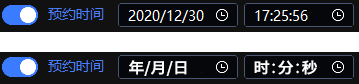
任务下单 自带 预约时间,且开关默认开启。请确认预约时间不晚于激活时间,否则发送失败,列表状态显示为 过期失效。
预约时间 开启时,下单并激活后,系统会按照指定的电脑本机时间发送委托。未到发送时间前,列表状态显示为 待发送。
预约时间 关闭时,下单并激活后,系统会立即发送委托。已发送的列表状态显示为 已发送。
点击 买入 或 卖出。此时下方列表委托状态为 未激活,可双击列表栏位修改参数。
勾选列表委托,点击发送按钮即可发送委托。
方法二:导出 + 导入 CSV 文件委托
不支持 WPS。建议使用窗口导出的 CSV 作为模板修改。
导出 CSV 文件。
在 Excel 中按指定格式修改参数。
返回 任务下单,点击导入按钮导入 CSV 文件。导入后,下方列表委托状态为 未激活,可双击列表栏位修改参数。
勾选列表委托,点击发送按钮即可发送委托。
注意事项
任务下单 窗口关闭不影响待发送和已发送的委托,但软件不能关闭。
保存算法时,若算法已部分成交,保存文件不会保留成交进度,数量会恢复为初始值。
保存的算法下次打开或导入后,算法列表状态为 已暂停,需手动点击开始后才会执行。
CSV 文件格式
CSV 文件可参考 任务下单 窗口导出的文件。中文导出的字段如下:
| 投资者账号 | 交易所 | 合约代码 | 买卖 | 开平 | 价格类型 | 价格 | 超价 | 数量 | 时态 | 类型 | 策略 | 算法参数 | 触发类型 | 易盛自动单 | 预约日期 | 预约时间 | 备注 | 指令编号 |
|---|---|---|---|---|---|---|---|---|---|---|---|---|---|---|---|---|---|---|
| 12345 | DCE | j2209 | 买 | 开仓 | 指定价 | 3275 | 0 | 100 | GFD | 投机 | 随机冰山 | 5;1 | 预约时间 | 否 | 20220525 | 10:00:00 | 备注A |
SHFE / INE 市价保护价示例:
| 投资者账号 | 交易所 | 合约代码 | 买卖 | 开平 | 价格类型 | 价格 | 超价 | 数量 | 时态 | 类型 | 策略 | 算法参数 | 触发类型 | 易盛自动单 | 预约日期 | 预约时间 | 备注 | 指令编号 |
|---|---|---|---|---|---|---|---|---|---|---|---|---|---|---|---|---|---|---|
| 0000000006 | SHFE | ad2608 | 买 | 自动(平今优先) | 市价剩余转限价 | 22710 | 0 | 1 | GFD | 投机 | 普通 | 预约时间 | 否 | 20260626 | 17:57:48 |
CSV 字段说明
| 字段名称 | 是否必填 | 说明 |
|---|---|---|
| 投资者账号 | 必填 | 登录的投资者账号。 |
| 交易所 | 必填 | 区分大小写:SSE - 上交所、SZSE - 深交所、BSE - 北交所、CFFEX - 中金所、CZCE - 郑商所、DCE - 大商所、INE - 能源中心、SHFE - 上期所、SGE - 上金所、GFEX - 广期所。 |
| 合约代码 | 必填 | 合约代码,区分大小写,例如 IC2103、AP105。 |
| 买卖 | 必填 | 填写 买 或 卖。 |
| 开平 | 必填 | 填写 自动(平今优先)、自动(上期平仓优先)、开仓、平仓、平今、自动(禁止平今) 或 自动(禁止卖平)。上期所 / 能源中心套利组合除自动模式外,需单独写明组合里前后两腿合约的开平仓,例如:开仓平仓、平仓平今、开仓开仓。 |
| 价格类型 zh-price-type | 必填 | 填写 指定价、最新价、排队价、对手价、市价FAK、市价FOK、市价剩余转限价、涨停价 或 跌停价。 |
| 价格 | 选填 | 价格类型 为 指定价 时,必须填写具体价格。价格类型 为 市价FAK、市价FOK 或 市价剩余转限价,且交易所为 SHFE 或 INE 时,必须在此栏填写 市价保护价:买入时成交价不会高于此价,卖出时成交价不会低于此价。 |
| 超价 | 必填 | 填写整数 n,单位为 Tick。 |
| 数量 | 必填 | 委托数量,必须为大于 0 的整数;期货单位为手,证券单位为股。 |
| 时态 | 必填 | 填写 GFD、FAK 或 FOK;证券填写 GFD。 |
| 类型 | 必填 | 填写 投机、套保、套利 或 备兑;证券填写 投机。上期所 / 能源中心套利组合需单独写明组合里前后两腿合约的类型,例如:投机投机、投机套保、套保投机。 |
| 策略 | 必填 | 普通委托填写 普通;Smart Order 委托填写对应策略名称,例如 价格触发、时间预约。 |
| 算法参数 | 选填 | 策略需要参数时,按策略要求顺序填写,参数之间用半角分号 ; 隔开。 |
| 触发类型 | 必填 | 立即触发:激活后立即委托;预约时间:激活后到达指定时间再委托。 |
| 易盛自动单 | 选填 | 仅登录易盛柜台时可用。需要委托自动单填写 是,其他情况填写 否。 |
| 预约日期 | 选填 | 触发类型 为 预约时间 时必填,格式为 YYYYMMDD。 |
| 预约时间 | 选填 | 触发类型 为 预约时间 时必填,格式为 HH:MM:SS。 |
| 备注 | 选填 | 自定义备注信息,发送订单时会代入到 实时回报 的 MEMO 栏位。 |
| 指令编号 | 选填 | GTS 指令交易专用字段。非 GTS 指令交易场景通常留空即可。 |
zh-price-type. 价格类型 选择 对手价、排队价、最新价 时,若市场没有所选价格,系统会按 最新价 → 昨结算价 → 昨收盘价 的顺序递补委托。若因断线、盘前等原因无法获取上述任一价格,委托价格将为 0。委托前请确认行情数据正常。选择 市价FAK、市价FOK、市价剩余转限价 时,请确认合约是否支持该市价指令及其可交易时间,详见 交易术语解释 。选择 涨停价、跌停价 时,若无法获取价格,委托价格将为 0。 ↩
触发类型 的 预约时间 不建议与 Smart Order 策略中的 时间预约、开盘抢单、竞价抢单 同时使用。若同时使用,会先按 触发类型 的预约时间发送一笔 Smart Order 单;若 Smart Order 内部设置的时间早于发送时间,触发时间可能被判断为下一个交易日,开盘抢单 / 竞价抢单将在发送后的下一次开盘 / 下一次竞价时触发。
导出 + 导入规则
| 导出任务 | 导出内容 | 导入后查看位置 |
|---|---|---|
| 储存未成交单为任务下单 / 储存错单为任务下单(普通委托) | 实时回报 窗口的未成交单 / 错单 | 在 任务下单 中导入并发送后,在 实时回报 查看。 |
| 储存未成交单为任务下单 / 储存错单为任务下单(开盘抢单) | 实时回报 窗口的未成交单 / 错单,存储为 开盘抢单 算法单 | 在 任务下单 中导入并发送后,在 算法列表 查看。 |
| 储存未成交单为任务下单 / 储存错单为任务下单(竞价抢单) | 实时回报 窗口的未成交单 / 错单,存储为 竞价抢单 算法单 | 在 任务下单 中导入并发送后,在 算法列表 查看。 |
| 储存未成交单为任务下单 / 储存错单为任务下单(易盛自动单) 仅易盛柜台有 |
实时回报 窗口的未成交单 / 错单,存储为易盛自动单 | 在 任务下单 中导入并发送后,在 实时回报 查看。 |
| 储存 Smart Order 未完成单为任务下单 | 算法列表 → Smart Order 中 执行中、已暂停 的算法 | 在 任务下单 中导入并发送后,在 算法列表 查看。 |
右键菜单选择 信息导出 得到的文件,不可在 任务下单 中激活。
Smart Order 算法单
Smart Order 算法单为本地预埋单,分为价格算法、时间算法、拆单算法等。可在下单板设置并开启 Smart Order 后下单,也可按 CSV 格式编辑策略单后导入激活。详见 Smart Order 算法单合集 。
下单板的预约时间和 Smart Order 同时使用时,系统会先按照预约时间发送 Smart Order 委托。
Smart Order 单格式说明
| 策略 | 算法参数 | 参数说明 |
|---|---|---|
| 价格触发 | 新;触;0;双 | 最新价(满足条件);触发价(委托基准);超价 0;双向触发(单向触发填 单)。 |
| 大于小于 | 对;排;2;> | 对手价(满足条件);排队价(委托基准);超价 2;触发条件 >。 |
| 止盈止损 | 10;8;-3 | 止盈 10;止损 8;超价 -3。 |
| (价格触发)止盈止损 | 对;10;8;-3 | 对手价(满足条件);止盈 10;止损 8;超价 -3。 |
| (大于小于)止盈止损 | 对;>;10;8;-3 | 对手价(满足条件);触发条件 >;止盈 10;止损 8;超价 -3。 |
| 二择一 | 200;190;0 | 上限价格 200;下限价格 190;超价 0。 |
| 两级回调 | 5;3;1;10 | 更优参数 5;回调参数 3;追单超价 1;追单次数 10。 |
| 开盘抢单 | 不填。 | |
| 竞价抢单 | 不填。 | |
| 自动抢单 | 不填。 | |
| 时间预约 | 10:42:00;指;0 | 触发时间 10:42:00;指定价(委托基准);超价 0。 |
| 限时下单 | 20;追单;1;10 | 总时长 20;追单(撤单模式填 撤单);追单超价 1;追单次数 10。 |
| 定时拆单 | 1s;5;指;0 | 间隔 1 秒;单笔数量 5;指定价(委托基准);超价 0。 |
| 经典冰山 | 2 | 单笔数量 2。 |
| 随机冰山 | 5;1 | 单笔上限 5;单笔下限 1。 |
| 高效冰山 | 2;50% | 单笔数量 2;对手量百分比 50%。 |
| 幽灵 | 10 | 单笔上限 10。 |
| TWAP | 10;1;4;2;对;5;8 | 算法总时长 10;价格检查间隔 1;单笔上限 4;单笔下限 2;追单价格 对手价;追单超价 5;最小开仓量 8。 |
| TWAP(限价) | 20;按次数;10;是 | 普通委托:算法总时长 20;按次数(按时间模式填 按时间);委托次数 10;总时长结束后撤单 是(不撤单填 否)。 |
| TWAP(限价) | 20;按次数;10;是;新 | 价格触发模式:前 4 项同普通委托;追加 最新价,表示当最新价满足委托价时委托母单。 |
| TWAP(限价) | 20;按次数;10;是;新;> | 大于小于模式:前 4 项同普通委托;追加 最新价 和触发条件 >,表示最新价满足大于条件时委托母单。 |
| VWAP(跟随) | 100;2;1;10 | 增加成交量 100;单笔数量 2;追单超价 1;追单次数 10。 |
| VWAP(限价) | 100;10;限价 | 增加成交量 100;单笔数量 10;成交量统计方式 限价(委托后的所有成交量填 全部)。 |
| 价格触发(TWAP) | 新;10;1;4;2;市;5;8 | 最新价(满足委托价);算法总时长 10;价格检查间隔 1;单笔上限 4;单笔下限 2;追单价格 市价;追单超价 5;最小开仓量 8。 |
| 大于小于(TWAP) | 新;>;10;1;4;2;买涨停/卖跌停;5;8 | 最新价(满足条件);触发条件 >;算法总时长 10;价格检查间隔 1;单笔上限 4;单笔下限 2;追单价格 买涨停/卖跌停;追单超价 5;最小开仓量 8。 |
| 价格触发(随机冰山) | 对;5;3 | 对手价(满足条件);单笔上限 5;单笔下限 3。 |
| 大于小于(随机冰山) | 新;>;5;3 | 最新价(满足条件);触发条件 >;单笔上限 5;单笔下限 3。 |
Designated Trader
Designated Trader lets you create, schedule, import, and send orders in batches through the order-entry window or a CSV file.
Path: Menu → Trade → Designated Trader
Video: One-Click Excel Import in InfiniTrader by Orange
Video: Use Designated Trader for Batch Orders in 4 Minutes by Strawberry
Video: Manage Same-Day Unfilled Orders with Designated Trader in 3 Minutes by Strawberry
⚠️ Risk warning: Except for server-side orders, InfiniTrader Algos are local algorithmic orders. They rely on market data or fills to trigger. If network latency, disconnection, software shutdown, or similar issues prevent an Algo from running normally, InfiniTrader is not responsible for the result.
How to Use
Method 1: Place Orders in the Designated Trader Window
Fill in the trading parameters at the top of the window.
Designated Trader includes Timer by default, and the switch is enabled by default. Make sure the appointment time is not earlier than the activation time. Otherwise, the order fails to send and the list status shows Expired.
When Timer is enabled, the order is sent at the specified local computer time after activation. Before the send time arrives, the list status shows Sending.
When Timer is disabled, the order is sent immediately after activation. Sent orders show Sent.
Click Buy or Sell. The order status in the lower list becomes Not Triggered. You can double-click a list cell to edit its parameters.
Select the orders in the list and click the send button.
Method 2: Export and Import a CSV File
WPS is not supported. Use a CSV exported from the window as the editing template.
Export a CSV file.
Window export: Click the export button in Designated Trader.
Order Book export: In Order Book, right-click and select Uncompleted Orders Save As Designated Order or Error Orders Save As Designated Order.
Algos export: In Algos, right-click and select Save As Designated Order. This exports Smart Order Algos.
Time Master export: In Time Master, configure and enable the task for saving uncompleted orders as Designated Trader orders. See Time Master .
Edit the parameters in Excel according to the required format.
Return to Designated Trader and click the import button to import the CSV file. Imported orders show Not Triggered in the lower list. You can double-click a list cell to edit its parameters.
Select the orders in the list and click the send button.
Notes
Sent regular orders can be viewed in Order Book. Algo orders can be viewed in Algos.
Closing the Designated Trader window does not affect orders waiting to be sent or already sent, but the software must remain open.
If an Algo is partially filled when saved, the fill progress is not saved. The quantity is restored to the original quantity.
When a saved Algo is opened or imported next time, its status in Algos is Paused. You must manually start it before it runs.
CSV File Format
Use a CSV file exported from Designated Trader as the template. English exports use the following fields:
| Investor | Exchange | Symbol | B/S | O/C | Price Type | Price | Pay up | Vol | TIF | S/H | Strategy | Parameters | Trigger Type | ESunny Auto Trade | Appoint Date | Appoint Time | Remark | InstructionID |
|---|---|---|---|---|---|---|---|---|---|---|---|---|---|---|---|---|---|---|
| 12345 | DCE | j2209 | Buy | Open | Limit | 3275 | 0 | 100 | GFD | Speculation | Iceberg Random | 5;1 | Timer | No | 20220525 | 10:00:00 | Remark A |
Example with a market protection price for SHFE / INE:
| Investor | Exchange | Symbol | B/S | O/C | Price Type | Price | Pay up | Vol | TIF | S/H | Strategy | Parameters | Trigger Type | ESunny Auto Trade | Appoint Date | Appoint Time | Remark | InstructionID |
|---|---|---|---|---|---|---|---|---|---|---|---|---|---|---|---|---|---|---|
| 0000000006 | SHFE | ad2608 | Buy | Auto(DayTrade First) | MarketGFD | 22710 | 0 | 1 | GFD | Speculation | Normal | Timer | No | 20260626 | 17:57:48 |
CSV Field Descriptions
| Field | Required | Description |
|---|---|---|
| Investor | Required | The logged-in investor account. |
| Exchange | Required | Case-sensitive exchange code: SSE, SZSE, BSE, CFFEX, CZCE, DCE, INE, SHFE, SGE, or GFEX. |
| Symbol | Required | Instrument code. Case-sensitive, such as IC2103 or AP105. |
| B/S | Required | Enter Buy or Sell. |
| O/C | Required | Enter Auto(DayTrade First), Auto(SHFE Close First), Open, Close, Close Today, Auto(No Close Today), or Auto(No Sell Close). For SHFE / INE arbitrage spreads, except in auto modes, specify the open/close action for the front and back legs separately, such as OpenClose, CloseCloseToday, or OpenOpen. |
| Price Type en-price-type | Required | Enter Limit, Last, Passive, Aggressive, MarketFAK, MarketFOK, MarketGFD, Limit Up, or Limit Down. |
| Price | Optional | Required when Price Type is Limit. When Price Type is MarketFAK, MarketFOK, or MarketGFD and Exchange is SHFE or INE, enter the market protection price in this field. A buy order will not trade above this price, and a sell order will not trade below this price. |
| Pay up | Required | Enter an integer n in ticks. |
| Vol | Required | Order quantity. It must be an integer greater than 0. Futures are in lots, and securities are in shares. |
| TIF | Required | Enter GFD, FAK, or FOK. Use GFD for securities. |
| S/H | Required | Enter Speculation, Hedge, Arbitrage, or Covered. Use Speculation for securities. For SHFE / INE arbitrage spreads, specify the type for the front and back legs separately, such as SpeculationSpeculation, SpeculationHedge, or HedgeSpeculation. |
| Strategy | Required | Enter Normal for regular orders. For Smart Order orders, enter the strategy name, such as Stop or Timer. |
| Parameters | Optional | If the selected strategy requires parameters, enter them in the required order and separate them with a semicolon ;. |
| Trigger Type | Required | Manual sends the order immediately after activation. Timer sends the order at the specified time after activation. |
| ESunny Auto Trade | Optional | Available only when logged in through the Esunny front. Enter Yes for auto orders; otherwise enter No. |
| Appoint Date | Optional | Required when Trigger Type is Timer. Format: YYYYMMDD. |
| Appoint Time | Optional | Required when Trigger Type is Timer. Format: HH:MM:SS. |
| Remark | Optional | Custom remark. It is passed to the MEMO field in Order Book when the order is sent. |
| InstructionID | Optional | Dedicated field for GTS instruction trading. Leave it blank when not using GTS instruction trading. |
en-price-type. When Price Type is Aggressive, Passive, or Last, and the selected price is unavailable in the market, the system falls back in this order: Last → yesterday's settlement price → yesterday's close price. If none of these prices are available because of disconnection, pre-market conditions, or similar reasons, the order price becomes 0. Check market data before sending the order. When using MarketFAK, MarketFOK, or MarketGFD, confirm that the instrument supports the selected market instruction and trading session. See Trading Terms Explained . When using Limit Up or Limit Down, the order price becomes 0 if the price cannot be obtained. ↩
Do not use Timer in Trigger Type together with Smart Order strategies such as Timer, Grab, or Grab(Auction) unless necessary. If both are used, Trigger Type controls when the Smart Order order is sent. If the time configured inside Smart Order is earlier than the send time, the trigger time may be treated as the next trading day. Grab / Grab(Auction) will trigger at the next opening / next auction after the order is sent.
Export and Import Rules
| Export Task | Exported Content | Where to View After Import |
|---|---|---|
| Uncompleted Orders Save As Designated Order / Error Orders Save As Designated Order (regular orders) | Unfilled orders / rejected orders from Order Book | Import and send in Designated Trader, then view in Order Book. |
| Uncompleted Orders Save As Designated Order / Error Orders Save As Designated Order (Grab) | Unfilled orders / rejected orders from Order Book, saved as Grab Algos | Import and send in Designated Trader, then view in Algos. |
| Uncompleted Orders Save As Designated Order / Error Orders Save As Designated Order (Grab(Auction)) | Unfilled orders / rejected orders from Order Book, saved as Grab(Auction) Algos | Import and send in Designated Trader, then view in Algos. |
| Uncompleted Orders Save As Designated Order / Error Orders Save As Designated Order (Esunny auto orders) Esunny front only |
Unfilled orders / rejected orders from Order Book, saved as Esunny auto orders | Import and send in Designated Trader, then view in Order Book. |
| Uncompleted Smart Order Save As Designated Order | Executing and Paused Algos in Algos → Smart Order | Import and send in Designated Trader, then view in Algos. |
Files exported through Information Export in the right-click menu cannot be activated in Designated Trader.
Smart Order Algos
Smart Order Algos are local algo orders, including price algos, time algos, and split algos. You can enable Smart Order on the order-entry panel before placing an order, or edit a strategy order in CSV format and import it for activation. See Smart Order Algos .
If the order panel appointment time and Smart Order are both used, the system first sends the Smart Order order according to the appointment time.
Smart Order Format
The Parameters column shows the exact CSV values to enter in an English CSV export.
Common CSV values map to Algo UI values as follows:
| CSV Value | Algo UI Value |
|---|---|
| la | Last |
| op | Aggressive |
| wi | Passive |
| in | Trigger Price in Stop; Limit in Timer, Split, and limit-related parameter fields |
| MKT | Market |
| Limit up/down | Limit up/down |
| S | Single |
| D | Both |
| Interval | Interval |
| Times | Times |
| Chase | Chase |
| Cancel | Cancel |
| Yes / No | Yes / No |
| in / All | Limit / All |
| Strategy | Parameters | Parameter Description |
|---|---|---|
| Stop | la;in;0;D | Condition Price = Last; Order Price = Trigger Price; Pay up = 0; Trigger Mode = Both. Use S for Single. |
| Above/Below | op;wi;2;> | Condition Price = Aggressive; Order Price = Passive; Pay up = 2; Condition = >. |
| Bracket | 10;8;-3 | Take Profit = 10; Stop Loss = 8; Pay up = -3. |
| (Stop) Bracket | op;10;8;-3 | Condition Price = Aggressive; Take Profit = 10; Stop Loss = 8; Pay up = -3. |
| (Above/Below) Bracket | op;>;10;8;-3 | Condition Price = Aggressive; Condition = >; Take Profit = 10; Stop Loss = 8; Pay up = -3. |
| OCO | 200;190;0 | Upper Price = 200; Lower Price = 190; Pay up = 0. |
| Gain Best | 5;3;1;10 | Gain (Tick) = 5; Stop (Tick) = 3; Pay up(Tick) = 1; Chase Count = 10. |
| Grab | Leave blank. | |
| Grab(Auction) | Leave blank. | |
| Grab(Auto) | Leave blank. | |
| Timer | 10:42:00;in;0 | Trigger Time = 10:42:00; Order Price = Limit; Pay up = 0. |
| Time Limit | 20;Chase;1;10 | Total Time = 20; Mode = Chase. Use Cancel for cancel mode; Pay up(Tick) = 1; Chase Count = 10. |
| Split | 1s;5;in;0 | Interval = 1s; Per Order = 5; Order Price = Limit; Pay up = 0. |
| Iceberg Classic | 2 | Per Order = 2. |
| Iceberg Random | 5;1 | Volume UpperLimit = 5; Volume LowerLimit = 1. |
| Iceberg Efficiency | 2;50% | Per Order = 2; opposite size % = 50%. |
| Ghost | 10 | Volume UpperLimit = 10. |
| TWAP | 10;1;4;2;op;5;8 | Total Time = 10; Price Check Interval = 1; Volume UpperLimit = 4; Volume LowerLimit = 2; Chase Price = Aggressive; Pay up(Tick) = 5; Min Open Volume = 8. |
| TWAP With Limit | 20;Times;10;Yes | Normal mode: Total Time = 20; Mode = Times. Use Interval for interval mode; Order Times = 10; Cancel order(s) at the end = Yes. Use No for No. |
| TWAP With Limit | 20;Times;10;Yes;la | Stop mode: the first 4 items are the same as normal mode; append Last to order the parent order when Last satisfies the order price. |
| TWAP With Limit | 20;Times;10;Yes;la;> | Above/Below mode: the first 4 items are the same as normal mode; append Last and condition > to order the parent order when Last satisfies the above condition. |
| VWAP | 100;2;1;10 | Volume Increase By = 100; Per Order = 2; Pay up(Tick) = 1; Chase Count = 10. |
| VWAP(Limit) | 100;10;in | Volume Increase By = 100; Per Order = 10; Volume Statistics = Limit. Use All for all volume after order placement. |
| Stop(TWAP) | la;10;1;4;2;MKT;5;8 | Condition Price = Last; Total Time = 10; Price Check Interval = 1; Volume UpperLimit = 4; Volume LowerLimit = 2; Chase Price = Market; Pay up(Tick) = 5; Min Open Volume = 8. |
| Above/Below(TWAP) | la;>;10;1;4;2;Limit up/down;5;8 | Condition Price = Last; Condition = >; Total Time = 10; Price Check Interval = 1; Volume UpperLimit = 4; Volume LowerLimit = 2; Chase Price = Limit up/down; Pay up(Tick) = 5; Min Open Volume = 8. |
| Stop(Iceberg Random) | op;5;3 | Condition Price = Aggressive; Volume UpperLimit = 5; Volume LowerLimit = 3. |
| Above/Below(Iceberg Random) | la;>;5;3 | Condition Price = Last; Condition = >; Volume UpperLimit = 5; Volume LowerLimit = 3. |